
Explore how spend moves through the model
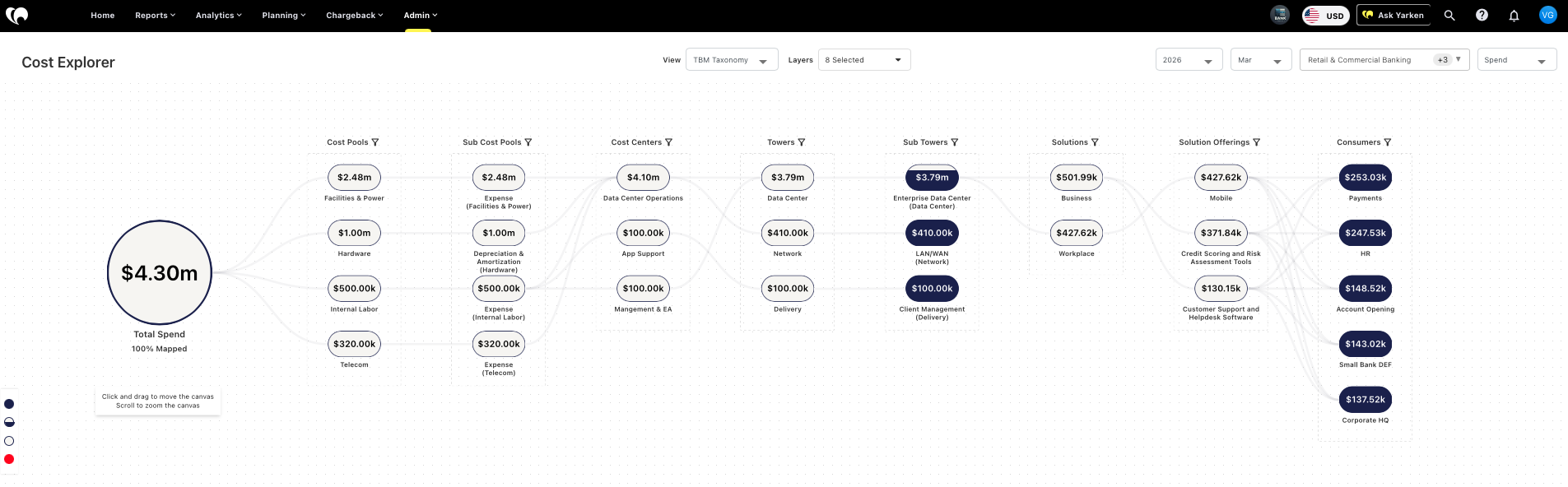
Cost Explorer helps users understand how total spend breaks down across the TBM spend model.
It shows how costs move through different layers of the model, including cost pools, towers, solutions, consumers, and related allocation structures. This gives teams a clearer way to review cost flow, investigate allocation outcomes, and identify areas where spend is not yet fully mapped.
What you can do
-
View spend across layers of the TBM spend model
-
Understand how total spend breaks down into cost pools, towers, solutions, and consumers
-
Identify unallocated cost in TBM models
-
Review cost allocation outcomes across the model
-
Use filters to focus the view by model, cost pool, sub cost pool, tower, or sub tower
-
Investigate how spend moves from financial data into technology and business views
-
Support allocation planning and model review
Cost flow visibility
Cost Explorer is based on the cost transparency model.
It helps users see how spend is distributed across the layers of the TBM spend model. This makes it easier to understand whether costs are flowing as expected and where allocation gaps may exist.
Unallocated spend remains visible, helping teams identify areas that need mapping or rule updates.
Model filtering
Cost Explorer includes model filtering, allowing users to view spend by selected model.
This is useful when teams are working with different spend, budget, or forecast structures and need to understand how data appears within a specific model context.
Additional filters such as cost pool, sub cost pool, tower, and sub tower can help users narrow the view and focus on specific areas of the allocation model.
How teams use it
Finance and IT teams use Cost Explorer to understand how spend is being distributed through the model.
Model owners use it to review allocation logic, spot unmapped cost, and validate whether cost pools, towers, solutions, and consumers are receiving spend correctly.
FinOps and technology teams use it to connect spend movement to cloud, applications, services, and business consumption.
What makes it different
Cost Explorer gives users a model level view of spend movement.
Dashboards show outcomes. Cost Explorer helps users understand how those outcomes were created.
This makes it especially useful when teams need to explain cost allocation, defend a model, review unallocated spend, or understand how financial transactions become business meaningful technology cost views.
When to use Cost Explorer
Use Cost Explorer when you need to understand how spend flows through the TBM model.
Use it when reviewing allocations, investigating unallocated spend, validating model behavior, or preparing for deeper analysis in dashboards, Analytics, planning, or chargeback.
Related help article
For detailed step-by-step instructions, refer to the relevant article: