
What is Data, Modeling, and Designer?
Data, Modeling, and Designer is where Yarken turns raw spend into a structured technology finance model.
Teams use Designer to load master data, load spend, manage rules, and map costs through the TBM structure. This is where spend is categorized, allocated, and prepared for analytics, planning, showback, chargeback, and Ask Yarken.
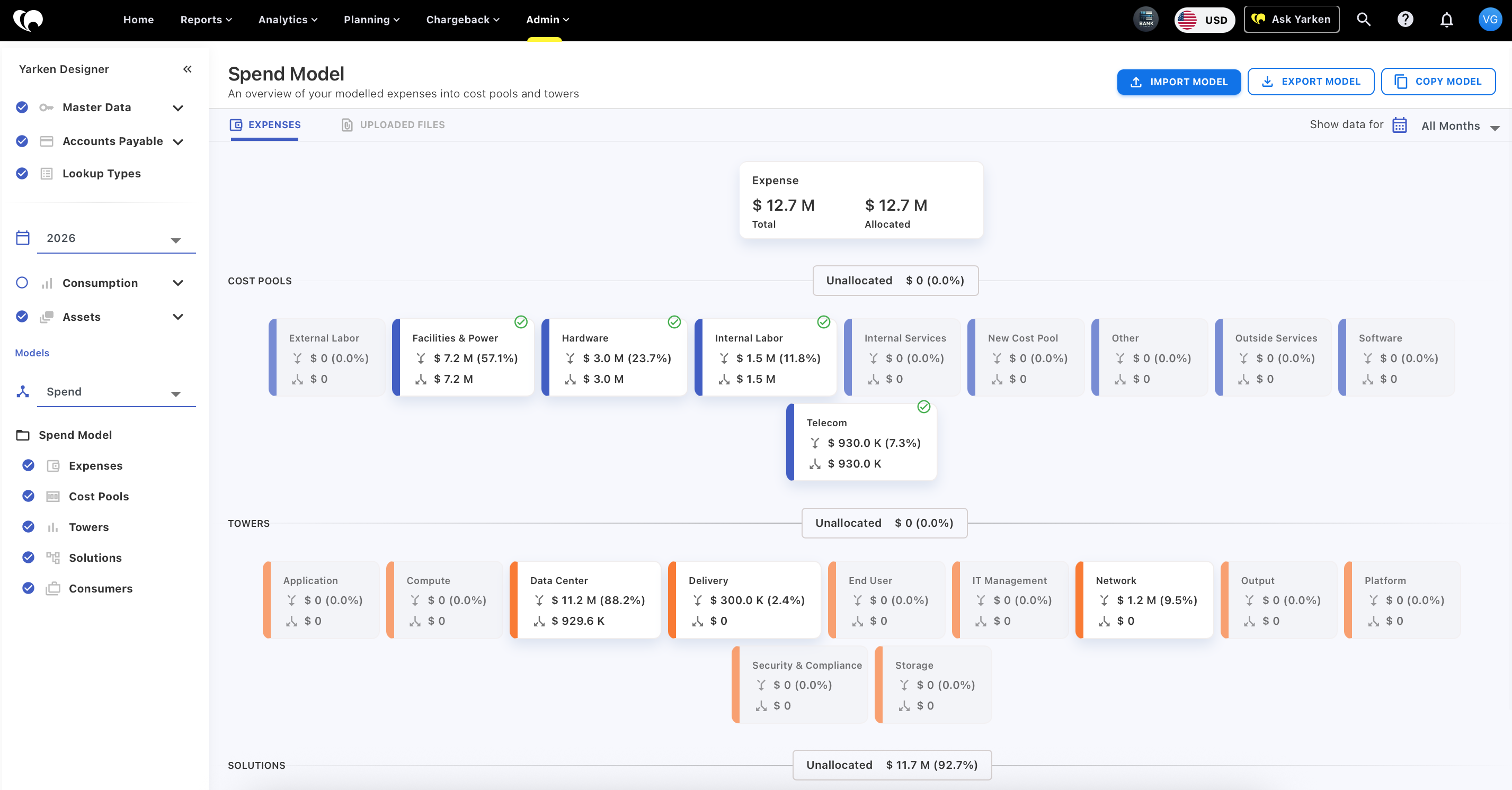
The model defines how technology spend flows through cost pools, towers, assets, solutions, and consumers. Once this structure is in place, teams can analyze spend consistently across Finance, IT, FinOps, and business stakeholders.
What you can do
-
Load master data and spend data into Yarken
-
Map spend to cost pools and sub cost pools
-
Allocate costs from cost pools into towers and sub towers
-
Use assets to support allocation into applications, products, and services
-
Allocate solution spend to consumers and business units
-
Create and manage rules for cost allocation
-
Review unallocated spend and resolve mapping gaps
-
Work with TBM taxonomy structures, including TBM v4 and TBM v5.0.1
-
Copy rules and mappings across models where supported
-
Maintain the structure used by analytics, planning, chargeback, and reporting
How teams use Designer
Teams use Designer to build and maintain the financial model behind Yarken.
The process begins with source data and master data. Spend needs valid accounts, cost centers, vendors, assets, and other reference structures so it can be mapped cleanly.
From there, teams allocate spend into cost pools. Cost pools are the foundation of the TBM model. Downstream views such as towers, solutions, consumers, showback, and chargeback depend on accurate cost pool allocation.
Once cost pools are mapped, spend can move into towers, assets, solutions, and consumers. This creates the structure needed to understand who owns cost, what services consume it, and how spend supports the business.
Cost flow in Yarken
Yarken follows a layered cost distribution model.
Spend is first mapped into cost pools. Cost pool spend is then allocated into towers. Asset and solution structures help connect technology cost to applications, products, services, and consumers.
This flow allows teams to move from financial transactions to business meaningful views of technology spend.
It also creates the foundation for variance analysis, service costing, cloud TCO, showback, chargeback, and planning.
Rules and mappings
Rules and mappings control how spend is allocated through the model.
Rules are executed in priority order and can fully or partially allocate spend. Any unallocated spend remains visible until it is mapped, which helps teams identify gaps and improve model completeness.
This gives teams control over allocation logic without relying on disconnected spreadsheets or manual calculations.
Models
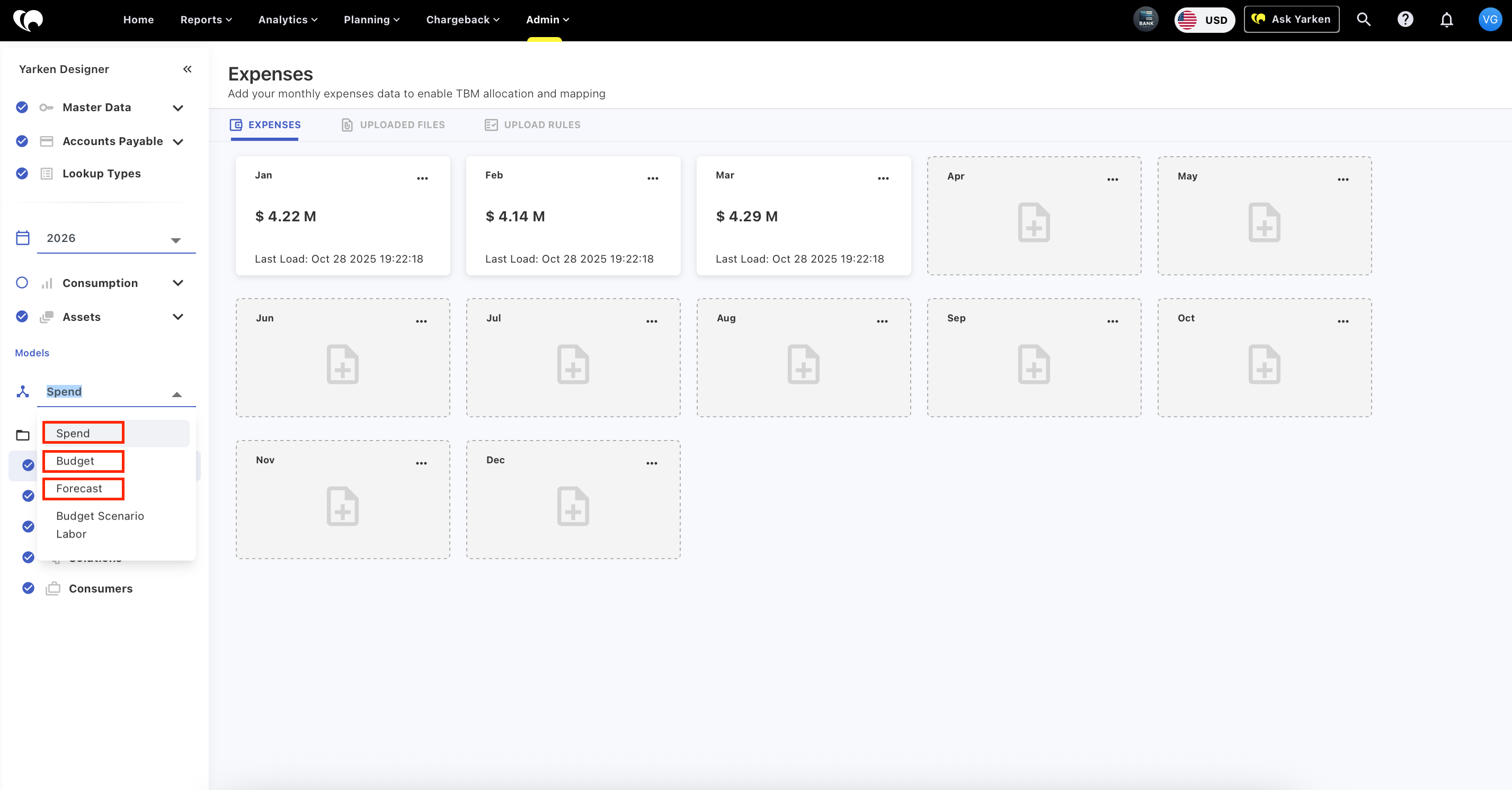
Yarken supports models for spend, budget, and forecast.
Models define how data is grouped and analyzed. They can apply to rules and mappings across assets, cost pools, towers, solutions, and consumers.
This helps teams manage different planning and reporting structures while keeping allocation logic organized and reusable.
What makes it different
Designer is not just a configuration area.
It is the operating layer for the Yarken financial model. The quality of everything downstream depends on it.
When the model is maintained well, analytics becomes more reliable, planning becomes more consistent, chargeback becomes more defensible, and Ask Yarken can reason from stronger context.
Teams are not just loading data. They are building the structure that makes technology spend explainable.
When to use Data, Modeling, and Designer
Use Designer when setting up or maintaining the structures that control how spend is categorized, allocated, analyzed, and reported.
Use it when new data is loaded, when mappings need to be updated, when allocation rules change, or when teams need to resolve unallocated spend.
Use models when spend, budget, or forecast structures need to be managed separately while remaining connected to the broader Yarken system.
Related help articles
For detailed step-by-step instructions, refer to the relevant articles: