
How data is stored across models
Each model maintains its own independent dataset and configurations.
This includes:
-
Expenses (Spend)
-
Budget data
-
Forecast data
-
Rules and mappings
This separation ensures:
-
No overlap between planning scenarios
-
Clean comparison across models
-
Controlled data transformations
Spend, Budget, and Forecast behavior
Each model type is designed for a specific purpose:
-
Spend model
-
Represents actual financial data (Expenses)
-
Acts as the baseline for reporting and analysis
-
-
Budget model
-
Stores planned financial data
-
Used for budget tracking and variance analysis
-
-
Forecast model
-
Stores projected or revised estimates
-
Used for forward-looking analysis
-
Each dataset is:
-
Stored independently
-
Processed using model-specific rules
-
Available for comparison in Analytics
Cloud spend behavior
Uploading cloud spend is independent of models. Cloud data can be ingested without selecting or being tied to any specific model during upload.
However, when cloud spend is published, it is always assigned to the Spend model.
Copying rules and mappings across models
You can copy the following between models:
-
Cost Pool rules
-
Tower rules
-
Asset rules
-
Solution Offering rules
-
Consumer rules
Supported actions:
-
Copy within the same model (across months/years)
-
Copy across different models
-
Use Copy To for bulk reuse
Using models in Analytics
You can analyze data across models in the Spend cube.
Compare multiple models in Spend cube
You can compare:
-
Default models (Spend, Budget, Forecast)
-
Custom models
Dynamic measures
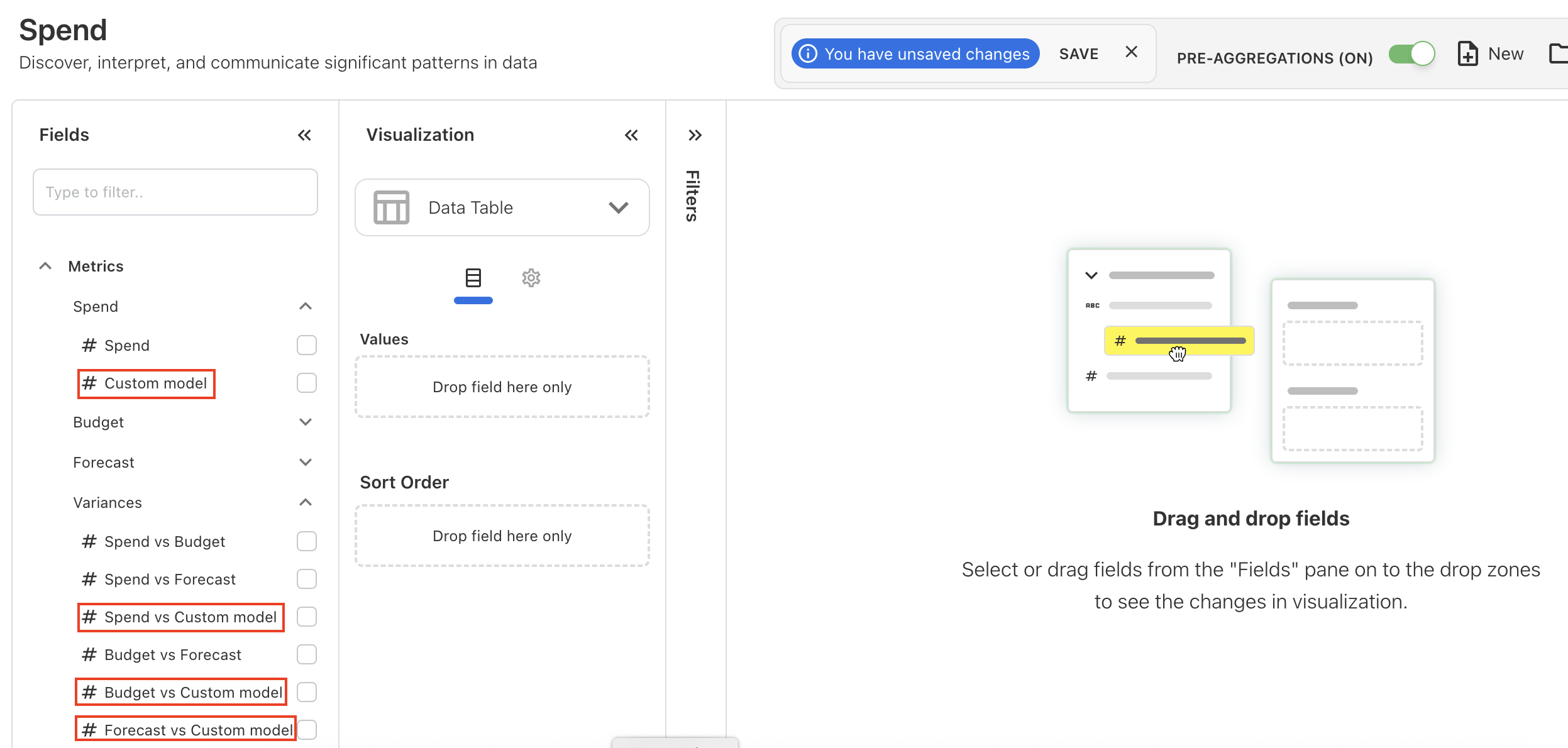
When you create a custom model, Yarken automatically generates dynamic measures in Analytics—no manual setup required.
How it works
For example, if you create a model of type Spend named Custom model:
-
A new metric Custom model appears under the Spend section in Analytics
-
This metric represents the spend associated with that custom model
In addition, Yarken automatically creates variance measures to enable comparison with existing models:
-
Spend vs Custom model
-
Budget vs Custom model
-
Forecast vs Custom model
These measures appear alongside existing metrics in the Metrics panel.
What are dynamic measures
Dynamic measures are system-generated metrics that:
-
Represent data from custom models
-
Appear automatically in Analytics without configuration
Models in Custom Dashboards
Custom Dashboards support model-based analysis. All widgets respect model filters and they are applied consistently across custom reports.
Related content