
Overview
Accounts Payable in Yarken Designer allows you to manage supporting financial records such as Invoices, Purchase Orders, and Contracts. These records provide additional context for vendor spend and help you to track the expenses at vendor-level.
Accounts Payable data enriches reporting and transaction details by connecting spend to:
-
Vendor invoices
-
Purchase orders
-
Vendor contracts
-
Cost centers
-
Accounts
-
Vendors
Once Accounts Payable data is added, invoice and related details can be viewed in transaction detail lists across applicable reports.
What is included in Accounts Payable
Accounts Payable includes the following datasets:
-
Invoices
-
Purchase Orders
-
Contracts
These datasets work together to create a commercial trail from contract commitment to purchase order and invoice.
Recommended data relationship
Accounts Payable records are most useful when they are linked correctly.
Recommended relationship:
Contract → Purchase Order → Invoice
-
A Contract defines the commercial agreement with a vendor.
-
A Purchase Order can be linked to a contract.
-
An Invoice can be linked to a purchase order.
All three can be associated with vendors, cost centers, and accounts where applicable.
Recommended load order
To ensure records can be linked correctly, load data in this order:
-
Vendors in Master Data
Vendors must exist before linking invoices, purchase orders, or contracts. -
Accounts and Cost Centers in Master Data
Required if Accounts Payable records need to be associated with accounting or ownership structures. -
Contracts
Load contracts before purchase orders if purchase orders need to be linked to contracts. -
Purchase Orders
Load purchase orders before invoices if invoices need to be linked to purchase orders. -
Invoices
Load invoices after vendor and purchase order data is available.
Invoices
Invoices represent vendor bills received by your organization. Each invoice captures details such as invoice number, invoice date, invoice amount, vendor, and optional links to purchase orders, cost centers, and accounts.
Invoices are useful for validating vendor spend and providing invoice-level visibility in transaction reporting.
Invoices help you:
-
Track vendor billing details
-
Link invoice spend to vendors
-
Associate invoice records with purchase orders
-
Provide transaction-level detail in reports
Mandatory fields
When adding or uploading invoices, the following fields are required:
-
Invoice Number
Unique identifier for the invoice. -
Invoice Date
Date associated with the invoice. -
Invoice Amount
Total amount of the invoice. -
Vendor Name
Vendor linked to the invoice.
Optional fields
You may also provide:
-
Invoice Description
-
PO Number
-
Cost Center Name
-
Account Name
-
Custom String fields
Use optional fields to improve traceability and reporting context.
Notes:
-
Vendors must exist in Master Data before they can be linked to invoices.
-
Add purchase orders before invoices if invoices need to be linked to purchase orders.
-
Invoice details become available in transaction-level reporting where applicable.
Purchase Orders
Purchase Orders represent official purchasing documents issued for products or services. They capture what was ordered, the agreed value, vendor information, and optional links to contracts or cost centers.
Purchase Orders help you:
-
Track approved purchasing commitments
-
Link invoices to purchase orders
-
Link purchase orders to contracts
-
Analyze spend by vendor, contract, or cost center
-
Improve governance over committed spend
Mandatory fields
When adding or uploading purchase orders, the following fields are required:
-
PO Number
Unique identifier for the purchase order. -
PO Date
Date associated with the purchase order. -
PO Amount
Total value of the purchase order. -
Vendor Name
Vendor linked to the purchase order.
Optional fields
You may also provide:
-
PO Description
-
Requester
-
Status
-
Contract Number
-
Cost Center Name
-
Custom String fields
Notes:
-
Vendors must exist before purchase orders can be linked to them.
-
Add contracts before purchase orders if purchase orders need to be linked to contracts.
-
Cost Center Name is optional but recommended when ownership or departmental reporting is required.
Contracts
Contracts represent vendor agreements that define commercial terms, committed amounts, and contract periods. They help track long-term obligations, negotiated agreements, and contract-related spend.
Contracts can be linked to vendors and optionally to cost centers or Companion Metrics.
Contracts help you:
-
Track vendor commitments
-
Compare contracted amount with actual spend
-
Compare planned and actual values in the companion metrics
-
Link purchase orders to vendor agreements
-
Monitor contract start and end dates
-
Support vendor and contract portfolio reporting
Mandatory fields
When adding or uploading contracts, the following fields are required:
-
Contract Number
Unique identifier for the contract. -
Contract Amount
Total contracted value. -
Vendor Name
Vendor linked to the contract.
Optional fields
You may also provide:
-
Contract Description
-
Contract Type
-
Actual Spend
-
Start Date
-
End Date
-
Status
-
Active
-
Cost Center Name
-
Custom String fields
Notes:
-
Vendors must exist before contracts can be linked to them.
-
Start Date and End Date are optional but recommended for contract lifecycle tracking.
-
Use Active to indicate whether a contract should be treated as active in the application.
-
Actual Spend can help compare usage or billed amounts against the contracted value.
Manage Contract Metrics
The Manage Contract Metrics option allows you to associate one or more Companion Metrics with a contract. These metrics can then be used for reporting and performance tracking within the Contract Portfolio dashboard.
By linking metrics to contracts, organizations can compare planned metric targets against actual metric values and monitor whether contractual obligations, service levels, or consumption targets are being achieved.
Note: Only metrics that have already been configured in Companion Metrics can be linked to a contract.
Why use Contract Metrics?
Contract Metrics help provide additional business context beyond contract spend. They can be used to track key contractual measures such as:
-
Number of service requests
-
Transaction volumes
-
User counts
-
Support tickets
-
Storage consumption
-
API calls
-
Service utilization metrics
-
Other business or operational KPIs
Once linked, these metrics can be analyzed alongside contract spend in reporting dashboards.
Add a metric to a contract
To link a Companion Metric to a contract:
-
Navigate to Accounts Payable > Contracts.
-
Locate the required contract.
-
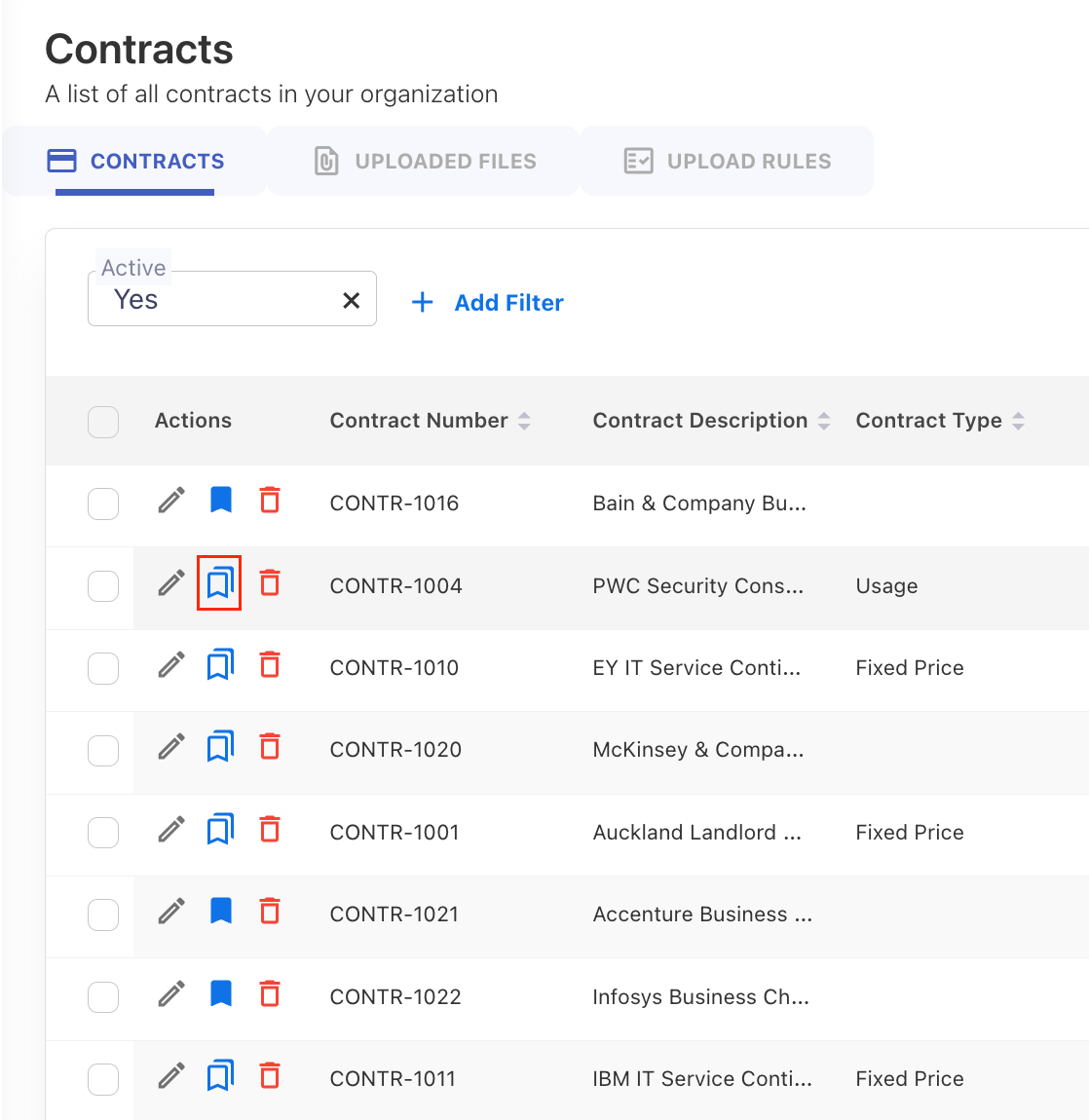
Click the Manage Contract Metrics icon in the Actions column.
-
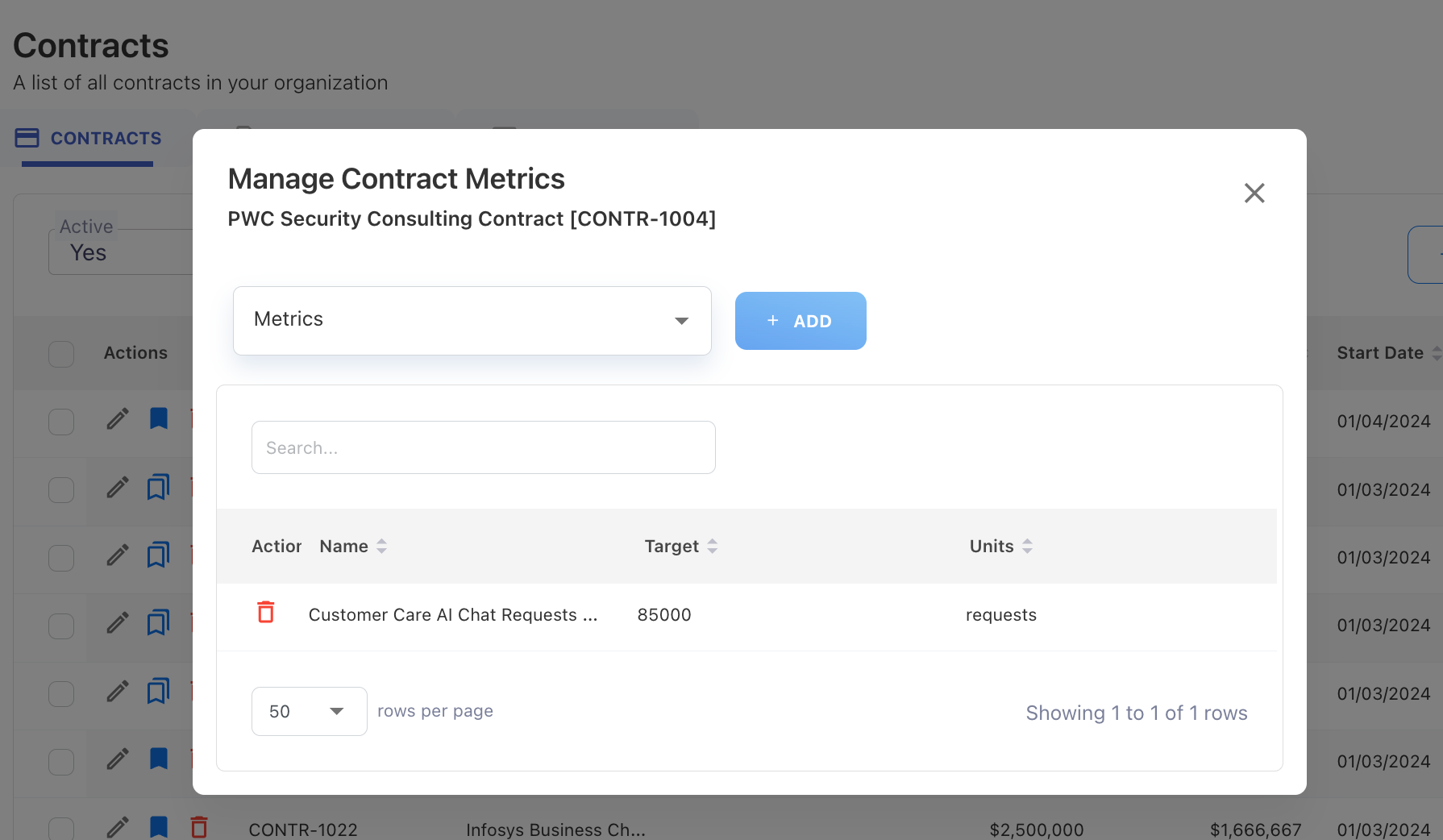
In the Manage Contract Metrics window, select a metric from the Metrics drop-down list.
-
Click Add.
-
The selected metric is added to the contract and displayed in the metrics list.
The list displays:
-
Metric Name
-
Target Value
-
Unit of Measure
Remove a metric from a contract
To remove a linked metric:
-
Open Manage Contract Metrics for the required contract.
-
Locate the metric in the list.
-
Click the Delete icon.
-
Confirm the action if prompted.
Removing the metric only removes the association between the contract and the metric. The metric definition remains available in Companion Metrics.
Viewing linked metrics
After metrics are linked to a contract, they are available for reporting within the Contract Portfolio dashboard.
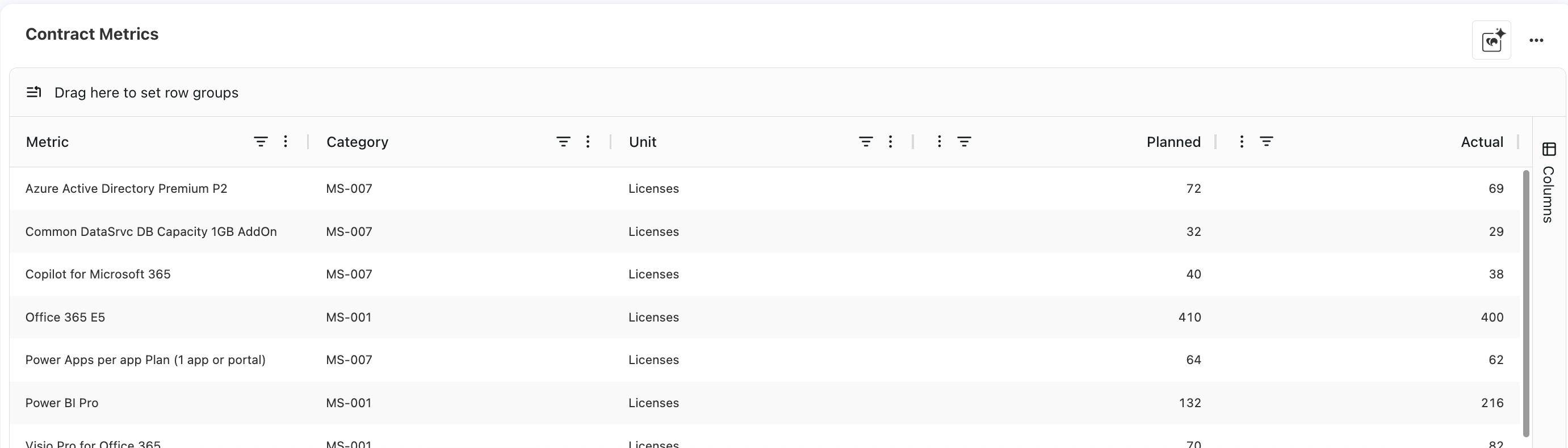
The Contract Metrics visual can be used to:
-
View metrics associated with a contract.
-
Compare planned and actual metric values.
-
Review contractual performance against agreed targets.
This helps organizations evaluate both the financial and operational performance of their contracts from a single reporting view.
Notes:
-
A contract can have multiple metrics linked to it.
-
Metrics must exist in Companion Metrics before they can be associated with a contract.
-
Removing a metric from a contract does not delete the metric definition.
-
Contract Metrics are used for reporting and performance analysis and do not affect contract spend calculations or allocations.
-
Changes to metric targets or definitions should be managed through the Companion Metrics configuration.
Next step
Related content