
FOCUS 1.2 expands the standardized cloud cost and billing information that technology providers can make available for FinOps analysis.
Yarken supports data ingestion using both FOCUS 1.0 and FOCUS 1.2. Existing integrations using FOCUS 1.0 can continue to load data into Yarken and do not need to migrate to FOCUS 1.2.
If FOCUS 1.2 is available from your cloud provider, you can use it to take advantage of additional supported fields for invoice reconciliation, pricing currency, pricing information, and account classification.
Use this page to:
-
Understand what's new in FOCUS 1.2
-
Check whether your cloud provider supports FOCUS 1.2
-
Configure a new FOCUS 1.2 export
-
Understand the additional FOCUS 1.2 fields supported by Yarken
-
Optionally migrate an existing FOCUS 1.0 export to FOCUS 1.2
-
Validate FOCUS 1.2 data before using it for production reporting
-
Moving from FOCUS 1.0 to FOCUS 1.2 is optional. You can continue using FOCUS 1.0 with Yarken if it meets your current requirements.
-
Provider FOCUS implementations can differ. Always check your provider's current documentation before creating or changing an export.
What's new in FOCUS 1.2
FOCUS 1.2 expands the standardized cost and usage data that technology providers can make available.
Key additions include:
-
Invoice reconciliation —
InvoiceIdand related invoice information provide a standardized way to associate cost and usage records with invoices. -
Pricing currency — New pricing-currency fields support reporting of effective, contracted, and list pricing in the applicable pricing currency.
-
Account classification —
BillingAccountTypeandSubAccountTypeprovide additional context about provider billing account structures. -
Capacity reservations — New fields can describe capacity reservations and whether reserved capacity is used or unused.
-
Commitment information — Additional fields provide information about commitment quantities and units.
-
Service and SKU detail — Additional service and SKU fields provide more detailed classification and pricing information.
Before you start
Before configuring FOCUS 1.2 or migrating an existing FOCUS 1.0 integration:
-
Identify the cloud provider and billing accounts that will supply cost and usage data to Yarken.
-
Check which FOCUS versions your provider supports for the required billing scope.
-
Decide whether FOCUS 1.0 or FOCUS 1.2 best meets your reporting requirements.
-
If you choose FOCUS 1.2, review any provider-specific requirements and schema differences.
-
If migrating an existing integration, identify Yarken mappings, Analytics views, allocation rules, Chargeback definitions, or other processes that depend on the existing FOCUS 1.0 data.
-
Plan to validate the FOCUS 1.2 dataset before replacing an existing export.
If you already use FOCUS 1.0 and do not require the additional FOCUS 1.2 data, no migration is required.
Check which FOCUS version your provider supports
FOCUS defines a common specification, but each technology provider determines which FOCUS versions and fields it makes available.
To check your provider:
-
Open the provider's billing or cost-management documentation.
-
Find its FOCUS cost and usage export documentation.
-
Check the FOCUS version available when creating an export.
-
Check whether the version is generally available or in preview.
-
Review the provider's schema or conformance information.
-
Confirm that the fields required for your reporting are populated.
Do not assume that a field is populated simply because it exists in the FOCUS schema. Provider implementations can differ.
See External resources for the FOCUS, AWS, and Microsoft documentation.
FOCUS 1.2 fields supported by Yarken
Yarken supports mapping selected additional FOCUS 1.2 fields during data ingestion.
The following fields are currently supported:
|
Field |
Description |
|---|---|
|
|
Identifies the invoice associated with the cost and usage record. |
|
|
Identifies the currency used for pricing values. |
|
|
Contracted unit price expressed in the pricing currency. |
|
|
Effective cost expressed in the pricing currency. |
|
|
List unit price expressed in the pricing currency. |
|
|
Provider-defined classification of the billing account. |
|
|
Provider-defined classification of the sub-account. |
These fields can be mapped during ingestion and used in downstream reporting where the provider supplies the corresponding data.
Configure AWS FOCUS 1.2 data
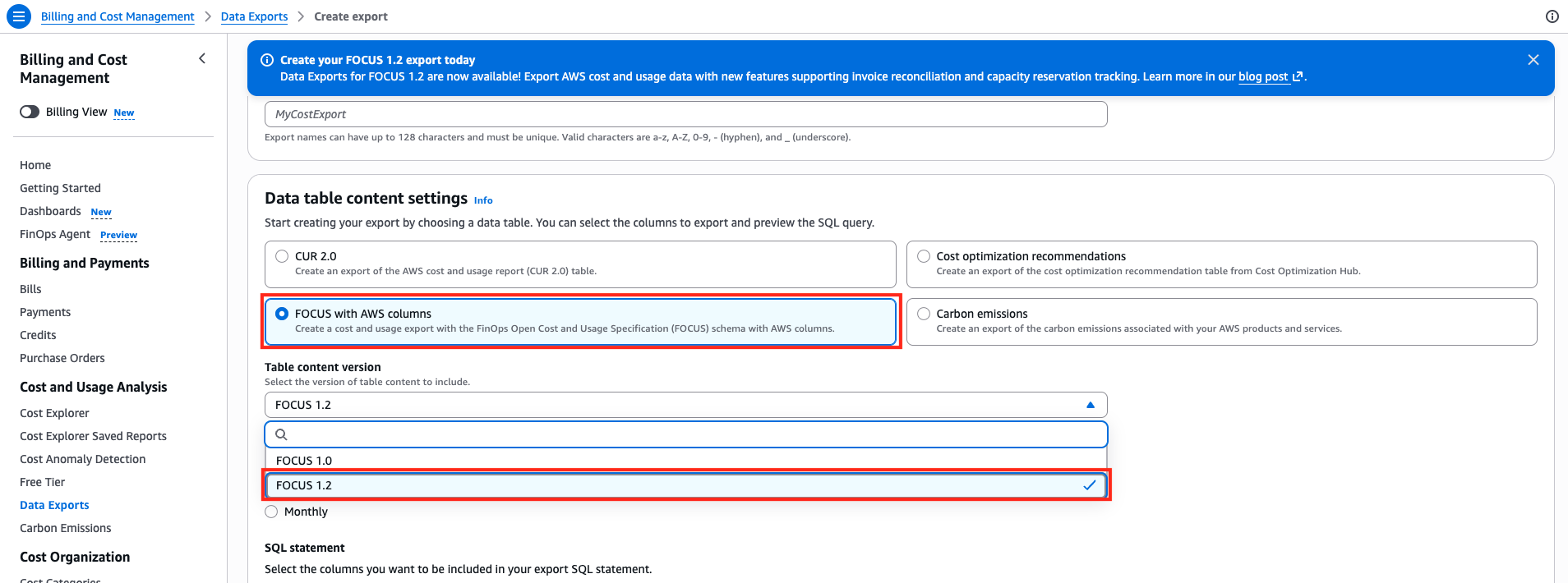
AWS provides FOCUS 1.2 cost and usage data through AWS Data Exports.
When creating the export, select the FOCUS 1.2 dataset available for your billing environment. AWS refers to this dataset as FOCUS 1.2 with AWS columns.
If you already use AWS FOCUS 1.0
Yarken continues to support AWS billing data using FOCUS 1.0. If you choose to use FOCUS 1.2, create a new FOCUS 1.2 export and validate it before replacing your existing FOCUS 1.0 export.
AWS FOCUS 1.2 contains schema and behavioral differences from FOCUS 1.0. Depending on the data you currently use, these can include:
-
New FOCUS columns
-
Removal or replacement of some AWS extension columns
-
Changes to some field values
-
Changes to null handling
-
Different representation of some AWS-specific information
-
Additional rows for some capacity-reservation scenarios
If you choose to migrate, review the AWS migration documentation and validate existing mappings, transformations, allocation rules, and reporting before replacing your FOCUS 1.0 export.
AWS validation considerations
When comparing AWS FOCUS 1.0 and FOCUS 1.2 data:
-
Do not expect record counts to be identical.
-
Compare financial totals rather than relying only on row counts.
-
Check fields used by existing allocation and reporting logic.
-
Review tags and other AWS-specific fields used for ownership or classification.
-
Validate billing periods and account structures.
-
Confirm that downstream Yarken reporting produces the expected results.
See the AWS documentation in External resources for current export requirements, migration guidance, and schema details.
Configure Microsoft Azure FOCUS 1.2 data
Microsoft provides FOCUS cost and usage data through Azure Cost Management exports.
When configuring an export, check the FOCUS dataset versions currently available for your Azure billing scope.
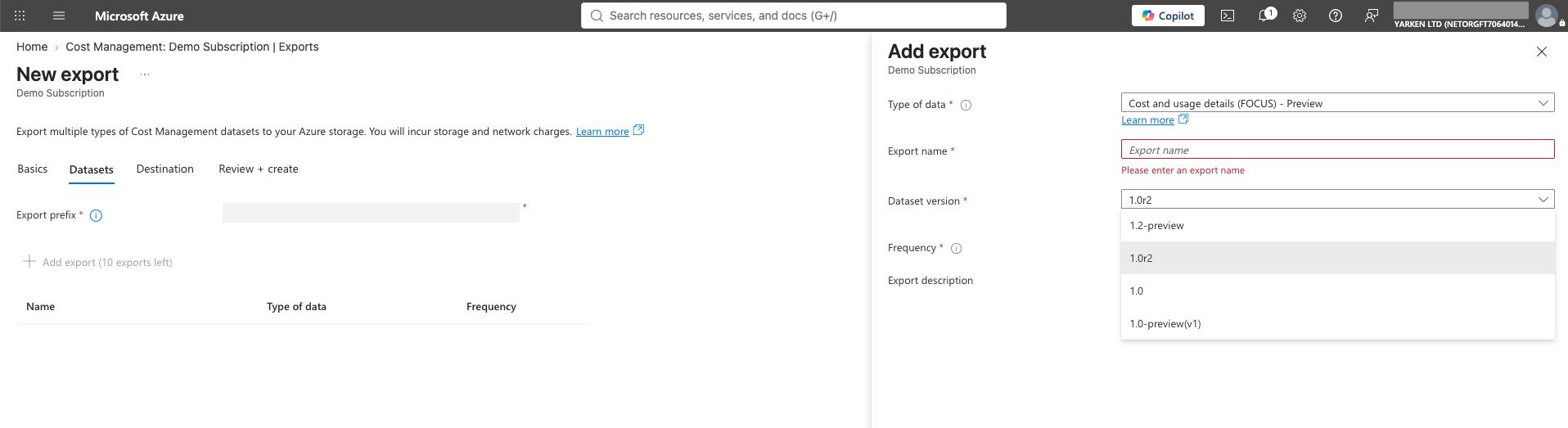
Microsoft's FOCUS implementation can differ from AWS and other providers. In particular, a FOCUS field can exist in the Azure schema without containing data.
Before enabling or migrating an Azure export:
-
Check Microsoft's current FOCUS schema documentation.
-
Confirm the FOCUS dataset version available for your billing scope.
-
Check whether that version is generally available or in preview.
-
Review which FOCUS 1.2 fields Microsoft currently populates.
-
Confirm that the fields required by your Yarken reporting contain the expected data.
Do not assume that equivalent FOCUS fields provide identical information across AWS and Azure.
See the Microsoft documentation in External resources for the current schema, availability, and export requirements.
Move an existing export to FOCUS 1.2 (optional)
If you choose to migrate, treat the change as a data migration rather than an automatic schema update. Validate the FOCUS 1.2 data and any dependent Yarken reporting before replacing your existing FOCUS 1.0 export.
1. Confirm provider support
Check that FOCUS 1.2 is available for the provider, billing account type, and scope you use.
Review the provider's current schema and migration documentation before changing the existing export.
2. Create the FOCUS 1.2 export
Create a new export using the provider's FOCUS 1.2 dataset.
Where possible, keep the existing export active during validation instead of immediately replacing it.
3. Run both exports in parallel
Where practical, run the existing export and the FOCUS 1.2 export in parallel for at least one complete billing period.
Parallel running gives you a period in which you can compare financial results and identify schema, mapping, or reporting differences before cutover.
Different FOCUS versions can legitimately produce different record counts or field values, so do not use row counts alone to determine whether the datasets match.
4. Update ingestion mappings
Configure the FOCUS 1.2 dataset as required by your Yarken ingestion process.
Map the fields required for your reporting, including the additional supported FOCUS 1.2 fields where they are supplied by the provider.
Review existing mappings for fields that have been renamed, replaced, removed, or represented differently in the new provider dataset.
5. Validate the data
Before using the new export for production reporting, validate:
-
Total cost for comparable billing periods
-
Billing and charge periods
-
Billing and pricing currencies
-
Billing account and sub-account structures
-
Provider, service, product, and resource dimensions
-
Tags and ownership information
-
Cost and pricing measures
-
Consumption measures used by reporting
-
FOCUS 1.2 fields required by your use cases
A successful migration does not necessarily mean that every row or field value is identical to the previous FOCUS version.
6. Validate downstream reporting
Check the Yarken capabilities that consume the data, including those relevant to your environment:
-
Analytics views
-
Dashboards
-
Cost Explorer
-
TBM mappings and allocation
-
Chargeback and showback
-
Planning and forecasting
-
Recommendations
-
Custom reports and calculations
Pay particular attention to rules or calculations that reference provider-specific columns from the previous export.
7. Complete the move to FOCUS 1.2
After validating the FOCUS 1.2 data and downstream reporting, you can choose to replace your existing FOCUS 1.0 export.
Before replacing the previous export:
-
Choose an appropriate date to start using the FOCUS 1.2 export as your primary data source.
-
Where possible, align the change with a billing-period boundary to simplify reconciliation.
-
Confirm that FOCUS 1.2 data is being ingested successfully into Yarken.
-
Verify that expected reporting, mappings, allocations, and other downstream processes are working correctly.
-
Retire the previous FOCUS 1.0 export when you are satisfied with the FOCUS 1.2 results and no longer require the previous export.
Retain historical data according to your organization's reporting and retention requirements.
Validate your FOCUS 1.2 migration
If you choose to migrate an existing FOCUS 1.0 integration, complete the following checks before replacing your existing export:
-
FOCUS 1.2 is available for the required provider and billing scope.
-
A new FOCUS 1.2 export has been created.
-
The existing and new exports have been compared over a suitable period.
-
Required FOCUS 1.2 fields are present in the source data.
-
Required fields are populated by the provider.
-
Yarken ingestion mappings have been reviewed.
-
Cost totals have been reconciled.
-
Currency fields have been validated.
-
Billing account and sub-account mappings have been validated.
-
Tags and ownership mappings have been reviewed.
-
Analytics and dashboards have been validated.
-
TBM allocation has been validated where applicable.
-
Chargeback or showback results have been validated where applicable.
-
Custom calculations or reports have been checked.
-
The final cutover has been planned.
Troubleshoot FOCUS 1.2 data
A field is missing
Confirm that:
-
The source export is using FOCUS 1.2.
-
The field exists in the provider's implementation.
-
The provider populates the field for your data.
-
The field has been included in the Yarken ingestion mapping.
A field exists but has no values
Check the provider's FOCUS schema documentation.
FOCUS defines standardized fields, but providers can differ in the information available from their billing platforms. A field appearing in the schema does not guarantee that it will contain values.
Costs do not match the previous export
Check:
-
The billing and charge periods being compared
-
The cost measures used in the comparison
-
Currency fields
-
Provider-specific FOCUS migration changes
-
Filters and account scope
-
Changes in row representation between versions
Do not rely on row counts alone when reconciling different FOCUS versions.
Downstream reports have changed
Review any:
-
Renamed or replaced source fields
-
Provider extension fields
-
Tags
-
Allocation rules
-
Chargeback definitions
-
Custom calculations
-
Analytics filters and dimensions
Trace the issue from the provider export through ingestion and mapping before troubleshooting downstream reports.
External resources
Provider capabilities and FOCUS versions can change over time. Use the current provider documentation when configuring or migrating an export.
-
FOCUS 1.2 specification — Review the FOCUS 1.2 schema, terminology, and requirements.
-
FOCUS provider getting-started guidance — Check provider adoption and available FOCUS datasets.
-
Introducing FOCUS 1.2 — Review the capabilities and fields introduced with FOCUS 1.2.
-
AWS FOCUS 1.2 with AWS columns — Review the AWS FOCUS 1.2 schema and AWS-specific columns.
-
AWS: Migrating from FOCUS 1.0 to FOCUS 1.2 — Review AWS-specific schema and behavioral changes before migration.
-
AWS Data Exports — Review current AWS Data Exports configuration guidance.
-
Microsoft Cost Management FOCUS schema — Review Microsoft's FOCUS cost and usage fields and version-specific information.
-
Microsoft Cost Management exports — Review Microsoft's current instructions for creating and managing exports.
Always check the provider documentation for current availability, supported billing scopes, dataset versions, populated fields, and enablement requirements before making production changes.
Related content