Use this article to understand the main analysis workflows Ask Yarken can support across Yarken data.
Spend analysis
Use Ask Yarken to understand total technology spend and the dimensions behind it.
Typical spend questions include:
-
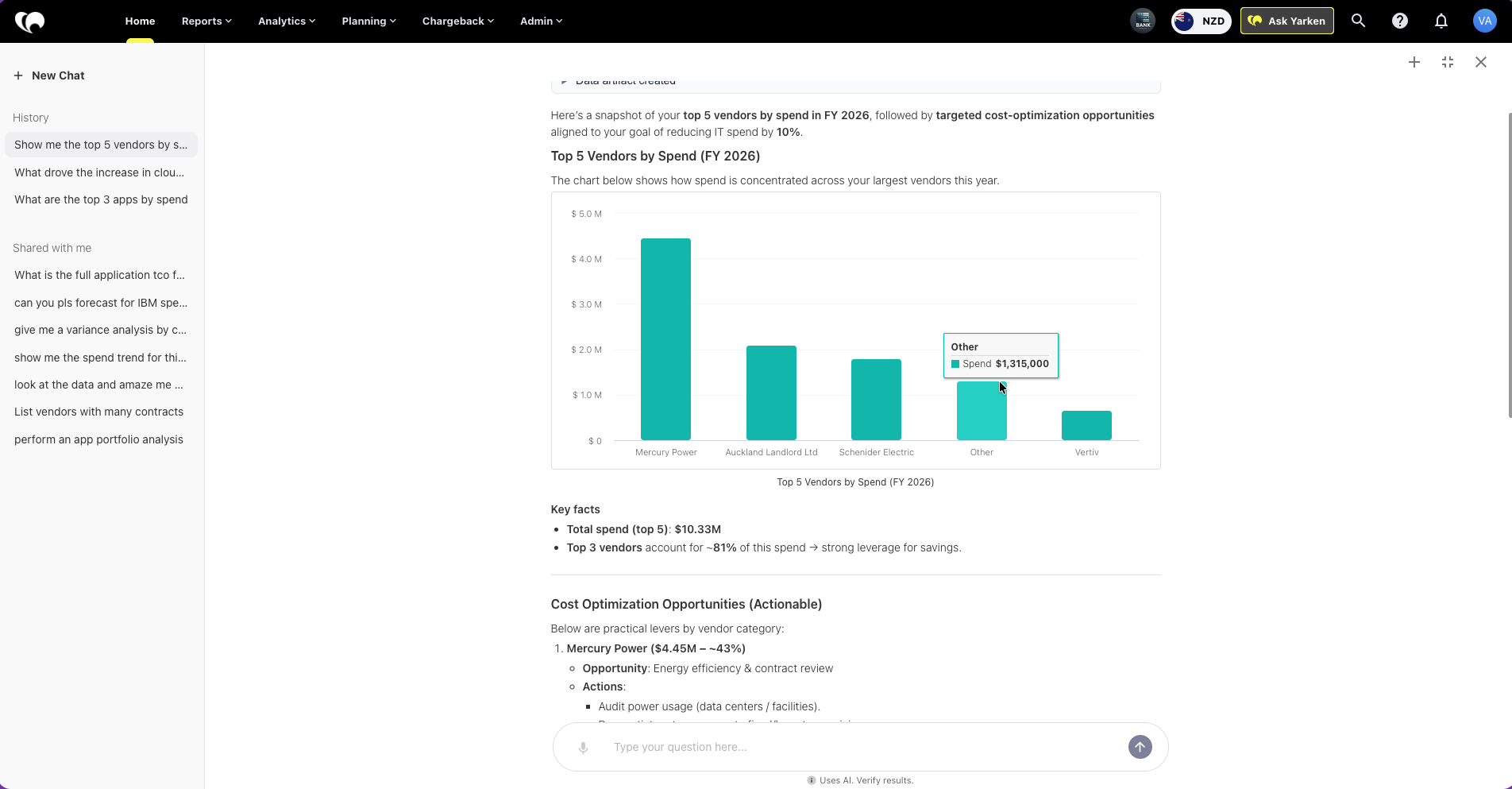
What are the top vendors by spend this year?
-
Which applications have the highest spend this quarter?
-
Break total spend down by cost center and entity.
-
Show the top spend increases month over month.
Ask Yarken can summarize spend, compare trends, break down results across multiple dimensions, and highlight the main drivers behind the totals.
Budget and variance analysis
Use Ask Yarken when you need to understand where actuals, budgets, and forecasts are moving apart.
Typical variance questions include:
-
Why is infrastructure spend over budget this month?
-
Which cost centers drove the largest forecast variance this quarter?
-
Compare actuals versus budget by account.
-
Identify the top drivers behind this overspend.
Ask Yarken can explain the variance, identify the dimensions involved, and suggest next actions such as review, reforecasting, or cost control follow-up.
Cloud and FinOps analysis
Use Ask Yarken to analyze cloud spend, usage patterns, and optimization opportunities.
Typical cloud questions include:
-
What drove the increase in cloud spend this month?
-
Compare AWS and Azure spend by service category.
-
Which business consumers drove the highest infrastructure spend?
-
Recommend actions to reduce cloud overspend this quarter.
Ask Yarken can connect cloud analysis to providers, services, business consumers, solutions, and other mapped dimensions available in Yarken.
Vendor and contract analysis
Use Ask Yarken when you need to investigate vendor relationships, Contracts, Purchase Orders, Invoices, contract exposure, or renewal timing.
Ask Yarken can follow linked Accounts Payable records across:
-
Contract → Purchase Order → Invoice
Ask Yarken can return:
-
Contract details
-
Vendor information
-
related Purchase Orders
-
associated Invoices
-
amounts and relevant dates, where available
-
the relationship between these commercial records
Example questions
-
Which contracts are expiring in the next 90 days?
-
Show the Purchase Orders associated with contract CONTR-1010.
-
Which Invoices are linked to this Purchase Order?
-
Provide the Vendor, Purchase Order, and Invoice details for contracts CONTR-1010 and CONTR-1020.
-
Summarize the commercial records associated with this vendor.
-
Compare the Contract amount with the associated Purchase Orders and Invoices.
Note: Ask Yarken uses the Accounts Payable and related master data available in your Yarken environment. The completeness of the answer depends on how the Contracts, Purchase Orders, Invoices, and Vendors are loaded and linked, and on your access permissions.
Published Contract content: When additional Contract information is required and published Contract content is available, Ask Yarken can use that content to supplement the structured Contract data.
For information about how these records are linked in Yarken, see Accounts Payable.
Planning analysis
Use Ask Yarken to compare actuals, budgets, and forecasts and to understand planning performance.
Typical planning questions include:
-
Show budget versus actuals by cost center for this quarter.
-
Explain the largest forecast variances by account.
-
Compare this quarter against the same quarter last year.
-
Identify where the forecast should be adjusted.
Ask Yarken can highlight pressure areas, performance drift, and the dimensions contributing to the change.
Chart requests and deeper detail
Ask Yarken can also generate charts and, where data is available, drill into granular-level detail.
Useful chart requests include:
-
Create a line chart of monthly cloud spend by provider.
-
Show a column chart of top applications by spend.
-
Create a stacked chart of cost center spend by month.
Useful drill-down requests include:
-
Show granular-level detail for the top 5 spend increases.
-
Break this result down by account and consumer.
-
Drill into the transactions behind this variance.
Audit Log analysis
Use Ask Yarken when you need to review recent configuration changes or other activity recorded in Audit Logs.
Ask Yarken can retrieve available Audit Log entries and summarize information such as:
-
the action that was recorded,
-
who performed the action, and
-
when the action occurred.
Example questions
-
What are the most recent changes made to the Upload Rules?
-
What was changed, who made the change, and when was it made?
-
Show recent Audit Log activity related to Upload Rules.
-
Who created or changed the latest Upload Rules?
-
Show recent configuration changes recorded in Audit Logs.
Access: Audit Log analysis through Ask Yarken is available only to Admin and Cost Model Manager users.
Next step
Configure Playbooks and SOPs for Ask Yarken
Related articles