
Use dashboard import, export, and access controls to reuse Custom Dashboard configurations and make dashboards available to the appropriate audience.
At a glance: Import dashboard configurations from JSON files, export reusable dashboards, and manage viewer and editor access for the right audience.
Dashboard sharing and menu publishing
Sharing a dashboard controls who can access it. Publishing controls whether it appears in the Yarken menu.
Publishing a dashboard does not grant additional access. Users must already have the required dashboard access to view it.
Import a dashboard
Import a dashboard when you want to reuse a dashboard configuration from a JSON file.
To import a dashboard:
-
Go to Analytics > Custom Dashboards.
-
Select Import.
-
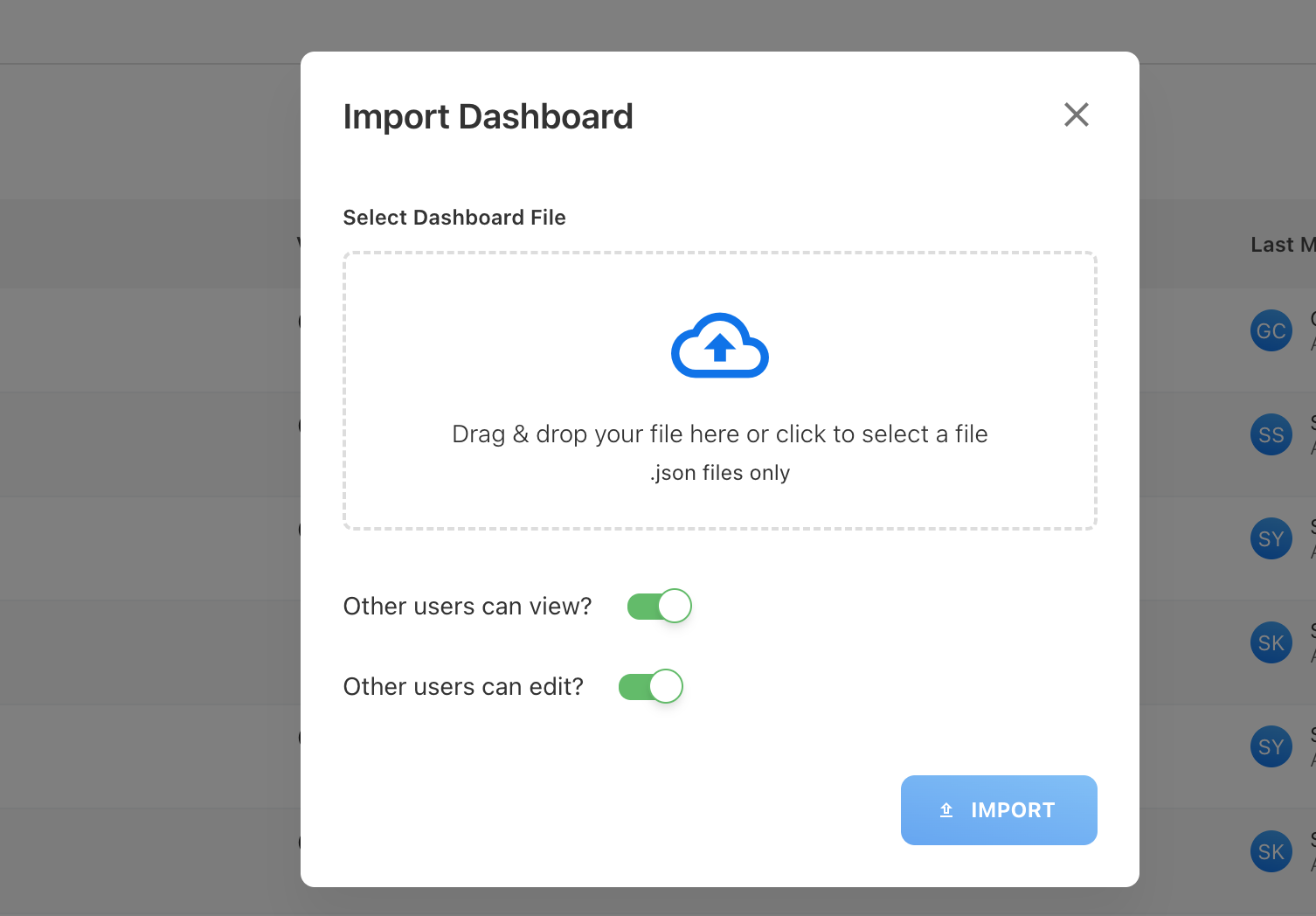
In Import Dashboard, drag and drop the dashboard file into Select Dashboard File, or select the area to browse for the file.
-
Select a
.jsondashboard file. -
Set Other users can view? to control whether other users can view the imported dashboard.
-
Set Other users can edit? to control whether other users can edit the imported dashboard.
-
Select Import.
-
Open the imported dashboard and verify its widgets, filters, and reporting context before using or sharing it.
File requirement: Dashboard import supports .json files only.
Export a dashboard
Export a dashboard in JSON format when you want to create a reusable dashboard file that can be imported later.
To export a dashboard:
-
Go to Analytics > Custom Dashboards.
-
Find the dashboard you want to export.
-
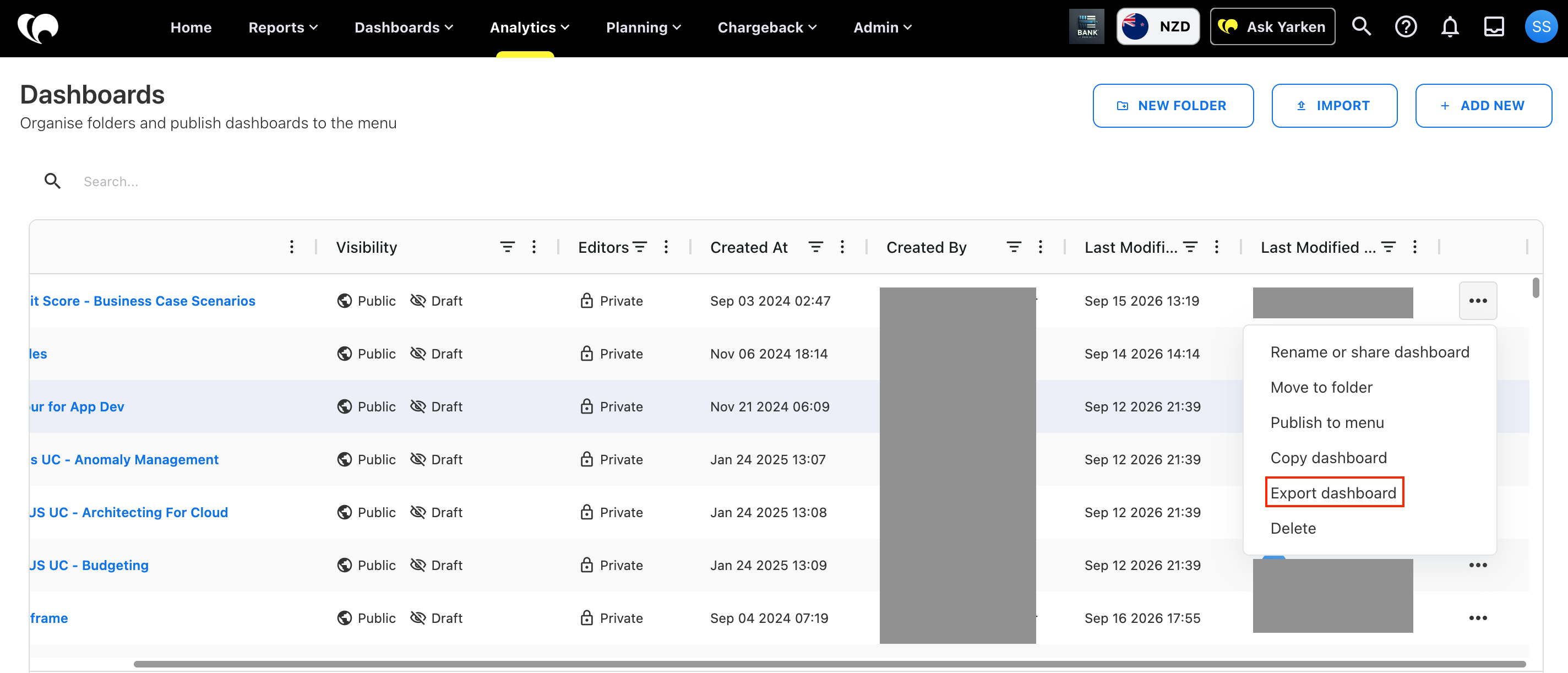
Open the Actions menu (•••).
-
Select Export dashboard.
-
Save the exported dashboard file when prompted by your browser.
You can use the exported file with Import to recreate the dashboard configuration where supported.
Share a dashboard
You can update dashboard access from the Dashboards list.
To share a dashboard or change its access:
-
Go to Analytics > Custom Dashboards.
-
Find the dashboard you want to share.
-
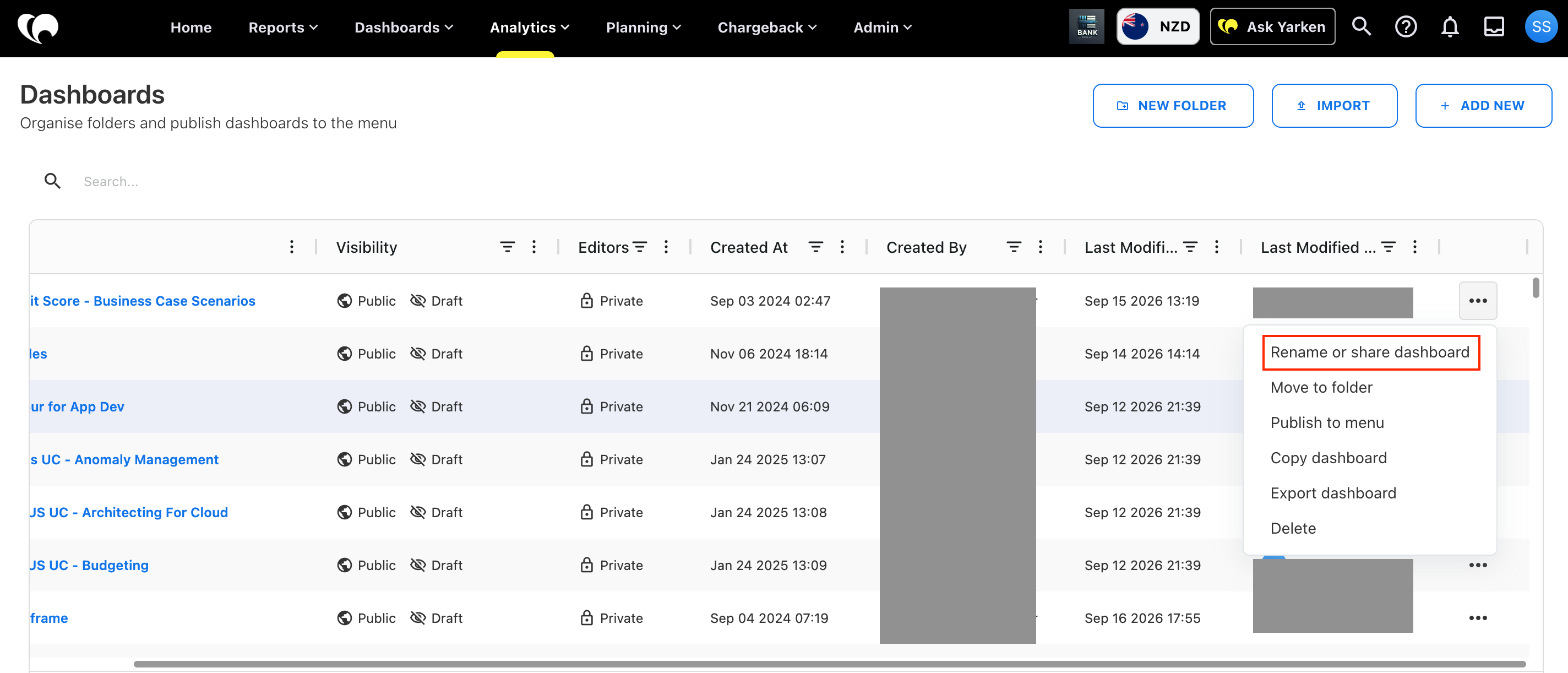
Open the Actions menu (•••).
-
Select Rename or share dashboard.
-
Review and update the dashboard's viewer and editor access as required.
-
Save the changes.
Viewer access controls who can open the dashboard. Editor access controls who can change its configuration.
Use restricted access for draft dashboards, sensitive financial views, or dashboards intended for a specific audience. Use broader access when the dashboard should support a wider reporting group.
Your role, permissions, and dashboard ownership can affect the actions available to you.
Review access carefully: Restrict draft or sensitive dashboards, and give editor access only to people who need to maintain the dashboard.
Review an imported or shared dashboard
Before using an imported dashboard or making a dashboard broadly available, review:
-
Dashboard name and reporting purpose
-
Viewer and editor access
-
Widgets
-
Filters
-
Data mappings and reporting context
-
Important totals and metrics
Validate the dashboard before using it for financial, operational, or executive reporting.
Recommended practices
-
Keep a dashboard restricted while it is being built or validated.
-
Give edit access only to people who need to maintain the dashboard.
-
Review access when dashboard ownership or reporting responsibilities change.
-
Validate imported dashboards before sharing them.
-
Confirm that imported fields, filters, and data mappings match the target environment.
-
Export a dashboard before moving or reusing its configuration where appropriate.
Recommended outcome: Validate imported dashboards and confirm their fields, filters, data mappings, and access settings before sharing them broadly.
Troubleshooting
A dashboard file cannot be imported
Confirm that the selected file uses the .json format. If the file was exported from another environment, confirm that the required dashboard data and configuration are available in the target environment.
An imported dashboard does not show the expected data
Review its fields, filters, and data mappings. Confirm that the required underlying data is available in the target environment.
Someone cannot view the dashboard
Review the dashboard viewer access and confirm that the person has the required Yarken permissions for the underlying content.
Someone cannot edit the dashboard
Review editor access and confirm that the person has the required role and permissions to modify Custom Dashboards.
Related content