
Use this guide to create a Custom Dashboard, work with the dashboard canvas, customize the dashboard background, and manage an existing dashboard.
At a glance: Create a dashboard, configure its widgets and filters, customize the dashboard appearance, then manage access and ownership from the Dashboards page.
Before you begin
Access requirement: You need permission to create or edit Custom Dashboards. Available actions depend on your role and dashboard access.
Create a Custom Dashboard
-
Go to Analytics > Custom Dashboards.
-
Select Add New.
-
Enter a clear dashboard name that describes its audience or reporting purpose.
-
Configure viewer access.
-
Configure editor access.
-
Save the dashboard.
-
Open the dashboard and select Edit.
After creating the dashboard, add the widgets and filters required for your reporting view.
Tip: Use names such as Monthly Finance Review, Vendor Spend Review, or Cloud Cost Governance to make the dashboard purpose clear.
Work in Edit mode
Use Edit mode to change the dashboard layout and configuration.
Depending on the content on the dashboard, you can:
-
Add widgets.
-
Move and resize widgets.
-
Duplicate or remove widgets.
-
Open widget settings and change the configuration.
-
Add or update filters.
-
Change the dashboard background color.
-
Reset the dashboard where available.
-
Use full-screen mode where available.
-
Cancel changes before finishing the edit.
When you finish making changes, select Done to return to the dashboard view.
For detailed widget configuration, see Add and configure dashboard widgets.
Customize the dashboard background
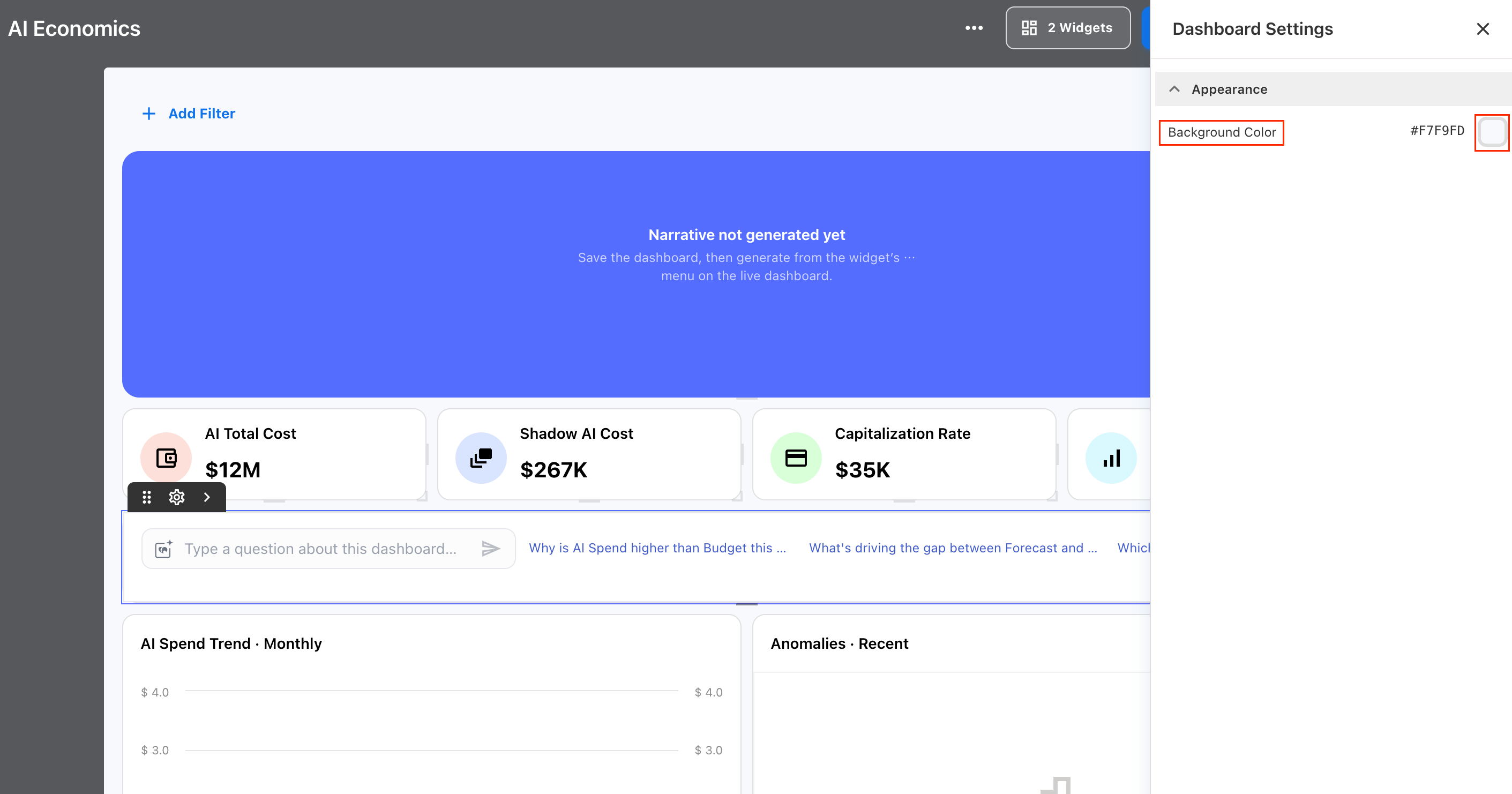
Use Dashboard Settings to change the background color of the dashboard page.
To change the dashboard background color:
-
Open the required Custom Dashboard.
-
Select Edit.
-
Select an empty area of the dashboard canvas.
-
In Dashboard Settings, expand Appearance.
-
Select Background Color.
-
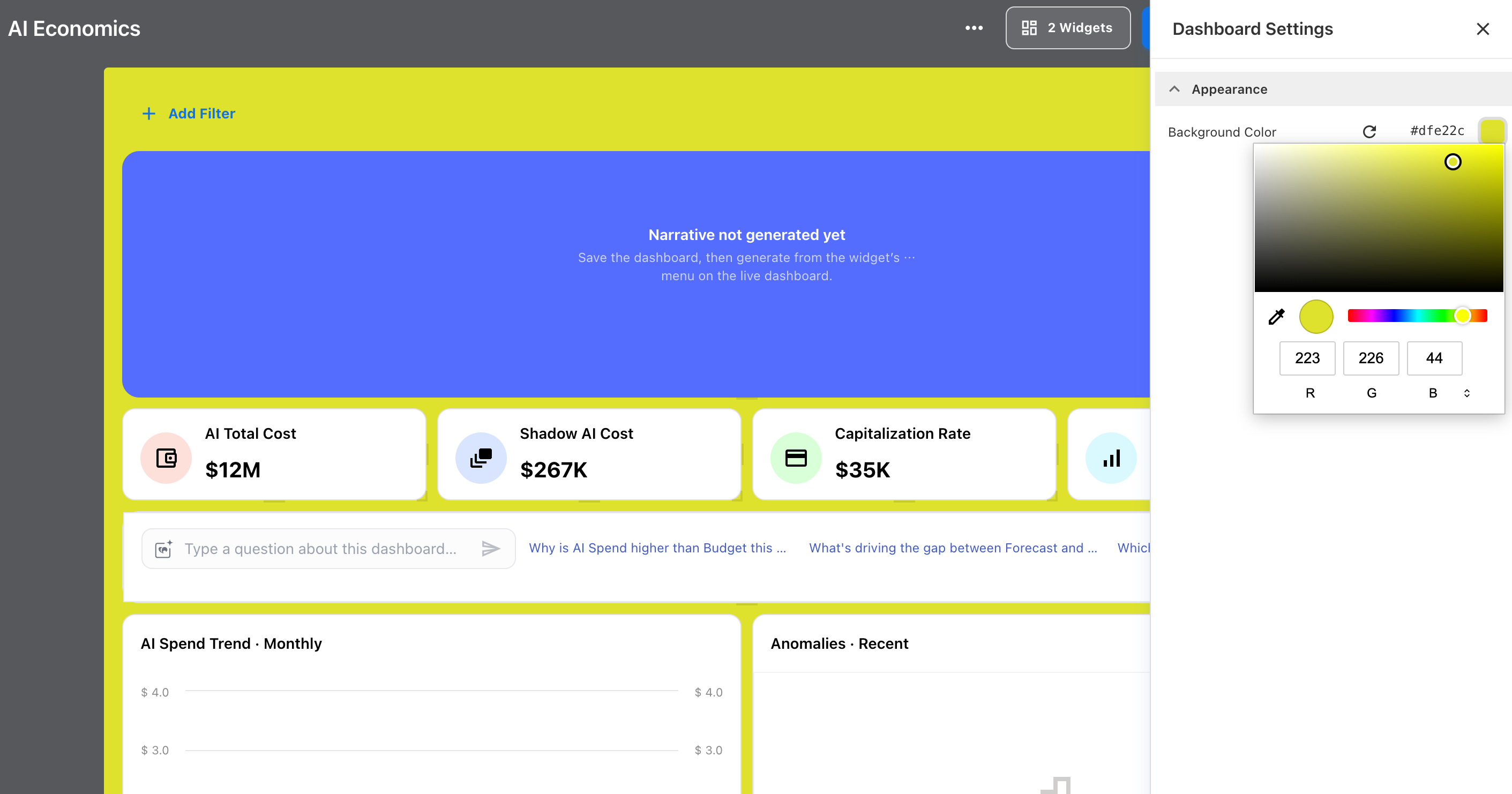
Choose the required color.
-
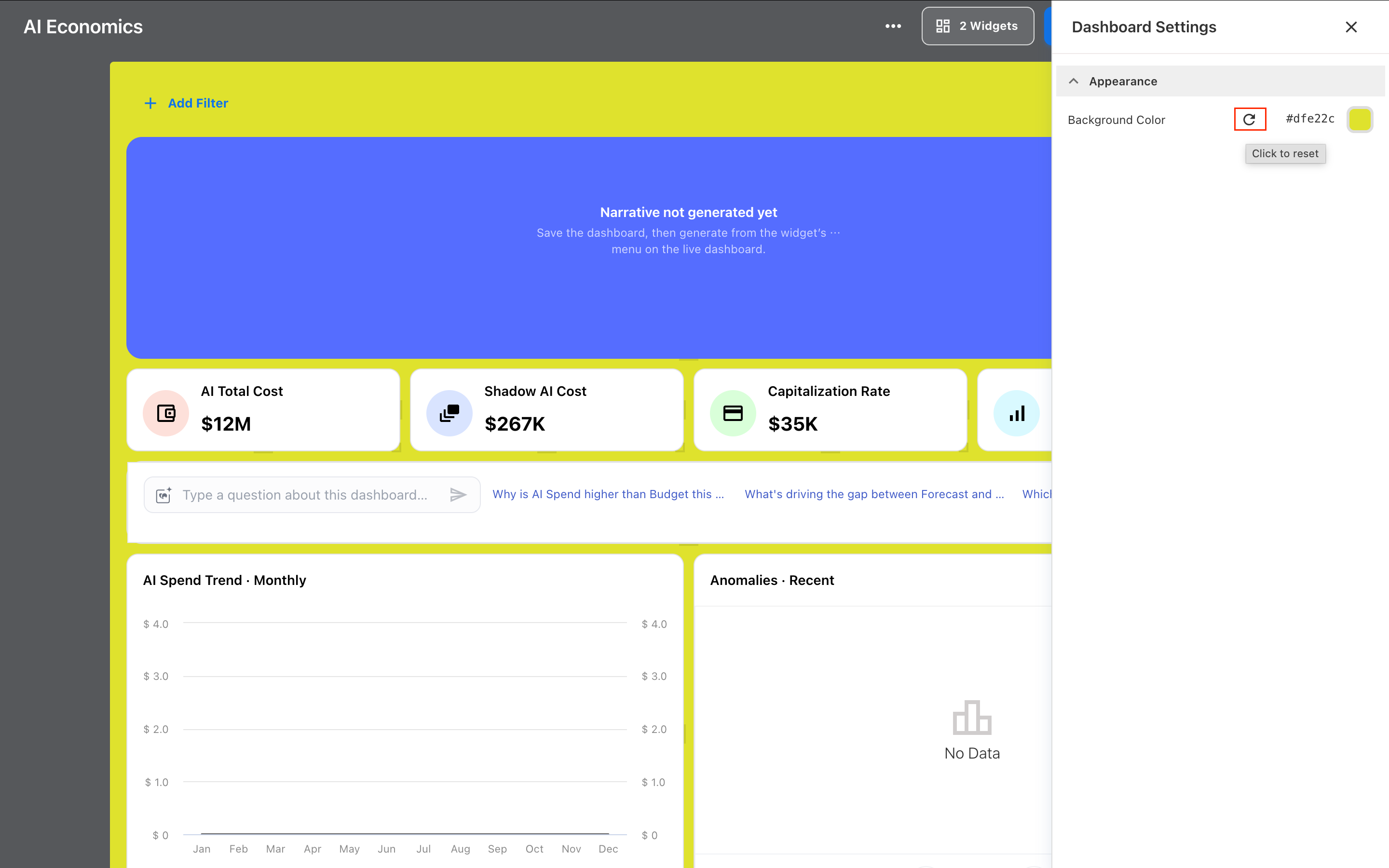
To restore the default dashboard background, select Reset next to Background Color.
-
Review the dashboard appearance.
-
Select Done to finish editing.
The selected color applies to the dashboard background behind the widgets.
Tip: Choose a background color that keeps widget content easy to read and provides sufficient contrast with cards, charts, and text.
Manage an existing dashboard
Use the Actions menu (•••) on the Dashboards page to manage an existing dashboard.
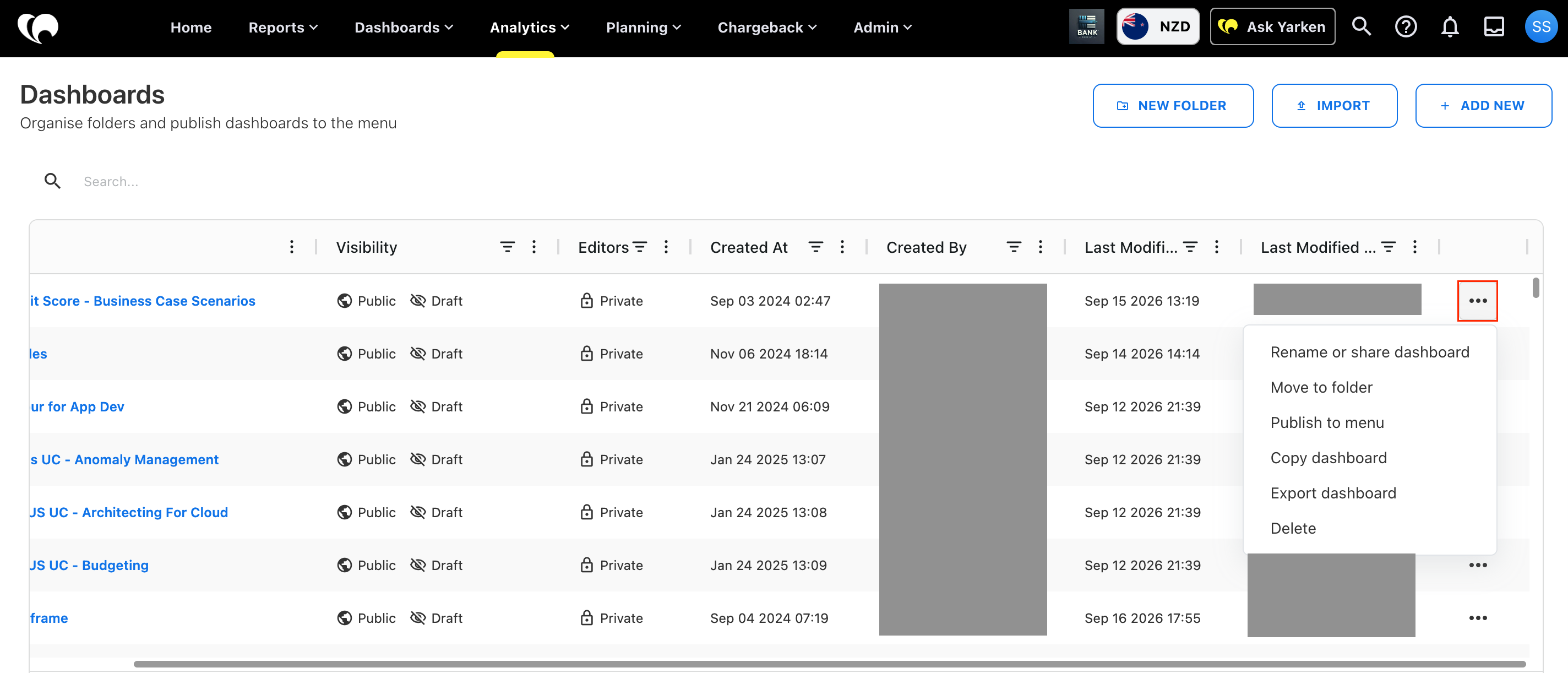
Available actions include:
-
Rename or share dashboard
-
Move to folder
-
Publish to Menu
-
Copy dashboard
-
Export dashboard
-
Delete
Available actions depend on your role, permissions, and dashboard access.
For dashboard sharing, importing, and exporting, see Import and share Custom Dashboards.
Move and publish dashboards: You can organize Custom Dashboards into folders and publish selected dashboards or folders to the Yarken menu. Publishing controls menu visibility and does not grant dashboard access. For details, see Organize and publish Custom Dashboards.
Copy a dashboard
Copy a dashboard when an existing dashboard already provides most of the structure you need.
To copy a dashboard:
-
Go to Analytics > Custom Dashboards.
-
Find the dashboard you want to copy.
-
Open the Actions menu (•••).
-
Select Copy dashboard.
-
Complete the copy options shown in Yarken.
-
Open the copied dashboard and review its configuration before using or sharing it.
After copying, review the dashboard name, widgets, filters, and access. Update them to match the purpose of the new dashboard.
Rename a dashboard
To rename an existing dashboard:
-
Go to Analytics > Custom Dashboards.
-
Find the dashboard you want to rename.
-
Open the Actions menu (•••).
-
Select Rename or share dashboard.
-
Update the dashboard name.
-
Save the changes.
Use a name that identifies the dashboard audience or reporting purpose. Clear names make dashboards easier to find and distinguish on the Dashboards page.
Delete a dashboard
Delete a dashboard when it is no longer required for reporting or review.
To delete a dashboard:
-
Go to Analytics > Custom Dashboards.
-
Find the dashboard you want to delete.
-
Open the Actions menu (•••).
-
Select Delete.
-
Review the confirmation message and confirm the deletion.
Caution: Before deleting a dashboard, confirm that it is no longer used for recurring reporting or by other dashboard viewers.
Review dashboard ownership and changes
The Dashboards page shows who created each dashboard and who last modified it. Use this information when you need to identify the dashboard owner or understand when a dashboard was last updated.
Collaborate with comments
Keep context with the dashboard: Use dashboard comments to keep discussion close to the information being reviewed.
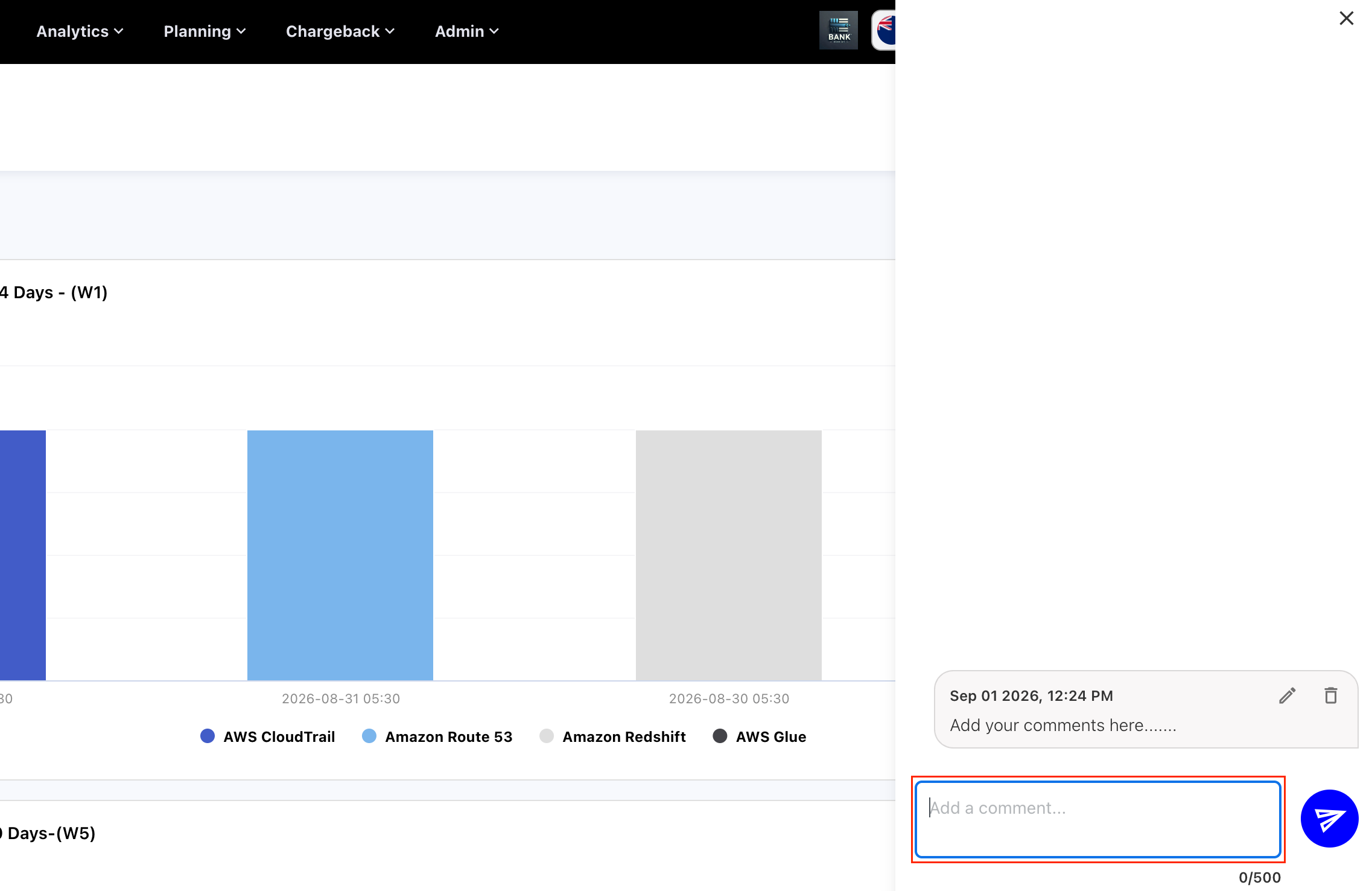
Comments can help you:
-
Ask follow-up questions.
-
Capture decisions from review meetings.
-
Add context for a variance or trend.
-
Request changes to a widget or filter.
-
Track feedback from other stakeholders.
Recommended practices
-
Give dashboards clear names that identify their audience or purpose.
-
Keep draft or sensitive dashboards restricted until they are ready to share.
-
Review viewer and editor access before sharing a dashboard broadly.
-
Choose a dashboard background that keeps widget content easy to read.
-
Copy an existing dashboard when it already provides most of the structure you need.
-
Confirm that a dashboard is no longer required before deleting it.
Recommended outcome: Keep dashboards clearly named, appropriately restricted, and reviewed regularly so reporting remains reliable and easy to maintain.
Troubleshooting
Before troubleshooting: Confirm your dashboard role and access. Available actions can differ between viewers, editors, owners, and administrators.
I cannot edit a dashboard
Confirm that you have editor access to the dashboard. If you can view the dashboard but cannot change it, ask a dashboard owner or administrator to review your access.
Dashboard Settings does not appear
Confirm that the dashboard is in Edit mode, then select an empty area of the dashboard canvas. Dashboard Settings opens for dashboard-level configuration.
I cannot find a dashboard
Use the search field on the Dashboards page. If the dashboard still does not appear, confirm that you have viewer access.
I cannot copy, rename, or delete a dashboard
Confirm that your role and dashboard access allow you to manage the dashboard. Available actions can differ based on your permissions.
My changes are not required
If you are still in Edit mode and do not want to keep the changes, use the available cancel option before finishing the edit.
Next steps
Related content