
In Planning, you can define additional fields in addition to the standard fields available in budget, forecast, and workforce planning items. These additional fields are controlled through Form Configuration.
Form Configuration allows you to add fields such as Currency and other fields items to planning forms. After the Currency field is enabled, you can create budget or forecast items in the required foreign currency instead of only using the application’s base currency.
To support foreign currency planning, the required currency exchange rates must also be configured. Once the Currency field and exchange rates are available, users can use the Update Currency Exchange Rate option to apply the configured rates to budget or forecast values.
What is Form Configuration?
Form Configuration allows administrators to add and control additional fields in Planning item forms.
You can use Form Configuration to:
-
Add additional fields to budget, forecast, and workforce planning items.
-
Configure a display name for additional fields.
-
Enable the Currency field for Planning.
-
Allow you to create planning items in a foreign currency.
After a field is enabled in Form Configuration, it appears in the relevant planning item forms. For example, when the Currency field is enabled, you can select a currency while creating or editing budget and forecast items.
Note: Additional fields can be added or updated only when the plan is still editable, such as when the budget or forecast is in Draft status or before it is submitted to the Budget Contributor.
How to configure additional fields?
To configure an additional planning field:
-
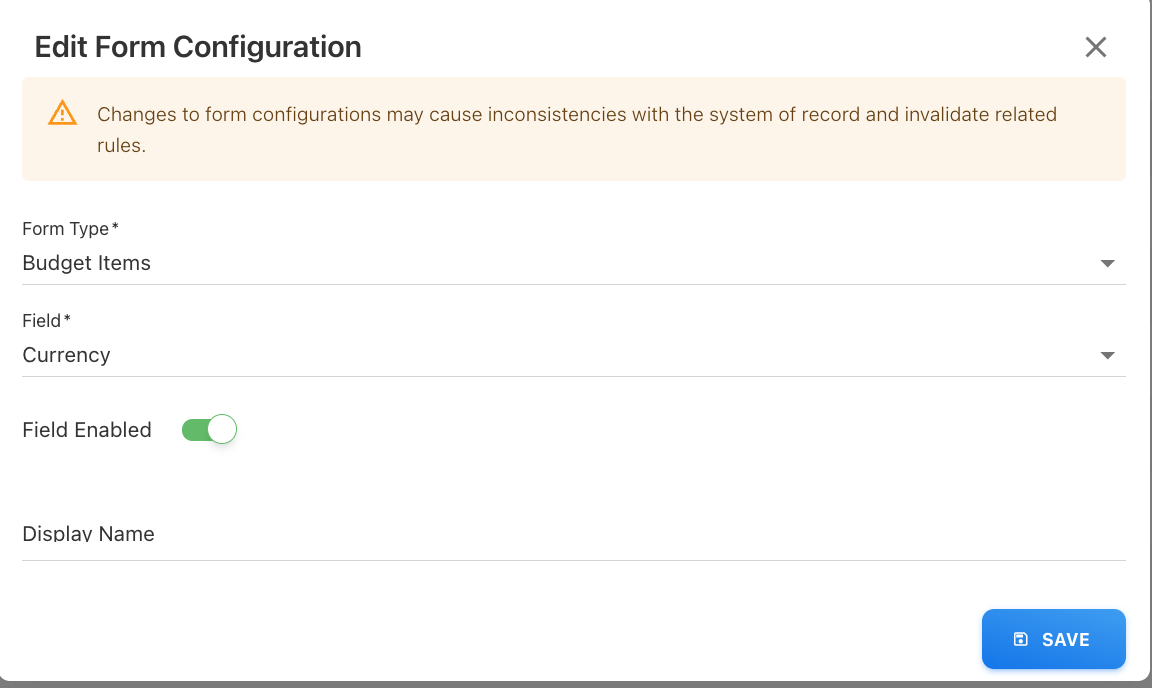
Go to Settings > Form Configuration.
-
Click Add New.
-
Select the field that you want to configure.
Example: Currency
-
Enable the field.
-
Add a display name, if required.
-
Click Save.
After the field is saved, it appears in the relevant planning item forms.
What is multi-currency planning?
Multi-currency planning allows you to create budget or forecast items in a currency other than the application’s base currency.
For example, if the base currency is NZD and a team wants to plan budget values in USD, the administrator must first enable the Currency field from Form Configuration. After that, users can select USD in the budget or forecast item.
-
The available currency list depends on the foreign currencies configured in Settings.
-
By default, the application uses the base currency. When a foreign currency is selected, the application uses the configured monthly exchange rate to convert the planning amount.
What is the Update Currency Exchange Rate option?
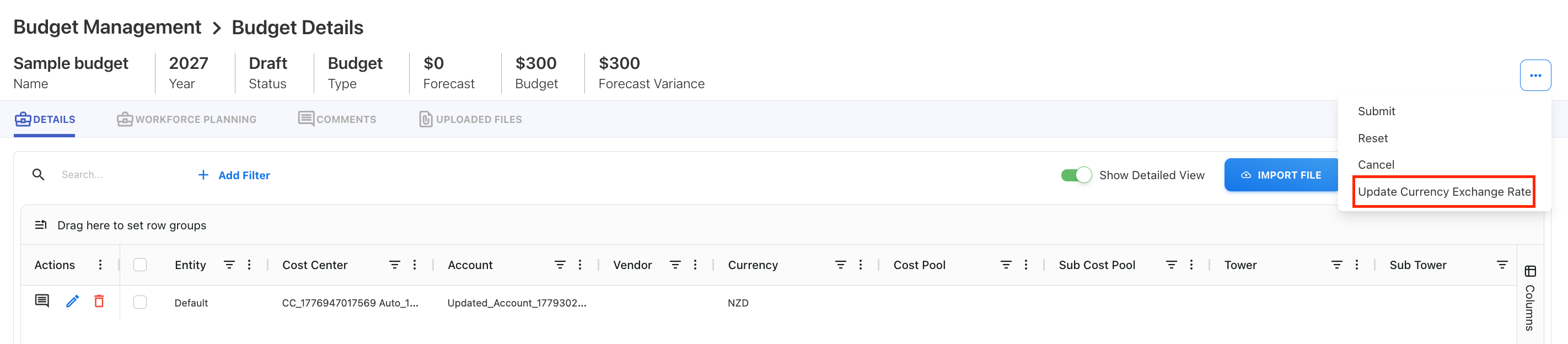
The Update Currency Exchange Rate option updates the exchange rates used for budget or forecast items that are planned in a foreign currency.
Use this option when:
-
The Currency field is enabled in Form Configuration.
-
Planning exchange rates are configured for the required months.
-
The budget or forecast is in Draft or In progress status.
Before using Update Currency Exchange Rate option
Before you update currency exchange rates in Planning, make sure the following setup is complete:
-
The Currency field is enabled from Settings > Form Configuration.
-
Planning exchange rates are defined for all required months in the selected year.
Planning exchange rates must exist for every required month. If an exchange rate is missing for a month, the application restricts saving for that month.
Update currency exchange rates for a budget or forecast
You can update currency exchange rates for budgets or forecasts that are draft or in progress state.
To update currency exchange rates:
-
Open the required budget or forecast.
-
Click the three-dot menu.
-
Select Update Currency Exchange Rate.
-
Confirm the action.
-
Go to the month-wise entries.
-
Review the exchange rate displayed next to each monthly value.
-
Edit or add entries, if required.
-
Click Save.
The application automatically converts the amount using the selected currency rate.
Related content