
Use the Anthropic AI Consumption integration to collect Claude Enterprise Analytics cost and usage data and load it into AI Usage Data in Yarken.
Yarken deploys and maintains the Advanced Integration for your environment. Your organization creates the required Anthropic Analytics API key, authorizes the Advanced Connection, and monitors the resulting data.
Supported Anthropic data source
This integration collects cost and usage data from Claude Enterprise Analytics for Claude Enterprise seats.
It uses a Claude Enterprise Analytics API key beginning with sk-ant-api01-. Anthropic Admin API keys beginning with sk-ant-admin01- are not supported by this integration.
What the integration provides
The integration helps you analyze Anthropic spend and token consumption by user, product, model, team, region, and supported cost meter.
-
Per-user Anthropic cost data.
-
Per-user token usage.
-
Product, model, region, speed, and team attributes when Anthropic provides them.
-
Separate AI Consumption records for supported token and tool meters.
-
Optional reconciliation against organization-wide Anthropic cost.
-
Normalized AI Consumption fields for reporting and chargeback.
Roles and responsibilities
|
Activity |
Responsibility |
|---|---|
|
Deploy and maintain the Advanced Integration |
Yarken |
|
Maintain connector logic and data transformation |
Yarken |
|
Enable public API access in Claude Enterprise |
Claude Enterprise Primary Owner |
|
Create and maintain the Anthropic Analytics API key |
Claude Enterprise Primary Owner |
|
Authorize the Anthropic connection in Yarken |
Yarken administrator |
|
Run and monitor the Advanced pipeline |
Admin or Cost Model Manager |
|
Review imported AI Consumption data |
FinOps and reporting users |
Before you begin
|
Requirement |
Details |
|---|---|
|
Claude plan |
Your organization must use Claude Enterprise with claude.ai seats. |
|
Primary Owner access |
Only the Claude Enterprise Primary Owner can enable public API access and create the required Analytics API key. |
|
Public API access |
Public API access must be enabled for the Claude Enterprise organization. |
|
Analytics API key scopes |
|
|
Yarken access |
You need a Yarken administrator account to authorize the Anthropic Advanced Connection. |
|
Secure secret storage |
Store the Analytics API key in an organization-approved secrets manager. |
Organization Owner, Admin, Billing, and Console administrator roles cannot create the Analytics API key required by this integration. The key must be created by the Claude Enterprise Primary Owner.
Create the Anthropic Analytics API key
Complete these steps as the Claude Enterprise Primary Owner:
-
Sign in to Claude Enterprise.
-
Go to Organization settings > API.
-
Locate the Keys section.
-
Enable public API access if it is not already enabled.
-
Select + Create key.
-
Enter a descriptive name for the key.
-
Select
read:analyticsfor Analytics data andread:membersto resolve user IDs to email addresses. -
If you use per-user spend governance, also select
read:spend_limits. -
Create the key.
-
Copy the secret and store it securely.
The required Analytics API key begins with sk-ant-api01-. Do not use an Anthropic Admin API key beginning with sk-ant-admin01-.
Anthropic fixes scopes when the key is created. If a required scope is missing, create a new key with the correct scopes and revoke the superseded key.
Authorize the Anthropic connection
-
Sign in to Yarken as an administrator.
-
Go to Admin > Pipelines > Connections.
-
Select the ADVANCED tab.
-
Open the Anthropic connection.
-
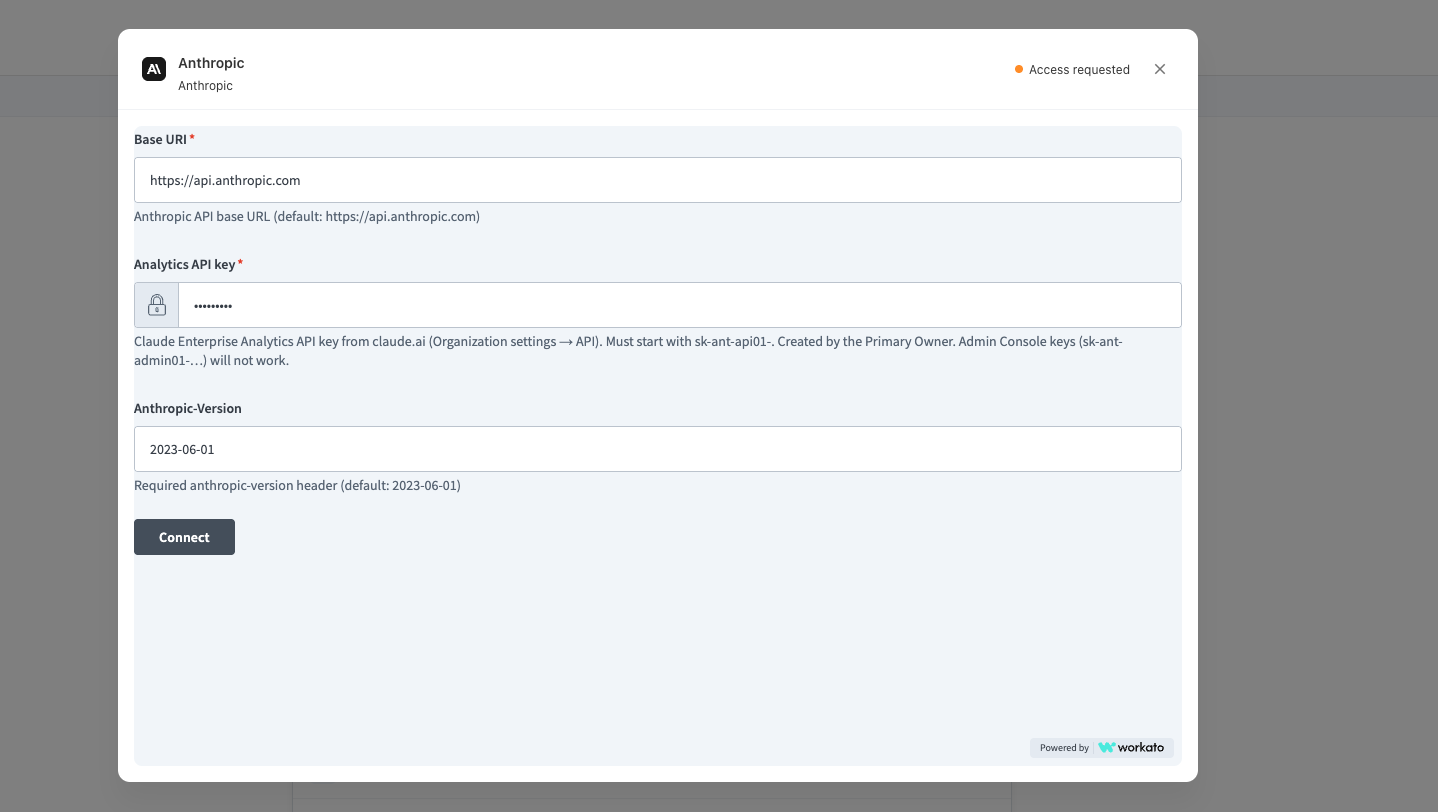
Complete the required connection fields.
-
Select Connect.
-
Confirm that the connection status changes to Connected.
|
Field |
Requirement |
Value or guidance |
|---|---|---|
|
Base URI |
Required |
Default: |
|
Analytics API key |
Required |
Enter the Claude Enterprise Analytics API key created in Organization settings > API. The key must begin with |
|
Anthropic-Version |
Defaulted |
The connection uses the required |
For the general authorization workflow, see Authorize Advanced Connections.
How the integration works
The integration retrieves Anthropic Analytics data through the Yarken-managed Advanced Integration. You do not configure the underlying API calls or transformation logic.
-
Claude Enterprise provides user-attributed cost and usage data.
-
Anthropic Advanced Connection authorizes Yarken using the Analytics API key.
-
Yarken-managed integration workflow combines compatible cost and usage records and processes optional organization-level reconciliation.
-
Advanced pipeline runs the integration and records the execution result.
-
AI Usage Data stores the normalized usage and cost records for reporting and chargeback.
Data collection behavior
The integration collects data in daily UTC buckets. Yarken handles pagination and source grouping automatically.
A single user and day can produce several AI Consumption records because Anthropic reports different cost meters separately, including input tokens, output tokens, cache usage, web search, and code execution.
How data appears in AI Consumption
|
Yarken field or measure |
Source or behavior |
|---|---|
|
Provider |
Anthropic |
|
Service category |
AI and Machine Learning |
|
Service name |
Anthropic product |
|
Billing account ID |
Anthropic organization ID |
|
Sub-account ID |
Anthropic team or RBAC group when provided |
|
User ID |
Named Claude Enterprise user |
|
Resource name |
User email, or name when email is unavailable |
|
Model name |
Anthropic model associated with the record |
|
Region |
Anthropic inference region when available |
|
Input, output, and cached tokens |
Populated on the matching token meter record |
|
Billed, effective, and contracted cost |
Post-discount Anthropic amount converted to US dollars |
|
List cost |
Anthropic list amount converted to US dollars |
Cost reconciliation and unallocated spend
User-level Anthropic Analytics data contains activity that Anthropic can attribute to named Claude Enterprise seats. Direct API-key or automation traffic can be absent from those user-level results.
When organization reconciliation is enabled, Yarken compares de-duplicated user-attributed cost with the organization-wide Anthropic cost.
-
If the totals match, Yarken does not add a reconciliation record.
-
If the organization-wide total is higher, Yarken can create an additional unallocated AI Consumption record for the difference.
-
Unallocated spend can represent Anthropic activity that is not tied to a named Claude Enterprise seat, such as direct API-key or automation traffic.
Important data interpretation guidance
Team overlap
Anthropic can repeat a user's full spend for each team the user belonged to during the UTC day. Do not add team-level billed cost directly when reconciling to the invoice total. Yarken removes team overlap during invoice reconciliation.
Meter-split records
A user, day, and model combination can create separate records for input, output, cache, web search, code execution, and other meters. A single meter record does not represent the user's total daily spend.
Seat cost and organization total
User-attributed cost can be complete for seat-level chargeback while excluding API-key or automation spend. Review unallocated cost when reconciling against the organization total.
Reporting lag
Anthropic Analytics exports refresh approximately every four hours and can continue to change for about 30 days. Treat recent data as provisional when reconciling it against other systems.
Run and monitor the Advanced pipeline
After the Anthropic connection shows Connected:
-
Go to Admin > Pipelines > Pipelines.
-
Select the ADVANCED tab.
-
Locate the Anthropic pipeline.
-
Select Run when you need an immediate execution, or keep recurring execution active as configured for your environment.
-
Open the pipeline to review the latest status and run history.
See Manage Advanced pipelines for the common pipeline controls.
Validate the integration
After the first successful run:
-
Confirm the Anthropic connection shows Connected.
-
Confirm the Analytics API key begins with
sk-ant-api01-. -
Confirm public API access remains enabled.
-
Confirm the key includes
read:analyticsandread:members. -
Confirm Anthropic appears as the provider in AI Consumption.
-
Confirm expected users and models are present.
-
Confirm token meters and costs are populated for the expected periods.
-
If reconciliation is enabled, review any unallocated record and confirm the difference is expected.
Troubleshooting
|
Issue |
Likely cause |
What to do |
|---|---|---|
|
Connection remains Access requested |
The connection has not been authorized successfully. |
Verify all required fields and select Connect. |
|
401 response |
Wrong key type, incomplete key, or public API access is disabled. |
Confirm the |
|
403 response |
The key is valid, but |
Create a new key with the required scope. Existing key scopes cannot be edited. |
|
400 response |
The requested data is not yet available. |
Retry using an earlier date. |
|
404 response |
Endpoint or integration configuration issue. |
Do not rotate a valid key only because of this response. Contact Yarken with the error details. |
|
Connected, but expected data is missing |
Reporting lag, date-window issue, or source data is not yet available. |
Review the source period and allow for Anthropic reporting delay. |
|
Cost total differs from user-attributed total |
Non-seat traffic may be present. |
Review organization reconciliation and any unallocated record. |
|
Team totals exceed the invoice |
Users can belong to multiple teams. |
Do not add team-level billed cost directly. Use de-duplicated totals for reconciliation. |
Security and credential management
-
Store the Analytics API key in an approved secrets manager.
-
Do not expose the full key in screenshots, documentation, email, chat, or support tickets.
-
Rotate or revoke the key according to your organization's security policy.
-
If you replace the key, update the Anthropic Advanced Connection and confirm it returns to Connected.
-
Run the Anthropic pipeline after credential rotation to validate the integration.
Related content