
Use the GitHub Copilot usage integration to collect daily Copilot usage data from your GitHub organization for reporting and analysis in Yarken.
Yarken deploys and maintains the Advanced Integration for your environment. Your organization enables Copilot usage metrics, creates and maintains the required GitHub fine-grained personal access token, authorizes the Advanced Connection, and monitors the resulting data.
What the integration provides
The integration can provide GitHub Copilot usage information by user, day, organization, enterprise, model, and Copilot feature.
-
Daily GitHub Copilot usage by user.
-
Model- and feature-level activity when GitHub provides that detail.
-
AI credit consumption and estimated cost.
-
Input and output token usage where available.
-
User interactions, code generations, and code acceptances.
-
Acceptance rate and usage indicators for supported Copilot surfaces.
Some values are calculated by Yarken because GitHub does not provide every metric at the same level of detail. In particular, GitHub reports AI credits at the user-day level rather than by model.
Roles and responsibilities
|
Activity |
Responsibility |
|---|---|
|
Deploy and maintain the Advanced Integration |
Yarken |
|
Maintain the integration and transformation logic |
Yarken |
|
Enable GitHub Copilot usage metrics |
Your GitHub administrator |
|
Create the fine-grained personal access token |
GitHub organization owner or authorized role |
|
Approve the token request, if required |
GitHub organization owner |
|
Authorize the GitHub connection in Yarken |
Yarken administrator |
|
Rotate the token before expiry |
Your GitHub or Yarken administrator |
|
Run and monitor the Advanced pipeline |
Admin or Cost Model Manager |
|
Review imported usage and cost data |
FinOps and reporting users |
Before you begin
|
Requirement |
Details |
|---|---|
|
GitHub organization |
You need the GitHub organization whose Copilot usage you want to report. |
|
Token owner |
The token creator must be an organization owner or hold a custom organization role with View Organization Copilot Metrics permission. |
|
Copilot usage metrics |
The Copilot usage metrics policy must be enabled for the enterprise or organization. |
|
Fine-grained personal access tokens |
Your GitHub organization must allow fine-grained personal access tokens. |
|
Token approval |
If your organization requires token approval, an organization owner must approve the request before the integration can run successfully. |
|
Yarken access |
You need a Yarken administrator account to authorize the GitHub Advanced Connection. |
|
Secure token storage |
Store the token in an organization-approved secrets manager. |
A fine-grained personal access token cannot have more access than the GitHub account that owns it. Make sure the token owner has the required organization-level access.
Create the GitHub fine-grained personal access token
Complete these steps using the GitHub account that will own the integration token.
Step 1: Open the token settings
-
Sign in to GitHub.
-
Select your profile photo, then select Settings.
-
Select Developer settings.
-
Select Personal access tokens > Fine-grained tokens.
-
Select Generate new token.
Step 2: Configure the token
|
Setting |
What to configure |
|---|---|
|
Token name |
Enter a descriptive name that identifies the Yarken integration and GitHub organization. |
|
Resource owner |
Select the GitHub organization being integrated with Yarken. |
|
Expiration |
Select an expiration period that follows your organization's security policy. Set a reminder to rotate the token before it expires. |
|
Repository access |
Select Public repositories (read-only). |
The GitHub organization must be selected as the token's Resource owner. A token owned by a personal account cannot retrieve the organization's Copilot usage metrics.
Step 3: Configure organization permissions
Under Permissions > Organization permissions, set only the following permissions to Read-only:
|
Permission |
Purpose |
|---|---|
|
Copilot metrics |
Required to retrieve organization Copilot usage reports. |
|
Administration |
Supports organization-level Copilot data used by the integration. |
|
Members |
Supports organization member and team lookups. |
Leave all other organization permissions set to No access.
Step 4: Generate and store the token
-
Select Generate token.
-
If your organization requires approval, generate the token and request access.
-
Copy the token immediately and store it securely.
Fine-grained GitHub personal access tokens begin with github_pat_. GitHub displays the token value only once. Do not include the full token in screenshots, documentation, email, chat, support tickets, or source code.
Step 5: Approve the token, if required
If your organization requires approval:
-
Sign in as a GitHub organization owner.
-
Open the organization.
-
Go to Settings > Personal access tokens > Pending requests.
-
Review the requested permissions.
-
Select Approve.
Authorize the GitHub connection
-
Sign in to Yarken as an administrator.
-
Go to Admin > Pipelines > Connections.
-
Select the ADVANCED tab.
-
Open the GitHub connection.
-
Complete the connection fields.
-
Select Connect.
-
Confirm that the connection status changes from Access requested to Connected.
|
Field |
Requirement |
Value or guidance |
|---|---|---|
|
Connection type |
Required |
Select Cloud when connecting to GitHub.com. |
|
Authentication type |
Required |
Select Personal Access Token. |
|
Host name |
Optional |
Leave blank for GitHub.com. If Yarken has configured this integration for GitHub Enterprise Server, enter the host name provided for your environment. |
|
Personal Access Token |
Required |
Enter the fine-grained PAT created for the GitHub organization. The token begins with |
|
Custom OAuth profile |
Optional |
Leave unselected unless Yarken instructs you otherwise. This integration uses Personal Access Token authentication. |
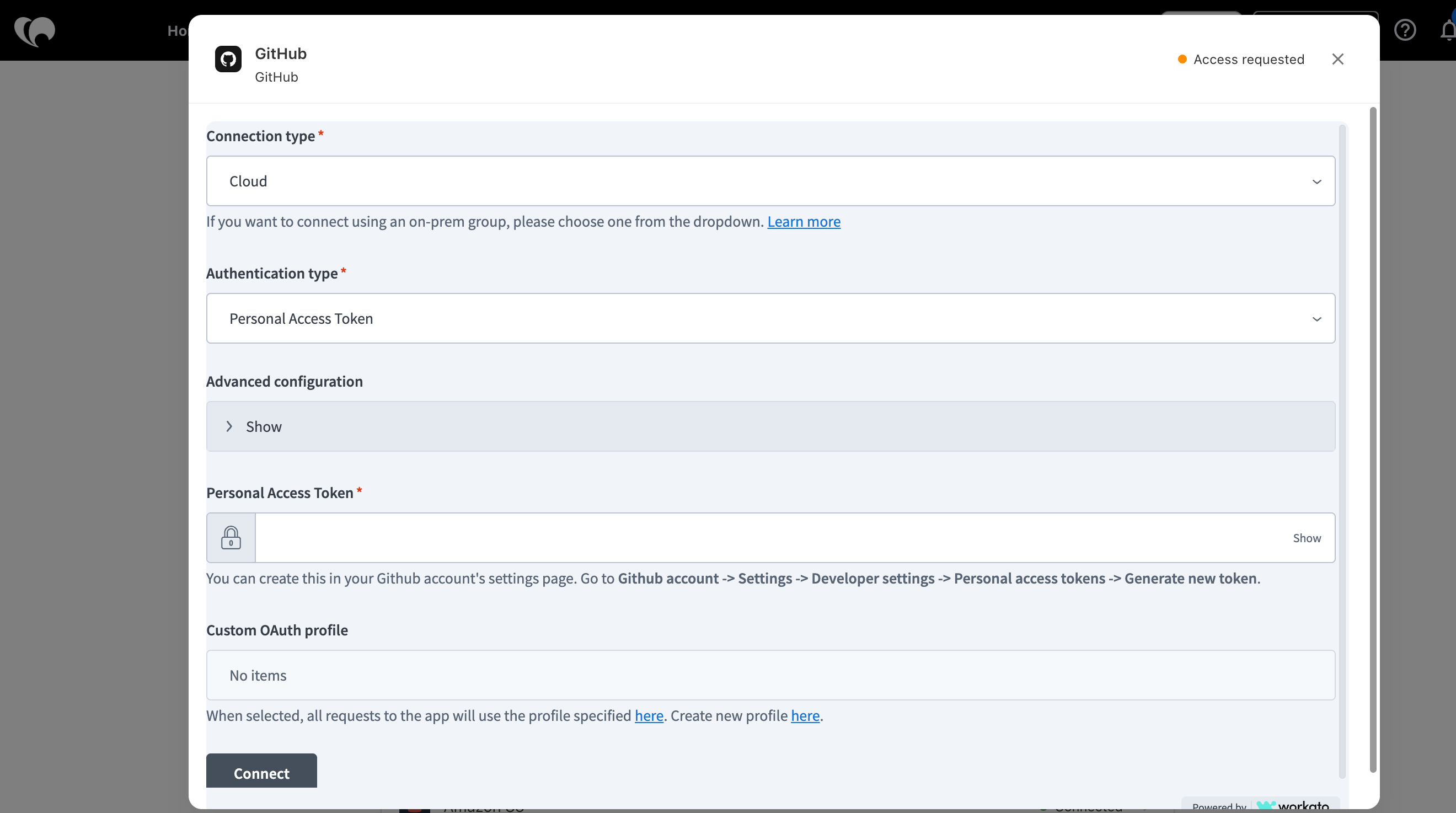
For the common connection workflow, see Authorize Advanced Connections.
How the integration works
Yarken retrieves daily GitHub Copilot usage reports through the deployed Advanced Integration. You do not configure the underlying API calls or transformation logic.
-
GitHub Copilot provides the daily organization usage report.
-
GitHub Advanced Connection authorizes Yarken using the fine-grained personal access token.
-
Yarken-managed integration workflow retrieves and transforms the report into consistent reporting records.
-
Advanced pipeline runs the integration and records the execution result.
-
Yarken reporting makes the transformed usage and cost data available for analysis.
How usage and cost are represented
GitHub reports several metrics at different levels of detail. Yarken combines these values into consistent user, day, model, and feature records.
AI credits and estimated cost
GitHub provides AI credits at the user-day level. Yarken allocates those credits across the model and feature records based on available activity.
Estimated cost is calculated as AI credits × $0.01.
Model-level AI credits are estimates generated from available activity. GitHub does not provide a billed credit amount by model or feature. The estimated cost also does not account for discounts, included allowances, or plan pricing.
Token usage
Token information is available only for supported Copilot surfaces. The integration currently uses token data from:
-
Copilot CLI
-
Copilot app
Other Copilot activity can therefore show usage and AI credits while reporting zero tokens.
Acceptance rate
Yarken calculates acceptance rate from code acceptance activity divided by code generation activity. The value is unavailable when no code generations are reported.
Current limitations and data interpretation
Model-level credits are allocated estimates
Do not interpret an individual model-level credit value as an amount directly billed by GitHub. User-day totals remain based on GitHub source data.
Token coverage is partial
Token data covers Copilot CLI and Copilot app activity. Other Copilot features can have usage and AI credits while reporting zero tokens.
Unknown model or feature
You can see unknown when GitHub does not identify the model or feature, or when usage cannot be attributed to a specific model and feature combination.
Users with no output record
A user can be omitted when GitHub reports no AI credits, no token usage, and no model or feature activity for that day. Zero-cost activity may therefore not always produce a reporting record.
Data availability
-
GitHub Copilot usage reports are available for dates on or after October 10, 2025.
-
Reports are retained for up to one year.
-
A day with no Copilot activity can return no report data.
Run and monitor the Advanced pipeline
After the GitHub connection shows Connected:
-
Go to Admin > Pipelines > Pipelines.
-
Select the ADVANCED tab.
-
Locate the GitHub Copilot pipeline.
-
Select Run when you need an immediate execution, or keep recurring execution active as configured for your environment.
-
Open the pipeline to review the latest status and run history.
See Manage Advanced pipelines for the common pipeline controls.
Validate the integration
After the first successful run, confirm that:
-
The GitHub connection shows Connected.
-
The fine-grained PAT has not expired.
-
The GitHub organization is the token's Resource owner.
-
Copilot metrics, Administration, and Members are set to Read-only.
-
Copilot usage metrics are enabled.
-
Token approval is complete, if required.
-
Expected GitHub users, models, and features are present.
-
AI credits and estimated cost are populated where GitHub reports AI credit consumption.
-
Input and output tokens are present where GitHub provides Copilot CLI or Copilot app token data.
Troubleshooting
|
Issue |
Likely cause |
What to do |
|---|---|---|
|
Connection remains Access requested |
The connection has not been authorized successfully. |
Verify the token, required permissions, approval status, and Copilot usage metrics policy, then select Connect. |
|
401 response |
The token is invalid or expired. |
Create or rotate the fine-grained PAT and update the GitHub Advanced Connection. |
|
403 response |
A required permission is missing, token approval is pending, or the Copilot usage metrics policy is disabled. |
Review the token permissions, approval status, and Copilot usage metrics policy. |
|
404 response |
The organization is incorrect or the token has the wrong Resource owner. |
Verify the GitHub organization and the token's Resource owner. |
|
No report data for a day |
No qualifying Copilot activity was available for that date. |
Validate a date with known Copilot activity. |
|
Connection succeeds but expected data is missing |
The source report is unavailable or contains no qualifying activity. |
Review the GitHub source period and expected usage. |
|
Tokens are zero but AI credits are present |
The usage came from a Copilot surface that does not provide token data. |
This can be expected. Review the feature and usage type. |
|
Model or feature is unknown |
GitHub did not provide sufficient model or feature attribution. |
Review the source activity for the affected user and period. |
Security and credential management
-
Use a fine-grained personal access token rather than broader credentials.
-
Grant only the required organization permissions.
-
Use Read-only access for the required permissions.
-
Set a fixed expiration date and rotate the token before it expires.
-
Store the token in an approved secrets manager.
-
Never include the full token in documents, email, chat, support tickets, screenshots, or source code.
-
After token rotation, update the GitHub Advanced Connection, confirm it returns to Connected, and run the pipeline to validate the integration.
Related content