
Use the OpenAI AI Consumption integration to collect OpenAI API Platform usage and cost data and load it into AI Usage Data in Yarken.
Yarken deploys and maintains the Advanced Integration for your environment. Your organization creates the required OpenAI Admin API key, authorizes the Advanced Connection, and monitors the resulting data.
Current scope
This integration currently supports usage and cost data from your OpenAI API Platform organization.
ChatGPT Enterprise/Workspace usage is a separate OpenAI data source and is not currently available through the active Yarken integration. Missing ChatGPT workspace usage does not indicate that the OpenAI API Platform integration failed.
What the integration provides
The integration retrieves supported OpenAI API Platform usage and cost data for reporting and analysis in Yarken.
-
OpenAI usage cost.
-
Input token usage.
-
Output token usage.
-
Cached token usage, where OpenAI provides it.
-
Project or sub-account information, where available.
-
User or service-account attribution, where available.
-
Daily usage information.
Where the data appears
After ingestion:
-
Review the imported OpenAI usage data in Designer > Consumption > AI.
-
Use Analytics > AI Consumption for reporting and analysis.
Roles and responsibilities
|
Activity |
Responsibility |
|---|---|
|
Deploy and maintain the Advanced Integration |
Yarken |
|
Maintain connector logic and data transformation |
Yarken |
|
Create and maintain the OpenAI Admin API key |
OpenAI API Platform Organization Owner |
|
Authorize the OpenAI connection in Yarken |
Yarken administrator |
|
Run and monitor the Advanced pipeline |
Admin or Cost Model Manager |
|
Review imported AI Consumption data |
FinOps and reporting users |
Before you begin
|
Requirement |
Details |
|---|---|
|
OpenAI API Platform organization |
Identify the API Platform organization whose usage and spend you want to report. |
|
Organization Owner access |
Only an API Platform Organization Owner can create the Admin API key required by this integration. |
|
Admin API key |
Create the key in the same API Platform organization whose usage and cost data you want to retrieve. The key must begin with |
|
Permissions |
Use Read only permissions. If your organization requires narrower access, use Restricted with read access to the Usage API and Organization Administration. |
|
Yarken access |
You need a Yarken administrator account to authorize the OpenAI Advanced Connection. |
|
Secure secret storage |
Store the Admin API key in an organization-approved secrets manager. |
Do not use a project API key beginning with sk-proj- or a ChatGPT workspace Admin key. These credentials do not provide access to the API Platform organization usage and cost endpoints.
Create the OpenAI Admin API key
Complete these steps as an OpenAI API Platform Organization Owner:
-
Sign in to
platform.openai.com. -
Go to Organization settings > Admin keys.
-
Select + Create new admin key.
-
Enter a descriptive name for the key.
-
Set Permissions to Read only.
-
If your organization requires restricted access, set the required Usage API and Organization Administration permissions to read access.
-
Select Create admin key.
-
Copy the secret immediately and store it securely.
The Admin API key is displayed only once and begins with sk-admin-.
Every time you create an Admin API key, OpenAI creates a separate credential. Revoke unsuccessful, duplicate, or obsolete keys so you can clearly identify the active key.
Optional: Verify the Admin API key
You can verify the credential before configuring Yarken.
curl -i "https://api.openai.com/v1/organization/usage/completions?start_time=<UNIX_SECONDS>&bucket_width=1d&limit=1" \
  -H "Authorization: Bearer <YOUR_ADMIN_KEY>" \
  -H "Content-Type: application/json"
An HTTP 200 response confirms that the Admin API key can access the organization usage endpoint. The key uses an Authorization: Bearer header.
Authorize the OpenAI connection
-
Sign in to Yarken as an administrator.
-
Go to Admin > Pipelines > Connections.
-
Select the ADVANCED tab.
-
Open the OpenAI connection.
-
Complete the required connection fields.
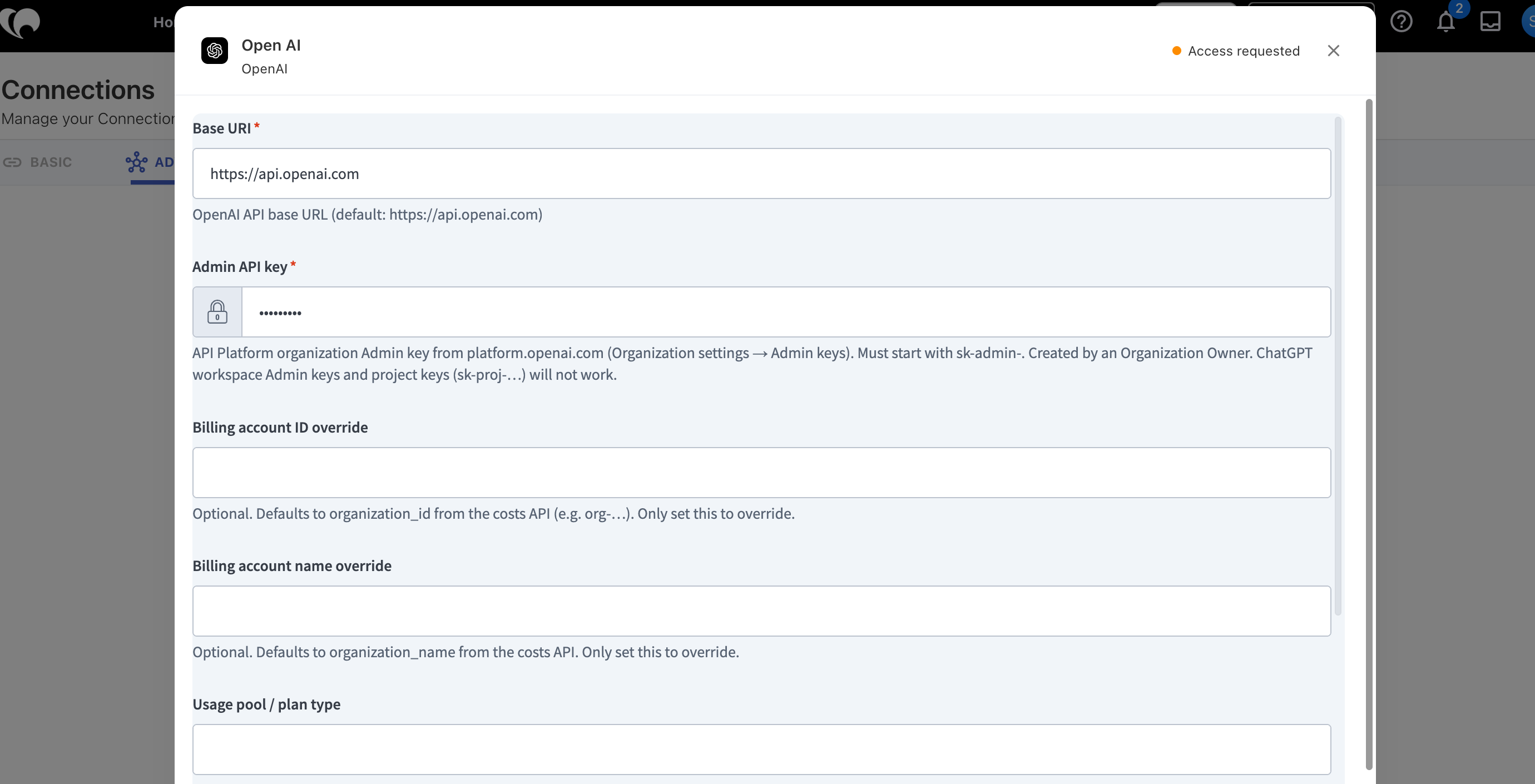
OpenAI Advanced Connection -
Select Connect.
-
Confirm that the connection status changes to Connected.
|
Field |
Requirement |
Value or guidance |
|---|---|---|
|
Base URI |
Required |
Default: |
|
Admin API key |
Required |
Enter the API Platform organization Admin API key. It must begin with |
|
Billing account ID override |
Optional |
Leave blank to use the |
|
Billing account name override |
Optional |
Leave blank to use the |
|
Usage pool / plan type |
Optional |
Enter your usage pool or plan type when required for reporting, for example |
|
Collector source |
Configured |
The connection displays OpenAI Admin API. The configured value is written to |
OpenAI Advanced Connection
For the general authorization workflow, see Authorize Advanced Connections.
How the integration works
The OpenAI Advanced Integration uses the API Platform organization Admin API key to retrieve supported OpenAI usage and cost data. You do not configure the underlying API requests or transformation logic.
-
OpenAI API Platform provides organization usage and cost information.
-
The OpenAI Advanced Connection authorizes Yarken using the Admin API key.
-
The Yarken-managed Advanced Integration retrieves and processes the supported records.
-
The Advanced pipeline runs the integration and records execution activity.
-
AI Usage Data stores the normalized usage and cost records.
-
Analytics > AI Consumption provides reporting and analysis.
Data collected
|
Data |
Behavior |
|---|---|
|
Cost |
OpenAI usage cost where returned by the source. |
|
Input tokens |
Input token consumption for supported API usage. |
|
Output tokens |
Output token consumption for supported API usage. |
|
Cached tokens |
Cached token usage where OpenAI provides it. |
|
Provider |
OpenAI. |
|
Project or sub-account |
Project or sub-account information where available. |
|
User or service account |
Attribution where OpenAI provides enough source information. |
|
Usage period |
Source usage can be reported at daily granularity. |
Billing account overrides
Normally, Yarken uses the organization details returned by the OpenAI costs API.
Use Billing account ID override or Billing account name override only when you intentionally want a different reporting value. Leave the fields blank to use the organization ID and organization name returned by OpenAI.
Usage pool / plan type
OpenAI does not provide the usage pool or plan type through the API used by this connection.
If required for reporting, enter the value manually in Usage pool / plan type, for example Pay-as-you-go or Prepaid.
Important data interpretation guidance
API Platform and ChatGPT Enterprise are separate
The OpenAI API Platform feed and ChatGPT Enterprise/Workspace usage are separate data sources.
The Admin API key configured on this page retrieves API Platform organization usage and cost data. It does not retrieve ChatGPT Enterprise/Workspace seat or workspace activity.
Service-account attribution
Some OpenAI usage can be generated by non-human service accounts. In those cases, usage and cost may not map cleanly to a named user.
Review the available project, sub-account, and service-account information when performing user-level allocation or chargeback.
Run and monitor the Advanced pipeline
After the OpenAI connection shows Connected:
-
Go to Admin > Pipelines > Pipelines.
-
Select the ADVANCED tab.
-
Locate the OpenAI pipeline.
-
Select Run when you need an immediate execution, or keep recurring execution active as configured for your environment.
-
Open the pipeline to review the latest status and run history.
See Manage Advanced pipelines for the common pipeline controls.
Validate the integration
After the first successful run:
-
Confirm the OpenAI connection shows Connected.
-
Confirm the Admin API key begins with
sk-admin-. -
Confirm the key belongs to the API Platform organization whose spend you expect to report.
-
Confirm the Advanced pipeline completed successfully.
-
Review the imported data in Designer > Consumption > AI.
-
Confirm expected OpenAI costs and token usage appear in Analytics > AI Consumption.
-
Review project, sub-account, user, and service-account attribution where expected.
-
Confirm billing account overrides are populated only when you intentionally configured them.
Current limitations
ChatGPT Enterprise/Workspace usage
The current OpenAI Advanced Integration collects usage and cost data from the OpenAI API Platform organization.
ChatGPT Enterprise/Workspace usage is provided through a separate OpenAI data source and requires different credentials. It is not currently available through the active Yarken integration.
-
ChatGPT Enterprise seat and workspace activity does not appear in the API Platform data collected by this integration.
-
Missing ChatGPT workspace activity does not indicate an API Platform ingestion failure.
-
Do not replace a working
sk-admin-API Platform key in an attempt to retrieve ChatGPT Enterprise/Workspace usage.
Troubleshooting
|
Issue |
Likely cause |
What to do |
|---|---|---|
|
Connection remains Access requested |
The connection has not been authorized successfully. |
Verify the required fields and select Connect. |
|
Admin API key is rejected |
The credential is not an API Platform organization Admin API key. |
Confirm the key was created in Organization settings > Admin keys and begins with |
|
|
Project key, ChatGPT workspace Admin key, incomplete secret, or revoked key. |
Confirm the key type and prefix. Re-copy the full secret or create a replacement if the key was revoked. |
|
|
A Restricted Admin API key does not have the required Usage API permission. |
Create or replace the key with Read only permissions, or grant the required read scopes. |
|
Usage or cost data is missing |
The key belongs to a different API Platform organization. |
Confirm the key was created in the organization whose usage and spend you want to retrieve. |
|
ChatGPT Enterprise/Workspace usage is missing |
ChatGPT workspace usage uses a separate OpenAI data source and credential. |
Do not replace a valid API Platform Admin API key. ChatGPT Enterprise/Workspace usage is not currently available through the active Yarken integration. |
|
Cost cannot be attributed to a named user |
Usage was generated by a service account or another non-human identity. |
Review the available project, sub-account, and service-account information before allocating the cost. |
Security and credential management
-
Store the Admin API key in an approved secrets manager.
-
Do not expose the full key in screenshots, documentation, email, chat, support tickets, or source code.
-
Revoke unsuccessful, duplicate, or obsolete Admin API keys.
-
Rotate the key according to your organization's security policy.
-
After replacing the key, update the OpenAI Advanced Connection and confirm that it returns to Connected.
-
Run the OpenAI Advanced pipeline after credential rotation to validate the integration.
Related content