
Use the Datadog Advanced Integration to collect supported Datadog cost and billable usage data for analysis and reporting in Yarken. Yarken retrieves data through read-only Datadog APIs, transforms it into FinOps FOCUS 1.2-aligned records, and loads the records into Cloud Consumption (cloudConsumption).
Destination: Datadog data loads into Cloud Consumption, not AI Usage Data. This also applies to Datadog products identified as AI-related.
What the integration provides
-
Monthly Datadog product costs, such as APM, Log Management, Infrastructure, and Real User Monitoring.
-
Billable usage quantities for supported meters, including hosts, GB ingested, or log events.
-
Unit prices derived from charges and supported usage quantities.
-
Separate records for on-demand, committed, and included usage.
-
FOCUS 1.2-aligned cost and usage records for cloud-consumption reporting.
-
Monthly billed-cost reconciliation, subject to estimated-cost and finalized-cost backfill limitations.
Before you begin
|
Requirement |
Details |
|---|---|
|
Datadog organization |
Access to the parent (primary) Datadog organization for billing data. |
|
Datadog site |
Know the regional site associated with your organization, such as US1, US3, US5, EU1, AP1, AP2, UK1, US1-FED, or US2-FED. |
|
API key |
Create a valid API key in the parent organization. |
|
Application key |
Create a scoped Application key with |
|
Yarken access |
Use a Yarken administrator account to authorize the Advanced Connection. |
|
Integration enablement |
Confirm that Yarken has deployed the Datadog Advanced Integration for your environment. |
Datadog billing costs require access to the parent organization. Child-organization credentials may support usage-only access but cannot retrieve the parent's billing costs.
Create Datadog API credentials
Datadog billing access uses an API key and an Application key. This integration does not use an OAuth sign-in flow.
Identify your Datadog site
-
Sign in to your Datadog organization.
-
Identify the regional site you use to access Datadog.
-
Record the site for your Yarken connection. For example,
app.datadoghq.comcorresponds to US1 — datadoghq.com.
Create an API key
-
In Datadog, go to Organization Settings > API Keys.
-
Create an API key for the parent organization.
-
Copy the key and store it securely.
Create an Application key
-
In Datadog, go to Organization Settings > Application Keys.
-
Create a scoped Application key.
-
Assign the
usage_readandbilling_readpermissions. -
Copy the key and store it securely.
|
Permission |
Purpose |
|---|---|
|
|
Read supported billable usage. |
|
|
Read supported billing and cost information. |
Use only the permissions required by this integration. Yarken makes read-only API requests and does not need write access to your Datadog account.
Authorize the Datadog connection in Yarken
-
Sign in to Yarken as an administrator.
-
Go to Admin > Pipelines > Connections.
-
Select the ADVANCED tab.
-
Open the Datadog connection deployed for your environment.
-
Complete the connection fields and select Connect.
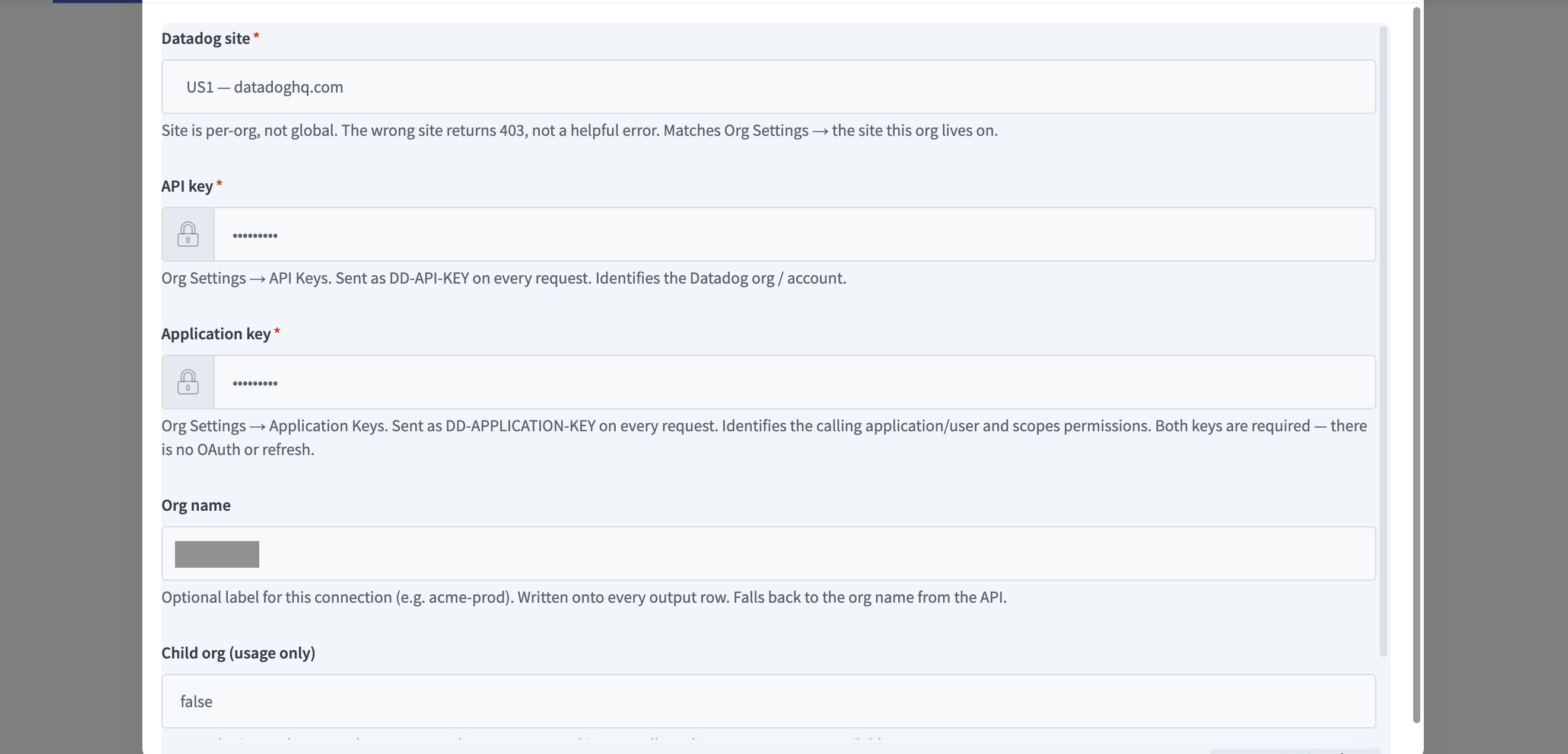
Datadog Advanced Connection -
Confirm that the status changes to Connected.
|
Connection field |
Required |
Description |
|---|---|---|
|
Datadog site |
Yes |
Select the regional Datadog site for your organization. |
|
API key |
Yes |
Enter the Datadog API key. |
|
Application key |
Yes |
Enter the scoped Datadog Application key. |
|
Org name |
No |
Optional organization label; if empty, the integration uses the name returned by Datadog. |
|
Child org (usage only) |
Context-dependent |
Used for a child-organization usage-only connection. Parent-organization access is required to retrieve billed costs. |
Connected confirms that the connection has been authorized. Validate a successful Advanced pipeline run separately; connection status alone does not confirm data ingestion.
For common authorization steps, see Authorize Advanced Connections.
How the integration works
-
Yarken retrieves Datadog cost and billable usage data through read-only APIs.
-
The integration matches product charges to supported usage meters.
-
Yarken derives the required FOCUS-aligned cost, pricing, and classification fields.
-
The transformed records are loaded into
cloudConsumption. -
Each scheduled collection refreshes the applicable month's records rather than appending duplicates.
-
You can review supported results using cloud-consumption reporting.
Data flow: Datadog billing and usage APIs → Yarken Advanced Integration → FOCUS 1.2 transformation → Cloud Consumption → Analytics.
How Datadog data is transformed into FOCUS
Datadog APIs do not return FinOps FOCUS-standard records. Yarken transforms source cost and billable usage information into FOCUS 1.2-aligned records before loading it into Cloud Consumption.
-
Maps source fields: Datadog accounts, organizations, products, charges, and billing periods map to supported FOCUS columns.
-
Matches cost and usage: Billing dimension mapping associates product charges with the corresponding billable usage meters.
-
Derives FOCUS values: Yarken calculates supported prices and costs using available source charges and quantities. For example, unit price can be derived from cost divided by pricing quantity.
-
Classifies charges: On-demand, committed, and included usage is represented in separate records.
-
Preserves Datadog details: Yarken extension fields beginning with
x_preserve information without a direct FOCUS equivalent.
|
Extension field |
Description |
|---|---|
|
|
On-demand, committed, included, or other supported usage classification. |
|
|
Whether the source cost is |
|
|
The Datadog usage meter associated with the charge. |
|
|
How Yarken obtained or derived the unit price. |
|
|
Identifies supported AI and LLM-related Datadog products. |
|
|
Records the source Datadog site. |
Datadog's billing API does not provide published list prices. Yarken derives supported unit prices from available charges and quantities. ListCost generally equals ContractedCost, except where the equivalent on-demand value of included usage can be calculated. Unsupported FOCUS fields remain empty.
Datadog APIs used by the integration
|
Read-only endpoint |
Purpose |
|---|---|
|
|
Validate credentials when the connection is saved. |
|
|
Fallback key validation endpoint. |
|
|
Retrieve finalized monthly costs for requested months. |
|
|
Retrieve estimated costs for the current month and unfinalized recent months. |
|
|
Retrieve on-demand, committed, and total usage quantities. |
|
|
Map billed products to usage meters and display names. |
Yarken does not ingest Datadog month-end projected_cost forecasts. See the Datadog Usage Metering API reference for the source endpoints.
Sync schedule and data freshness
|
Behavior |
Current behavior |
|---|---|
|
Scheduled sync |
The integration runs once daily. |
|
Current month |
Each sync refreshes the month-to-date records. |
|
Previous month |
The previous month is refreshed again on the first day of the following month. |
|
Usage availability |
Datadog usage data can lag by up to 72 hours. |
|
Final cost availability |
Datadog typically finalizes monthly costs around the 16th of the following month. |
|
Replacement behavior |
When a month is processed again, its records replace the previous rows rather than adding duplicate charges. |
|
Finalized-cost backfill |
The integration does not currently revisit previously processed months automatically after Datadog finalizes those costs. |
Estimated and finalized costs
The x_SourceCostStatus field indicates whether Datadog reported a cost as estimated or final. Datadog typically finalizes a billing month's cost around the 16th of the following month.
Current limitation: The previous-month refresh occurs on the first day of the next month, but Yarken does not automatically schedule another refresh after Datadog finalizes that month. Previously ingested estimated costs may therefore remain unchanged and differ from the finalized Datadog invoice.
For example, Yarken may refresh September's data on October 1, while Datadog may not finalize September until around October 16. The integration does not automatically revisit September after October 16. If the stored amounts remain estimated, contact Yarken support to review available reconciliation options.
How Datadog charges and usage are processed
-
On-demand and committed product charges are represented separately. Datadog's repeated total line is excluded to prevent double-counting.
-
Yarken matches each billed product to its supported usage meter using billing dimension mapping.
-
Quantities are expressed in supported Datadog pricing units, such as
1M Log Eventsor1000 Sessions. -
Account-level usage is counted once in multi-organization scenarios.
Usage classifications
|
|
Meaning |
Billed cost |
|---|---|---|
|
|
Usage billed at on-demand rates. |
Yes |
|
|
A billed charge without a usage quantity, such as a flat-fee product. |
Yes |
|
|
Usage covered by a contracted commitment. |
Yes |
|
|
Usage included without an additional billed charge; |
No |
Optional commitment details
Where supported by the Datadog order form and enabled by Yarken support, commitment detail can be split into commitment-purchase (billed commitment), committed-used (consumed portion), and committed-unused (unused portion). The used and unused allocation is calculated proportionally from quantities because Datadog does not provide unused commitment directly.
Data loaded into Cloud Consumption
The transformed data is stored in cloudConsumption at the grain billing month × Datadog account × product (billing dimension) × usage class. Datadog source cost amounts are in USD. Raw API responses are used during ingestion and discarded; they are not available as user-facing raw records.
FOCUS field reference
Example consumption record
|
Field |
Example |
|---|---|
|
|
|
|
|
|
|
|
Log Management |
|
|
Ingested Logs |
|
|
on-demand |
|
|
134,347 |
|
|
GB |
|
|
0.10 |
|
|
13,434.70 |
|
|
USD |
|
|
final |
Run and monitor the Datadog pipeline
-
Go to Admin > Pipelines > Pipelines.
-
Select the ADVANCED tab.
-
Locate the Datadog pipeline deployed for your environment.
-
Select Run if you need to run it immediately.
-
Review the run status and run history to confirm that it completed successfully.
For pipeline controls and statuses, see Manage Advanced pipelines.
Review and reconcile Datadog data
-
Go to Designer > Consumption > Cloud and locate the expected billing year and month.
-
Confirm the month contains the expected Cloud Consumption data.
-
Go to Analytics > Consumption Data and select supported provider and billing period fields.
-
Identify records where
ProviderNameisDatadog. -
Compare source cost and usage details with Datadog for the corresponding month.
-
Check
x_SourceCostStatuswhere available before comparing totals with a finalized invoice.
Not every backend FOCUS or x_ extension field is necessarily exposed in Analytics. For reporting guidance, see Consumption Data.
Reconcile costs with your Datadog invoice
When the ingestion contains finalized data, the sum of BilledCost for the billing month can be compared with Datadog's corresponding billed total. The integration excludes repeated total charge lines and replaces month-specific rows when the month is processed again.
If the ingested records are still marked estimated, totals can differ from the finalized invoice. Automatic backfill of finalized costs for previously processed months is not yet supported. If billing is through a marketplace, coordinate with Yarken support to avoid double-counting charges already present in marketplace cloud billing.
Troubleshooting
|
Issue |
What to check |
Recommended action |
|---|---|---|
|
|
Invalid API key or Application key. |
Verify and replace both keys. |
|
|
Incorrect Datadog site or insufficient access. |
Confirm site and required permissions. |
|
|
Temporary Datadog API limits. |
Wait briefly and retry. |
|
Connected, but no billing cost |
Child-organization credentials or missing |
Use parent-organization credentials with required access. |
|
Recent usage missing |
Datadog may lag by up to 72 hours. |
Review source availability and the next integration run. |
|
Previously loaded costs remain estimated |
No automatic finalized-cost backfill. |
Check |
|
Cost without usage quantity |
Source did not provide a quantity for this charge. |
Check whether |
|
List price differs from expectation |
Derived pricing, not Datadog published list price. |
Compare billed charges and quantities. |
|
Marketplace billing appears duplicated |
Charge may also appear in cloud marketplace data. |
Contact Yarken support about invoice issuer and reconciliation. |
For general issues, see Troubleshoot Advanced Integrations.
Current limitations
-
Monthly cost grain: Datadog costs are represented by calendar month, not as daily cost records.
-
Parent organization: Billing costs require parent-organization access.
-
Source reporting lag: Usage can be delayed by up to 72 hours.
-
No automatic finalized-cost backfill: Previously processed months are not automatically revisited after Datadog finalizes monthly costs. Earlier estimates may not match the final invoice.
-
Tags and resource detail: Billing information does not include per-team, per-environment, or individual resource-level cost detail.
-
History: Up to 15 months of supported source history.
-
No projected costs: Month-end
projected_costforecasts are not ingested. -
New products: Unknown Datadog products can still be ingested with inferred service names or units.
-
Raw responses: Raw Datadog API responses are not retained or displayed in Yarken.