Use the Claude Console Advanced Integration to collect costs and token usage billed through your Anthropic API organization. Yarken retrieves cost and usage reports through Anthropic's Admin API, matches usage with charges, attributes costs to users or API keys, and loads FOCUS-aligned records into AI Usage Data (aiConsumption).
Two different Anthropic integrations: Claude Console uses an organization Admin key beginning with sk-ant-admin01-. The separate Claude Enterprise Analytics integration collects Claude Enterprise Analytics data using a key beginning with sk-ant-api01-. The credentials are not interchangeable.
What the integration provides
-
Daily cost reporting: View supported Anthropic API costs by workspace, model, user, or API key.
-
Token usage: Track input, output, cache-read, and cache-write tokens, including separate 5-minute and 1-hour cache-write meters.
-
Unit prices: Review token quantities and unit prices expressed per 1 million tokens.
-
Tool costs: Review supported web search, code execution, and session charges.
-
Pricing categories: Differentiate Standard, Batch, and fast-mode (Premium) usage.
-
Attribution: Allocate charges proportionally or preserve them as Unattributed when individual attribution is unavailable.
-
FOCUS-aligned records: Analyze Claude Console costs alongside other supported AI providers.
Before you begin
|
Requirement |
Details |
|---|---|
|
Claude Console organization |
The Anthropic API organization that owns the cost and usage reports. |
|
Organization role |
An organization admin or owner must create the Admin key. |
|
Credentials |
Console Admin key beginning with |
|
Yarken permissions |
Use a Yarken administrator account to authorize the Advanced Connection. |
|
Integration availability |
Yarken has deployed and enabled the Claude Console integration for your environment. |
|
Credential management |
Store the secret in an organization-approved credential manager. |
Supported data source
This integration covers Anthropic API usage billed through Claude Console. It does not include Claude.ai Team or Enterprise seat subscriptions or Claude usage billed through AWS Bedrock or Google Vertex AI. Use the separate Claude Enterprise Analytics integration for Claude Enterprise Analytics data.
Create a Claude Console Admin key
-
Sign in to Claude Console at console.anthropic.com.
-
Go to Settings > Admin keys.
-
Create an Admin key for the organization you want Yarken to connect.
-
Copy the key immediately and store it securely. Claude Console displays its secret only once.
|
Key type |
Prefix |
Supported |
|---|---|---|
|
Console Admin key |
|
Yes |
|
Claude Enterprise Analytics key |
|
No |
|
Standard API key |
|
No |
Security: Console Admin keys have organization-level administrative capabilities and are not restricted to read-only permissions. Yarken uses the key only for the read-only GET calls documented below and never creates, changes, or deletes your Anthropic resources. Handle the key as an administrator credential.
Authorize the Claude Console connection in Yarken
-
Sign in to Yarken as an administrator.
-
Go to Admin > Pipelines > Connections.
-
Select the ADVANCED tab.
-
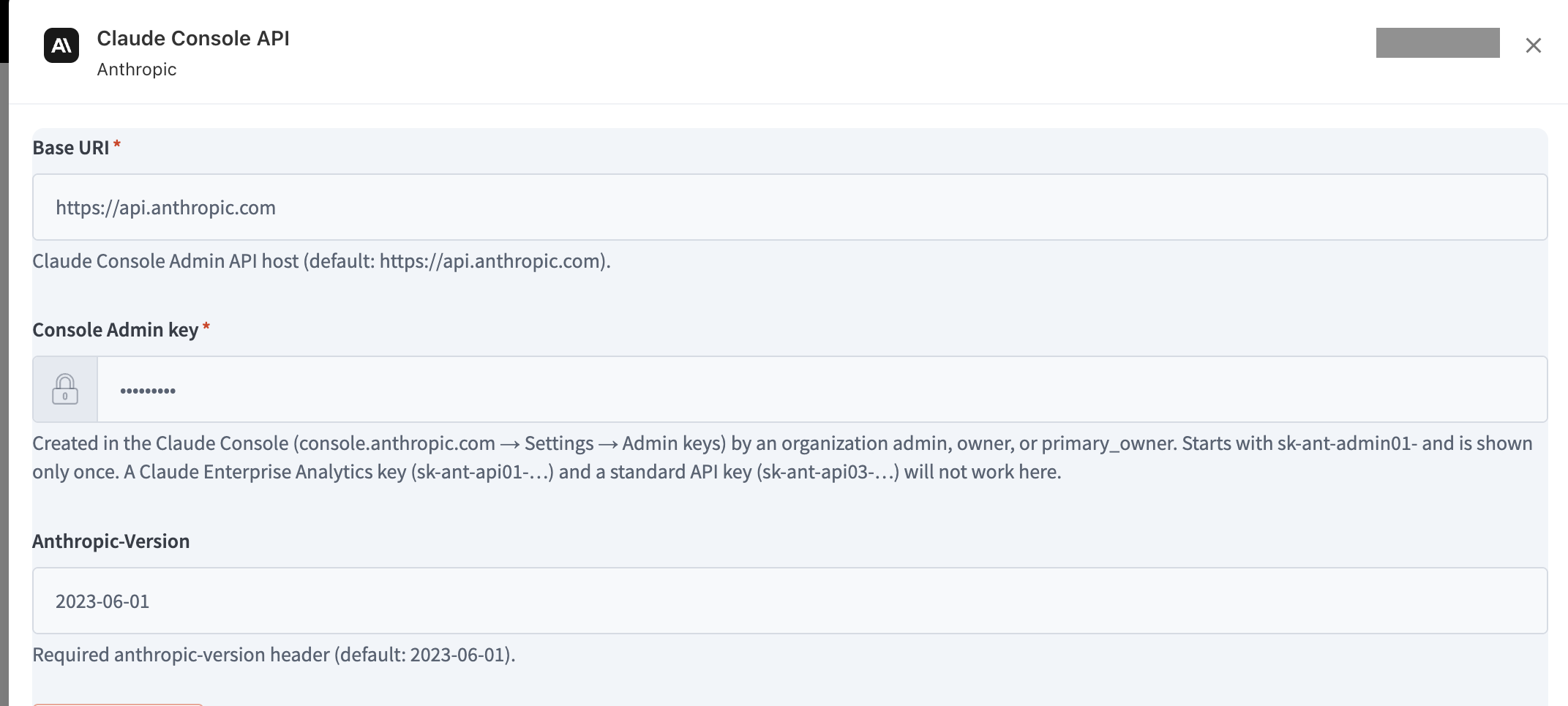
Open the Claude Console API connection.
-
Enter the required connection fields and select Connect.
Claude Console API connection -
Confirm that the connection status changes to Connected.
Connection fields
|
Field |
Required |
Description |
|---|---|---|
|
Base URI |
Yes |
Claude Console Admin API host. Default: |
|
Console Admin key |
Yes |
Enter your organization Admin key beginning with |
|
Anthropic-Version |
Defaulted |
Required Anthropic API version header. Default: |
Connection validation: Yarken checks the key format and retrieves your organization ID and name. A Connected status confirms authorization but does not confirm successful ingestion. Validate the Advanced pipeline separately.
For shared authorization procedures, see Authorize Advanced Connections.
How Yarken uses the Admin key
Yarken sends HTTPS requests to https://api.anthropic.com using the x-api-key header and the anthropic-version header (default 2023-06-01). You can revoke the key in Claude Console > Settings > Admin keys.
How the integration works
-
Retrieve costs. Read daily charges from the Claude Console cost report.
-
Retrieve usage. Read daily token and supported tool request counts from the usage report.
-
Match charges and usage. Associate each cost meter with the corresponding usage quantities and source dimensions.
-
Attribute costs. Split charges across users or API keys where supported; retain unattributed costs.
-
Transform records. Populate FOCUS-aligned consumption, model, pricing, attribution, and cost fields.
-
Load AI Usage Data. Store the results in
aiConsumptionfor review and reporting.
Data flow: Claude Console Admin API → Yarken Advanced Integration → cost and usage matching → attribution → AI Usage Data → Analytics.
Anthropic Admin API endpoints
|
API endpoint |
What Yarken retrieves |
|---|---|
|
|
Organization ID and name. |
|
|
Daily costs by workspace and cost-line description, including supported model, token meter, service tier, speed, context window, and region. |
|
|
Daily token usage and web search requests by supported source dimensions, including workspace, user, and API key. |
|
|
Workspace names, including archived workspaces. |
|
|
User names and email addresses. |
|
|
API key names and their associated users. |
Yarken reads paginated responses and processes long date ranges in 31-day intervals. The cost and usage endpoints are required; if either fails, the sync loads no partial records. Workspace, user, and API key name lookups are best effort—if unavailable, Yarken can load IDs rather than names.
How Claude Console costs and usage become records
Match cost lines to usage
Anthropic provides daily cost lines for combinations of workspace, model, token type, context window, service tier, speed, and region. Yarken matches these to the corresponding usage report to identify quantities and derive prices.
|
Meter or charge type |
How it appears |
|---|---|
|
Input |
Uncached input tokens. |
|
Output |
Generated output tokens. |
|
Cache read |
Input tokens read from cache. |
|
Cache write |
Separate 5-minute and 1-hour cache-write token meters. |
|
Web search |
A separate request-based tool charge. |
|
Code execution and sessions |
Time-based charges that may lack token quantities. |
Attribute costs to users or API keys
Yarken allocates token-based cost lines in proportion to each user's or API key's token consumption. For web search, it uses request counts. The allocated parts add up to the original cost line, including the small remainder assigned to the final share. User-attributed records show an email address when available; API key records show the key name and associated user when available.
Unattributed costs: Charges without sufficient user or API key information stay in records labeled Unattributed. Examples include time-based code execution or session charges, usage with missing attribution, and cost whose usage is not yet available.
Workspace-level attribution
The integration also supports an optional workspace-level mode that retains one record per cost line and workspace rather than allocating each charge among users and API keys.
Derive token unit prices
Token unit prices are stored per 1 million tokens, not per individual token. Yarken derives prices from the reported cost and the relevant quantity. For token-based records:
Unit price per 1M tokens = (cost ÷ token quantity) × 1,000,000
For example, a USD 5.00 charge for 1,000,000 input tokens produces a stored unit price of USD 5.00 per 1M tokens. Request-based tool charges use their applicable request-pricing units instead.
Data loaded into AI Usage Data
The transformed records are stored in aiConsumption. In the default per-user mode, each record represents one day × workspace × cost line × user or API key. The cost line includes the applicable model, token type, context window, service tier, speed, and region. Raw source API responses are discarded after synchronization.
AI consumption field reference
Example: input-token consumption record
|
Field |
Example value |
|---|---|
|
|
|
|
|
|
|
|
jane@example.com |
|
|
|
|
|
|
|
|
Standard |
|
|
1,000,000 |
|
|
1,000,000 |
|
|
1M tokens |
|
|
5.00 |
|
|
5.00 |
|
|
5.00 |
|
|
USD |
|
|
Global |
The example represents 1,000,000 input tokens at a stored unit price of USD 5.00 per million tokens, resulting in a billed cost of USD 5.00.
Run and monitor the Claude Console Advanced pipeline
-
Go to Admin > Pipelines > Pipelines and select ADVANCED.
-
Locate the Claude Console pipeline enabled for your environment.
-
Select Run if you want to execute it immediately.
-
Review the run status and run history to confirm that the integration completed successfully.
For shared pipeline controls and run history, see Manage Advanced pipelines.
Review and reconcile imported Claude Console data
-
Go to Designer > Consumption > AI and select the required reporting year and month.
-
Review the monthly Spend and Last Load values.
-
Go to Analytics > AI Consumption.
-
Identify records where the provider is Anthropic and the collector source is Claude Console, where those fields are available.
-
Check workspace, model, user or API key, pricing category, token meters, and source costs.
-
Compare the sum of billed costs with the Claude Console cost report for the same period, including Unattributed records.
The provider is Anthropic, but the collector source is Claude Console. Use both values to distinguish these records from other Anthropic integrations when the reporting fields are available.
Reconcile with the source report
Yarken allocates cost-line totals proportionally and keeps costs with no available attribution in Unattributed records. These amounts are included in the daily and monthly billed-cost totals, so the values can be reconciled with Claude Console cost reports.
Privacy and security
In per-user mode, records can include Anthropic user IDs, email addresses, API key names, workspace identifiers, model names, token counts, request counts, and costs. Yarken does not retrieve or store prompt text, model responses, uploaded files, or other conversation content through this integration.
Troubleshooting
|
Issue |
What to do |
|---|---|
|
The connection rejects your key type |
Create a Console Admin key beginning with |
|
401 Authentication failed |
Verify whether the Admin key is invalid, expired, or revoked; create a replacement as needed. |
|
403 Forbidden |
Confirm the key belongs to the intended organization and that the Admin API is available for that organization. |
|
400 during a sync |
The requested day may not yet be available in the cost or usage report. Review subsequent collection runs. |
|
Connection is Connected, but data is missing |
Check the Advanced pipeline run history and source reporting dates. |
|
User or API key name is missing |
Name lookup is best effort. A deleted user or key may appear as a source identifier. |
|
Unattributed costs appear |
Review whether the source supplied user or API key attribution and whether the charge is time-based. |
|
One model has multiple rows on a day |
Review token meter, pricing category, workspace, region, and user or API key before aggregating. |
For generic integration issues, see Troubleshoot Advanced Integrations.
Current limitations
-
Daily detail: The finest supported reporting granularity is one day.
-
Claude Console only: This integration excludes Claude.ai Team and Enterprise seat subscriptions and Claude usage billed through AWS Bedrock or Google Vertex AI.
-
Time-based charges: Code execution and session charges may have no consumption quantity and remain Unattributed.
-
Reporting lag: The latest day's cost and usage may not yet be available from Anthropic. Unavailable days can be collected on later syncs.
-
Missing display names: Deleted users or API keys may show identifiers instead of names.
-
Both reports required: A sync does not write partial data when the required cost or usage report fails.