
Overview
The AI Usage Data screen allows you to upload and manage monthly AI consumption data used for AI cost analysis, reporting, and analytics in Yarken.
AI usage data can be uploaded manually for individual months or automatically through Advanced Integration (Workato). Once uploaded, the data becomes available for AI Consumption analytics and reporting.
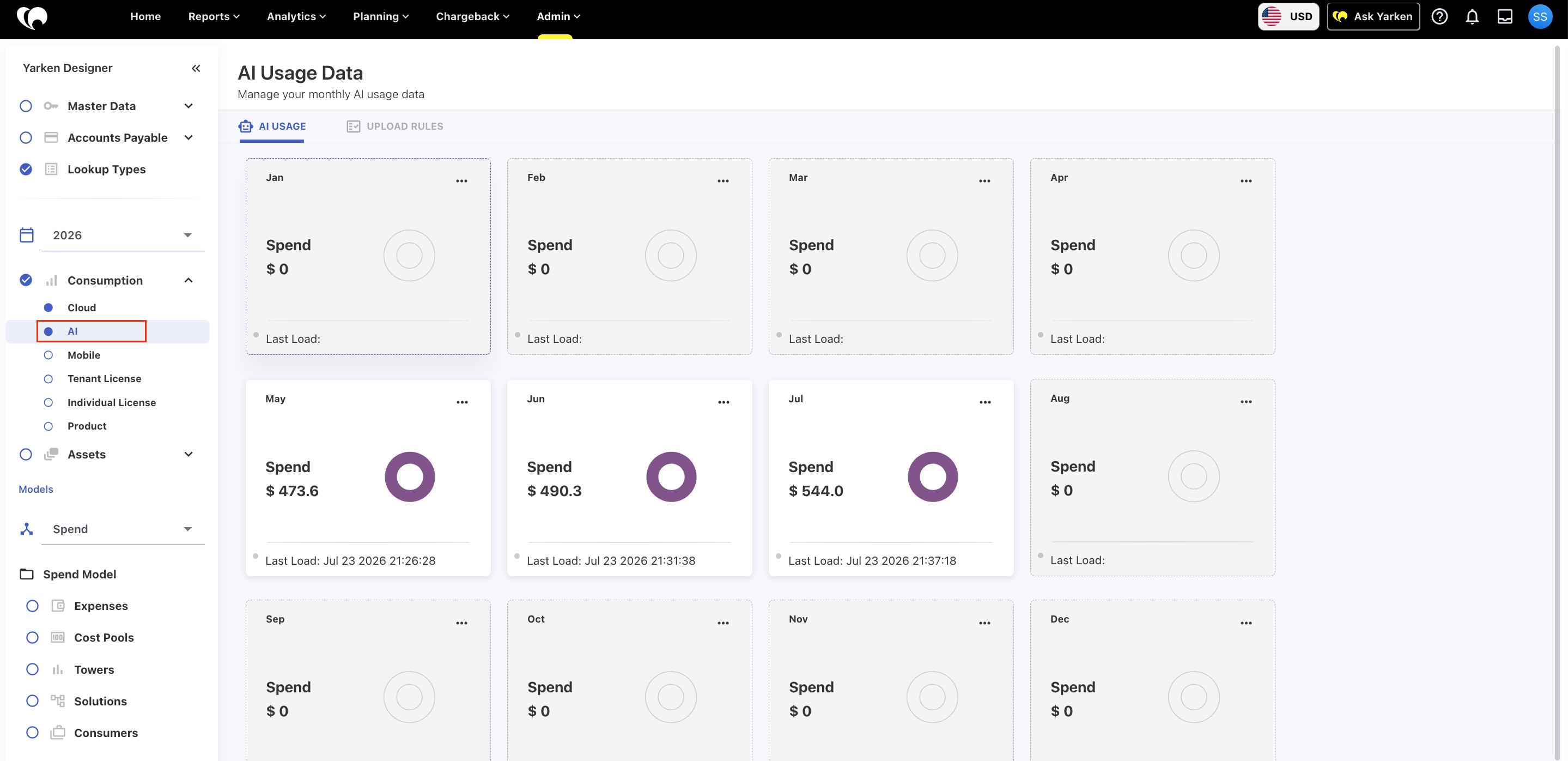
The page provides a monthly overview of uploaded AI usage, including spend and the most recent upload date.
Note:
AI usage data must be uploaded before it can be analyzed in the AI Consumption cube under Analytics.
Standardized Cursor AI usage data
Cursor usage data imported through Advanced Integration (Workato) uses the following standardized field values for consistent AI cost reporting:
|
Field |
Value |
|---|---|
|
Service category |
AI and Machine Learning |
|
Publisher and provider |
Cursor |
|
Service name |
Cursor |
|
Collector source |
cursor-admin-api |
|
Charge category |
Usage |
|
Billing account ID |
<yourorganizationname>-Cursor |
These values help ensure that Cursor usage is categorized consistently and is available for cost analysis in the AI Consumption Analytics cube.
Before you upload AI usage data
Ensure that:
-
Your AI usage file matches the supported data format.
-
The reporting year is selected before uploading data.
If your organization uses Advanced Integration (Workato), AI usage files can be imported automatically based on the configured integration schedule.
AI Usage overview
The page displays one card for each month of the selected year.
Each monthly card provides:
|
Item |
Description |
|---|---|
|
Month |
The reporting month. |
|
Spend |
Total AI spend uploaded for the month. |
|
Usage indicator |
Visual representation showing that AI usage data has been loaded. |
|
Last Load |
Date and time of the most recent successful upload. |
|
More options |
Access additional actions for the selected month. |
Months without uploaded data display a spend value of $0 and no last load information.
Upload AI usage data
To manually upload AI usage data:
-
Navigate to Designer > Consumption > AI.
-
Select the required reporting year.
-
Locate the month you want to upload data for.
-
Open the More options menu on the monthly card.
-
Select Upload.
-
Choose the AI usage data file.
-
Complete the upload process.
After the upload completes successfully:
-
The monthly spend is updated.
-
The Last Load timestamp is refreshed.
-
The uploaded data becomes available for reporting in the AI Consumption Analytics cube.
Automated uploads using Advanced Integration (Workato)
If your organization has Advanced Integration (Workato) configured, AI usage data can be uploaded automatically.
Workato retrieves AI usage data from the configured source system and uploads it into Yarken based on the integration schedule, eliminating the need for manual uploads.
Automatic uploads provide:
-
Scheduled data ingestion.
-
Reduced manual effort.
-
Consistent monthly AI usage reporting.
-
Faster availability of data for Analytics.
For information about configuring automated integrations, see Advanced Integration (Workato).
Upload rules
Select the Upload Rules tab to configure or manage the rules used when importing AI usage data.
Upload rules determine how incoming AI usage files are validated and processed during ingestion.
Best practices
-
Upload AI usage data regularly to keep reports current.
-
Verify the reporting month before uploading a file.
-
Review the Last Load timestamp to confirm the latest successful upload.
-
Use Advanced Integration (Workato) for recurring AI usage imports to minimize manual administration.
-
Validate uploaded data in the AI Consumption Analytics cube after each upload.
Related content