
Overview
AWS Data Exports are stored in a structured folder hierarchy within your Amazon S3 bucket.
Understanding this structure helps you configure pipelines correctly and verify that billing files are being delivered successfully.
Standard export structure
AWS stores exported billing files using the following structure:
S3: //<bucket-name>/<prefix>/<export-name>/data/BILLING_PERIOD=<YYYY-MM>/<file-name>.csv.gz
Components
|
Component |
Description |
|---|---|
|
bucket-name |
The name of the S3 bucket |
|
prefix |
The file prefix that you assign to the export |
|
export-name |
The export name that you assign |
|
data |
The folder where the billing period files are saved in hierarchy |
|
BILLING_PERIOD |
The billing period year and month. For example, the billing period for April 2024 will be 2024-04 |
|
file-name |
The exported file name |
Example
s3://demo-focus-yarken/data-export/demo-focus-yarken/data/BILLING_PERIOD=2024-12/2024-12-11T20:26:27.197Z-90653477-578b-4ee0-93aa-74776fa71552/demo-focus-yarken-00002.csv.gz
In this example:
-
Bucket Name =
demo-focus-yarken -
Prefix =
data-export
Additional folders created by Yarken
For the Pipeline feature in the Yarken, the system automatically creates two new additional folders named processed and error for the file processing. The purpose of these folder is to maintain the separation of all the processed and unprocessed files.
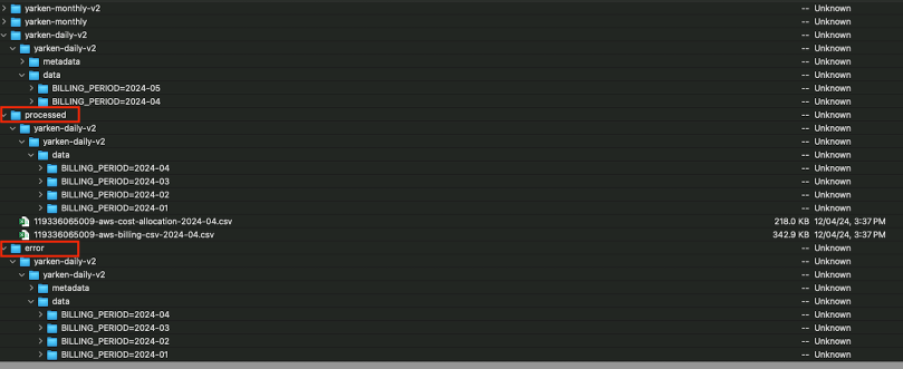
processed
Stores files that have been successfully processed and imported into Yarken.
Use this folder to:
-
Verify completed imports
-
Track processed billing files
-
Audit historical processing activity
error
Stores files that failed validation or processing.
Common reasons include:
-
Unsupported file extensions
-
Invalid file structure
-
Corrupted files
Review this folder when troubleshooting pipeline failures.
Next steps: