
After configuring the OIDC application, securely provide the application details to the Yarken implementation team. Yarken uses these values to complete the server-side configuration and establish the trust relationship with your Okta tenant.
Information to provide
Provide:
|
Information |
Description |
|---|---|
|
Client ID |
Unique identifier of the Okta application. |
|
Client Secret |
Secret used by Yarken to authenticate with Okta. |
|
Okta tenant domain |
Your organization's Okta domain, for example, |
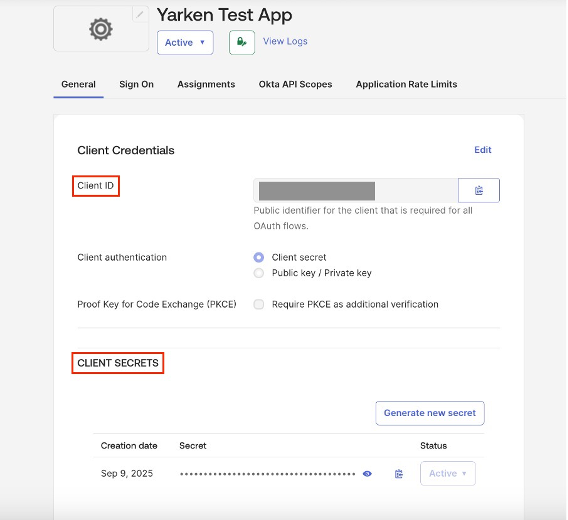
Locate the Client ID and Client Secret
-
Open the OIDC application you created for Yarken.
-
Select the General tab.
-
Under Client Credentials, copy:
-
Client ID
-
Client Secret
-
Locate your Okta tenant domain
-
In the Okta Admin Console, select your user profile.
-
Copy your organization's Okta domain.
Share the information securely
Provide the following to the Yarken implementation team:
-
Client ID
-
Client Secret
-
Okta tenant domain
Important: The Client Secret is sensitive. Use your organization's approved secure communication method when sharing credentials. Don't send credentials through an unapproved communication channel.
What happens next?
Wait for the Yarken implementation team to configure the customer’s Okta tenant in Yarken and confirm that the server-side configuration is complete.
Don't enable SSO organization-wide until you've successfully validated the integration.
Next step
Validate the Okta SSO integration
Related content