
Overview
Before you can import Azure billing data into Yarken, you must create an Azure Storage Account to store your Azure Cost Management billing exports.
The Azure Storage Account serves as the source location that the Azure Blob Pipeline uses to retrieve billing files for automated ingestion into Yarken.
Create the Storage Account
To create an Azure Storage Account:
-
Sign in to the Azure portal.
-
In the left navigation menu, select Storage accounts.
-
Select Create.
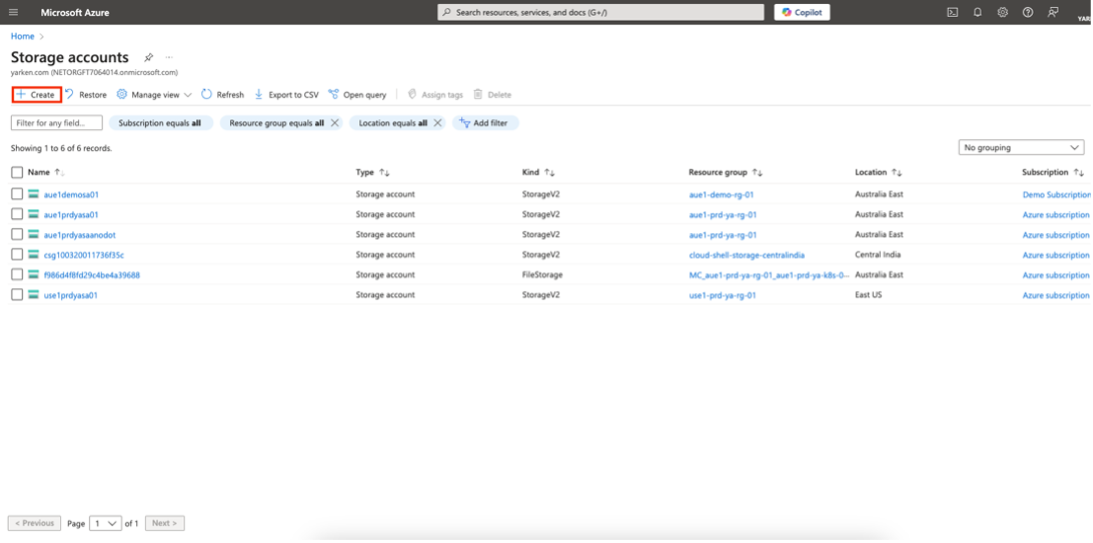
The Create a storage account page opens.
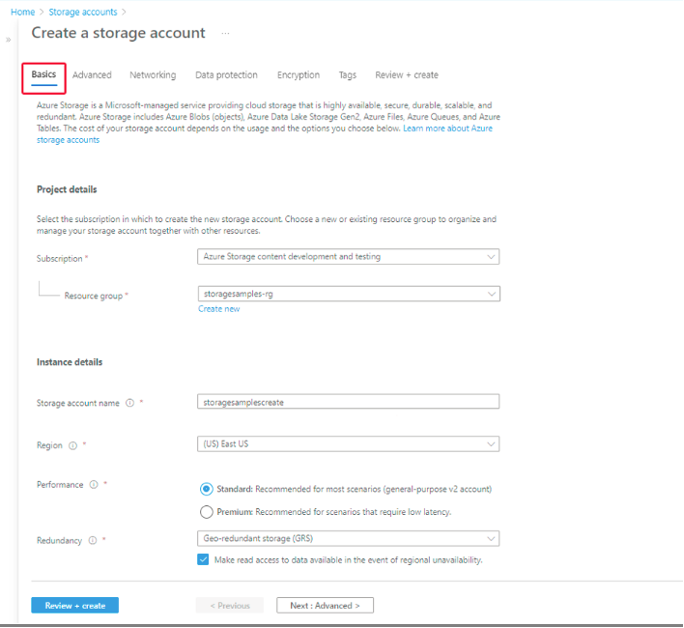
Configure the Basics tab
On the Basics tab, provide the required information.
|
Field |
Description |
|---|---|
|
Subscription |
Select the Azure subscription where you want to create the Storage Account. |
|
Resource group |
Select an existing Resource Group or create a new one. |
|
Storage account name |
Enter a unique name containing 3–24 lowercase letters and numbers. |
|
Region |
Select the Azure region where you want to create the Storage Account. |
|
Performance |
Select the required performance tier, such as Standard or Premium. |
|
Redundancy |
Select the redundancy option that meets your organization's availability requirements. |
Review the remaining settings
Review the remaining configuration tabs:
-
Advanced
-
Networking
-
Data protection
-
Encryption
-
Tags
Unless your organization has specific security or compliance requirements, you can keep the default settings.
Create the Storage Account
-
Select Review + create.
-
Wait for Azure to validate the configuration.
-
After validation succeeds, select Create.
Azure will now validate your configuration and start deploying the storage account. This process may take a few minutes.
Verify the Storage Account
After the deployment completes:
-
Open the newly created Storage Account.
-
Confirm that the Status is Running.
-
Verify that you can access the Containers page.
You will use this Storage Account when configuring Azure Cost Management exports.
Result
You have successfully created an Azure Storage Account.
The Storage Account is now ready to store Azure Cost Management billing exports that Yarken can import through the Azure Blob Pipeline.
What happens next?
After creating the Storage Account:
-
Create a Blob Storage container if one does not already exist.
-
Configure Azure Cost Management to export billing data to the Storage Account using a supported FOCUS version.
-
Use this Storage Account when creating the Azure Blob Storage connection in Yarken.
Next step
-
Continue to Create a Daily Export Report in Azure to configure the Azure Cost Management export.
Related content
Azure configuration
Yarken