
This article applies only to Account Key authentication. If you plan to authenticate using a Service Principal, see Create an Azure Service Principal instead.
Overview
If you are using Account Key authentication, you must obtain the Azure Storage Account Name and Access Key before creating an Azure Blob Storage connection in Yarken.
Yarken uses these credentials to securely connect to your Azure Storage Account and retrieve billing export files from the configured container.
Procedure
To view your Azure Storage Account access keys:
-
Sign in to the Azure portal.
-
Navigate to the Storage Account that stores your billing export files.
-
In the left navigation menu, expand Security + networking, then select Access keys.
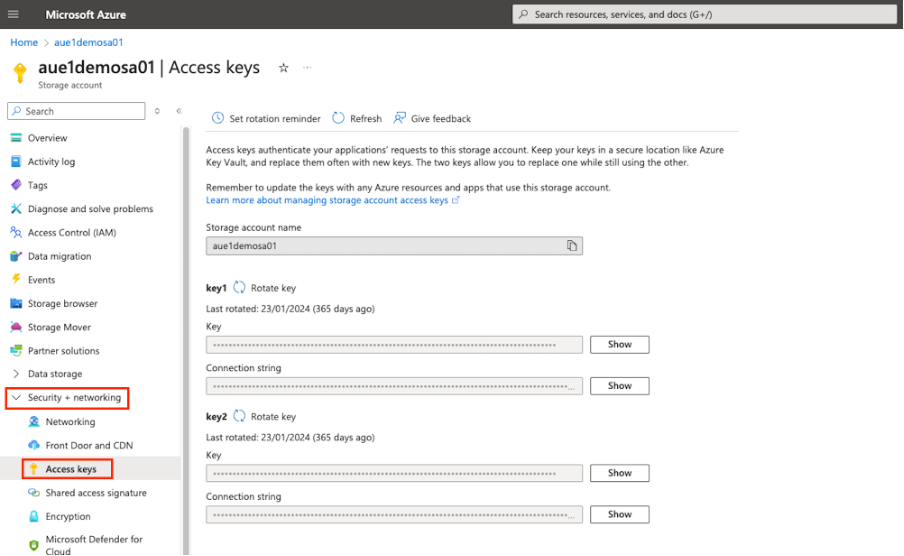
The Access keys page displays two access keys that can be used to authenticate with the Storage Account.
-
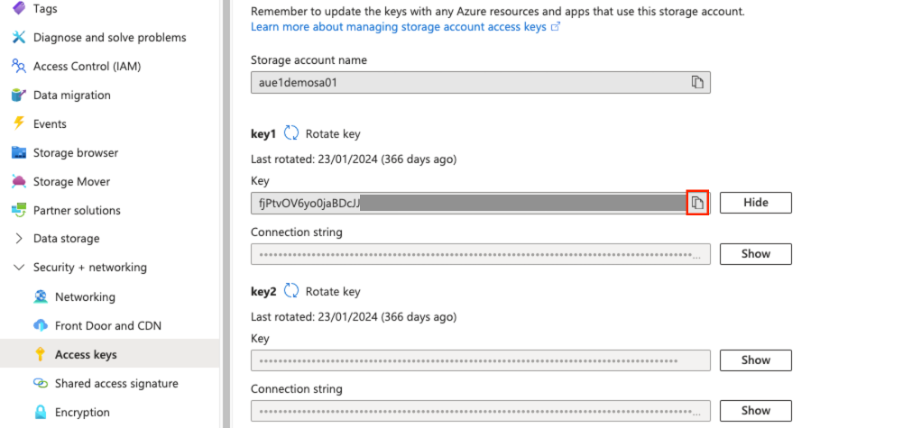
Under key1 (or key2), click Show to display the access key.
-
Copy the following information:
|
Credential |
Description |
|---|---|
|
Storage Account Name |
The name of the Azure Storage Account. |
|
Access Key |
The Storage Account access key used to authenticate with Azure Blob Storage. |
-
Store the credentials securely.
You will use these values when creating an Azure Blob Storage connection in Yarken.
Result
You have obtained the Azure Storage Account credentials required to create an Azure Blob Storage connection using Account Key authentication.
Authentication methods
Yarken supports two authentication methods for Azure Blob Storage.
|
Authentication method |
Required credentials |
|---|---|
|
Account Key |
Storage Account Name, Access Key, Container Name |
|
Service Principal |
Storage Account Name, Tenant ID, Client ID, Client Secret, Container Name |
If your organization uses Service Principal authentication, continue with Create an Azure Service Principal to obtain the required credentials.
Next steps
Continue to one of the following articles:
-
Create an Azure Service Principal (if using Service Principal authentication)
-
Configure the Azure Blob Pipeline in Yarken (if you already have the required credentials)
Related content
Azure configuration
Yarken Pipelines