
Use the Yarken User API to programmatically manage users and their access to Yarken. You can integrate the API with your identity management platform, integration tool, or custom application to automate user lifecycle activities.
With the User API, you can:
-
Retrieve users.
-
Disable a user's access without deleting their user record.
-
Re-enable a disabled user.
-
Update supported user attributes, including name, username, and roles.
-
Create a user and set their initial access status.
For example, when an employee leaves your organization, you can use the API to immediately disable their access while retaining their user record in Yarken.
Note: Yarken uses an API key to authenticate User API requests. The API does not use the individual user's Yarken credentials.
Before you begin
Before using the User API:
-
Ensure that you have access to Admin > Settings > API Keys.
-
Generate an API key for your integration.
-
Identify the host name of your Yarken environment.
-
Ensure that your integration can securely store and use the API key.
The base path for the User API is:
/api/v1/users
Generate an API key
Generate an API key in Yarken before configuring your integration.
-
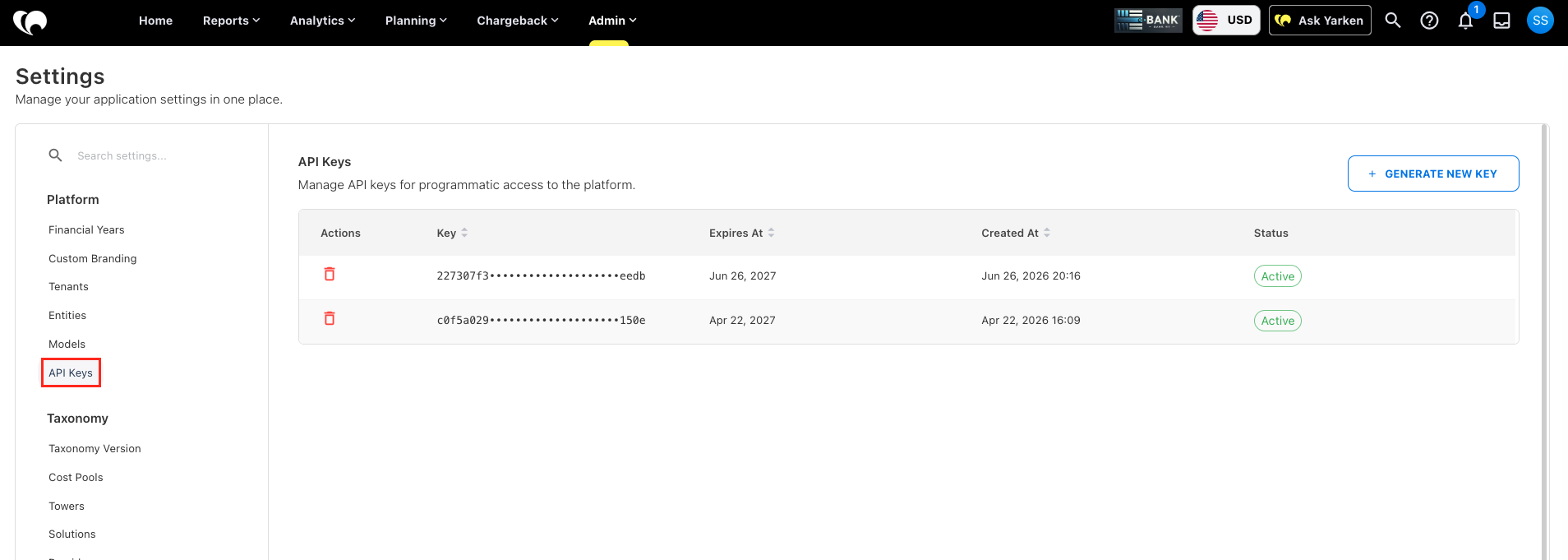
In Yarken, navigate to Admin > Settings.
-
Under Platform, select API Keys.
-
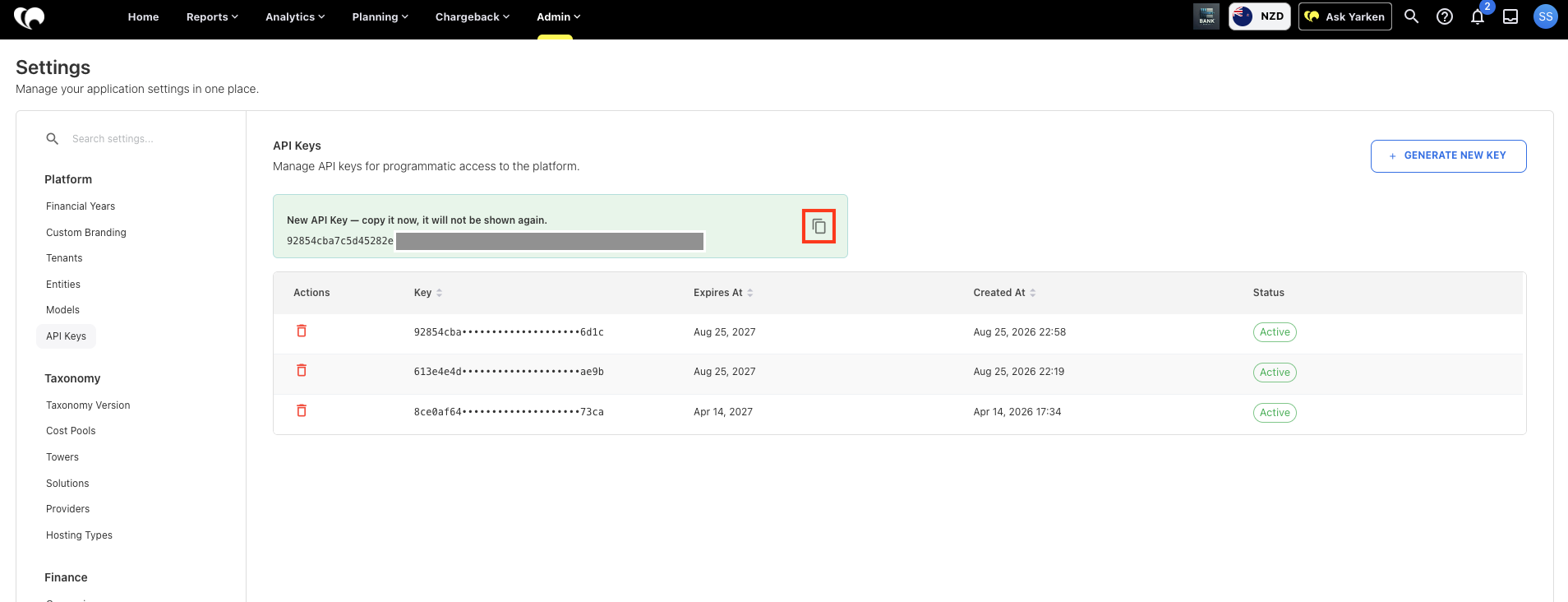
Click Generate New Key.
-
Copy the generated API key.
-
Store the key securely for use by your integration.
Important: Copy and securely store the API key immediately after you generate it. Yarken does not display the complete key again after you navigate away from the screen.
The API Keys page displays your existing API keys and information such as their expiry date, creation date, and status.
Security: Treat API keys as sensitive credentials. Store and share them using your organization's approved credential-management process.
Authenticate API requests
Include the API key with each User API request.
You can send the key using the x-token header:
x-token: <YOUR_API_KEY>
If the API key is missing or invalid, Yarken returns HTTP status 401:
{
  "error": "Unauthorized: Invalid or missing API key"
}
Find a user
You can retrieve the user list to confirm a user's email address before updating or disabling the user.
Method and endpoint
GET /api/v1/users/list
Example
curl -X GET "https://<HOST>/api/v1/users/list" \
  -H "x-token: <YOUR_API_KEY>"
Use the email field returned by the API when making subsequent requests for that user.
URL-encode email addresses when including them in an endpoint.
For example:
user%40company.com
Disable a user
Use the dedicated disable endpoint when you need to prevent a user from accessing Yarken.
Disabling a user:
-
Sets
disabledtotrue. -
Records the date and time in
disabledAt. -
Prevents the user from signing in.
-
Prevents the user's existing session from being refreshed.
-
Retains the user record so you can re-enable the user later.
Disabling a user does not change their name, username, or assigned roles.
Method and endpoint
PUT /api/v1/users/disable/:email
No request body is required.
Example
curl -X PUT "https://<HOST>/api/v1/users/disable/jane.doe%40company.com" \
  -H "x-token: <YOUR_API_KEY>"
A successful request returns HTTP status 200 and the updated user object, including:
disabled: true
disabledAt: <date and time>
If the user cannot be found, Yarken returns HTTP status 404:
{
  "message": "User not found"
}
Update or re-enable a user
Use the edit endpoint when you need to update supported user attributes or change the user's access status.
You can update:
-
Display name.
-
Username.
-
Roles.
-
Disabled status.
Method and endpoint
PUT /api/v1/users/edit/:email
Content-Type: application/json
The request supports the following fields:
|
Field |
Type |
Description |
|---|---|---|
|
|
string |
Display name of the user. |
|
|
string |
Username of the user. |
|
|
string |
One or more Yarken role codes, separated by commas with no spaces. |
|
|
boolean |
Set to |
When you set disabled to true, Yarken records the current date and time in disabledAt. When you set it to false, Yarken clears disabledAt.
Example: update and disable a user
curl -X PUT "https://<HOST>/api/v1/users/edit/jane.doe%40company.com" \
  -H "x-token: <YOUR_API_KEY>" \
  -H "Content-Type: application/json" \
  -d '{
    "name": "Jane Doe",
    "username": "jane.doe@company.com",
    "roles": "admin,budgetProcessOwner,budgetContributor",
    "disabled": true
  }'
Example: re-enable a user
curl -X PUT "https://<HOST>/api/v1/users/edit/jane.doe%40company.com" \
  -H "x-token: <YOUR_API_KEY>" \
  -H "Content-Type: application/json" \
  -d '{
    "name": "Jane Doe",
    "username": "jane.doe@company.com",
    "roles": "admin,budgetProcessOwner,budgetContributor",
    "disabled": false
  }'
If the user cannot be found, Yarken returns HTTP status 404 with:
{
  "message": "User not found"
}
Accepted role values
When you create or update a user, provide the roles value using the Yarken role codes listed below.
Role codes are case-sensitive. Enter multiple roles as a comma-separated list without spaces.
|
Yarken role |
API role code |
|---|---|
|
Admin |
|
|
Power User |
|
|
Viewer |
|
|
Dashboard Only |
|
|
User Administrator |
|
|
Budget Process Owner |
|
|
Budget Contributor |
|
|
Chargeback Approver |
|
|
Cloud Engineer |
|
|
Cloud Cost Owner |
|
|
Cost Model Manager |
|
Assign a single role
"roles": "admin"
Assign multiple roles
Separate the role codes with commas and do not include spaces:
"roles": "admin,budgetProcessOwner,budgetContributor,chargebackApprover,cloudCostOwner"
Create a user
Use the User API to create a new user in Yarken. You can create the user with immediate access or create the user in a disabled state.
Method and endpoint
POST /api/v1/users/new
Content-Type: application/json
Create an active user
Set disabled to false to create an active user.
Example: Create an active user
curl -X POST "https://<HOST>/api/v1/users/new" \
  -H "x-token: <YOUR_API_KEY>" \
  -H "Content-Type: application/json" \
  -d '{
    "name": "Jane Doe",
    "username": "jane.doe@company.com",
    "email": "jane.doe@company.com",
    "roles": "admin,budgetProcessOwner,budgetContributor",
    "disabled": false
  }'
For the supported role codes, see Accepted role values.
Create a user in a disabled state
You can create a user with access already disabled. This can be useful when you need to provision a user record before allowing the user to access Yarken.
Set disabled to true to create the user without allowing access to Yarken.
Example
{
  "name": "Jane Doe",
  "username": "jane.doe@company.com",
  "email": "jane.doe@company.com",
  "roles": "viewer",
  "disabled": true
}
What happens when you disable a user
Disabling a user blocks their access without removing their user record.
|
Channel |
Behaviour |
|---|---|
|
Yarken sign-in |
Access is denied. The user cannot sign in. |
|
Existing session refresh |
Yarken rejects the session refresh. |
|
Integrations using a tenant API key |
Unaffected. API keys are not associated with an individual user. |
Important: Disabling a user does not revoke or disable a tenant API key. If you need to stop machine-to-machine access from an integration, script, or other API client, revoke or rotate the API key separately.
API quick reference
|
Action |
Method |
Endpoint |
|---|---|---|
|
List users |
|
|
|
Disable a user |
|
|
|
Edit or re-enable a user |
|
|
|
Create a user |
|
|
Replace <HOST> with the host name of your Yarken environment.
Related content