
After a contract has been processed, review the extracted information before publishing it to Yarken. During this step, you can verify extracted values, confirm their accuracy against the source document, resolve any review items, and update information where required. Reviewing the extraction results helps ensure that contract records are complete and accurate before they become available for contract management and reporting.
Before reviewing
Before reviewing an extracted contract, confirm that:
-
The contract upload has completed successfully.
-
The contract appears in the Extracted tab.
-
Processing has finished and the contract is no longer in Pending or Processing status.
Monitor processing status
Each uploaded contract is assigned a processing status that indicates its current stage in the extraction workflow. Use these statuses to determine whether a contract is ready for review or requires further action.
Contract statuses
|
Status |
Description |
Recommended action |
|---|---|---|
|
Pending |
The contract is waiting to be processed. |
No action is required. |
|
Processing |
Yarken is currently analyzing the document. |
Wait until processing completes. |
|
Completed |
Contract information has been extracted successfully. |
Review the extracted information before publishing. |
|
Need Review |
One or more extracted values require manual validation. |
Open Analysis and resolve the highlighted items. |
|
Invalid Contract |
The uploaded document does not meet the contract validation requirements. |
Review the document or discard it. |
|
Published |
The contract has been successfully published. |
No further extraction action is required. |
|
Discarded |
The contract has been removed from the extraction workflow. |
No further action is required. |
|
Failed |
Processing could not be completed. |
Retry the operation or contact your administrator if the issue persists. |
Note:
If the displayed status does not update automatically, select Refresh to retrieve the latest processing status.
Review extracted information
Once a contract reaches the Completed or Need Review status, review the extracted information before publishing it.
Procedure
-
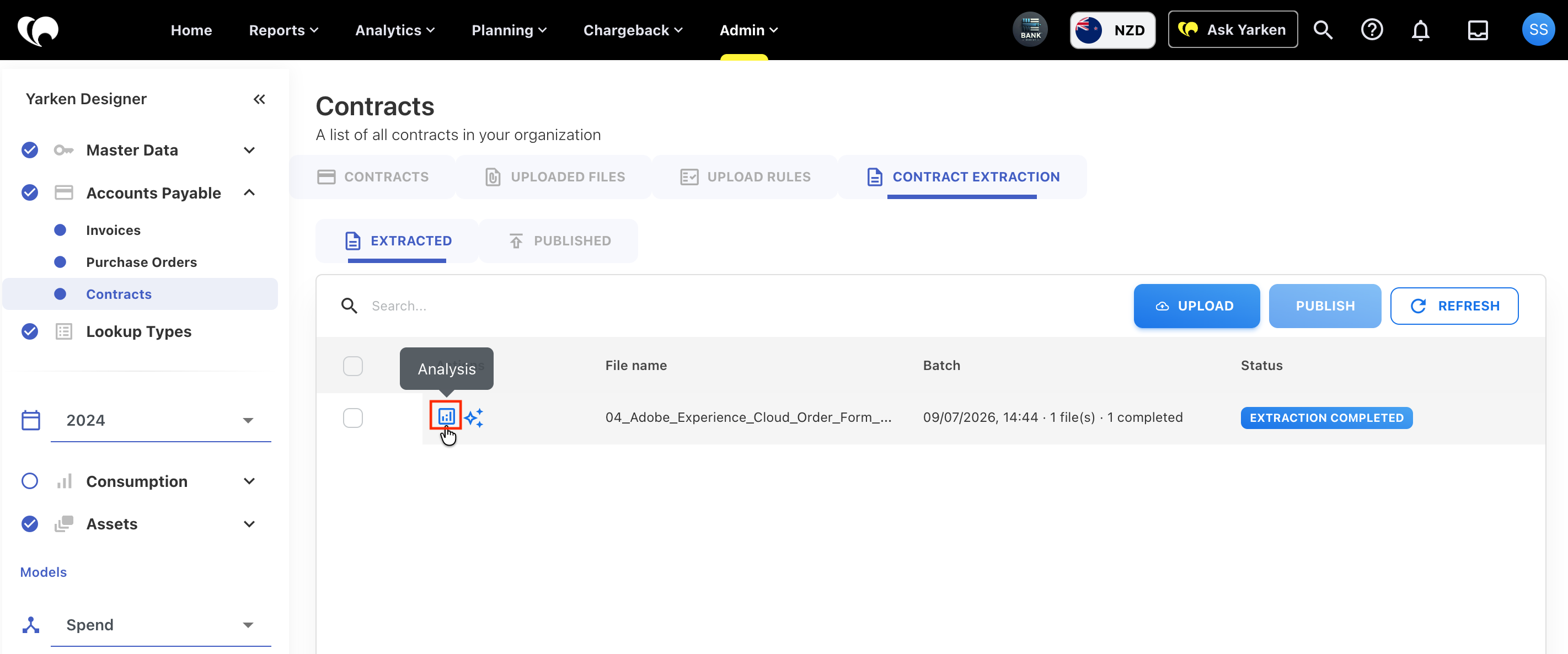
Navigate to Designer > Accounts Payable > Contracts > Contract Extraction.
-
Locate the contract you want to review.
-
Select Analysis from the Actions column.
-
Review each extracted field.
-
Compare the extracted values with the original contract where necessary.
-
Correct any inaccurate or incomplete information before publishing the contract.
Understand extracted fields
Yarken automatically identifies and extracts key information from the uploaded contract to simplify the onboarding process.
The following information may be extracted:
|
Field |
Description |
|---|---|
|
Vendor Name |
The vendor or supplier identified in the contract. |
|
Contract Description |
A summary of the contract purpose. |
|
Contract Type |
The contract category, when available. |
|
Contract Amount |
The total contract value or commercial amount. |
|
Start Date |
The contract start or effective date. |
|
End Date |
The contract expiry or end date. |
|
Vendor Identification |
Vendor-related identifying information, where available. |
Verify extracted values using source references
Where available, Yarken provides source references that show where an extracted value was identified in the original contract. These references help you quickly verify important information without manually searching through the document.
Use source references to validate information such as:
-
Contract amount
-
Start date
-
End date
-
Vendor name
-
Contract description or scope
Understand confidence scores
Each extracted value may include a confidence score that indicates how certain Yarken is that the extracted information is correct.
Confidence score guidance
|
Confidence score |
What it means |
Recommended action |
|---|---|---|
|
90% or higher |
The extracted value is likely to be accurate. |
Review the information before publishing. |
|
Below 90% |
The extracted value may require manual verification. |
Compare the value with the original contract and update it if necessary. |
Contracts marked Need Review
A contract is marked Need Review when Yarken identifies information that requires manual validation.
Resolve all review items before publishing the contract to ensure the contract record is accurate and complete.
Common reasons include:
-
One or more extracted fields have a low confidence score.
-
The vendor could not be matched to an existing vendor.
-
Required information is missing.
-
Contract dates appear inconsistent.
-
The document contains conflicting or unclear information.
-
A processing or parsing issue occurred during extraction.
Review low-confidence fields
When a contract contains low-confidence values, review each highlighted field before publishing.
Procedure
-
Open the contract in Analysis.
-
Review each highlighted field.
-
Compare the extracted value with the original contract.
-
Review the confidence score and any supporting rationale.
-
Update the value if required.
-
Save your changes.
Fields commonly requiring review
The following fields are more likely to require manual validation:
-
Vendor Name
-
Contract Amount
-
Start Date
-
End Date
-
Contract Description
-
Contract Type
Review tips
To improve data quality before publishing:
-
Confirm that each value is explicitly stated in the contract.
-
Check for multiple dates or monetary amounts that could affect extraction.
-
Ensure the selected information applies to the entire contract rather than a specific section.
-
Verify that the vendor matches an existing vendor record in Yarken.
Next steps
Once you have reviewed and validated the extracted information, continue to Edit and Publish Contracts to update any remaining information and publish the contract into Yarken.
Related content